MCP server that runs sudo via a native OS password dialog so the password never enters the model context.
sudo-mcp
An MCP server that lets a coding agent run sudo commands without piping a password through the model.
Disclaimer: this tool has no command denylist. Whatever command the agent passes, sudo will run it. Add your own guardrails (sudoers
Cmnd_Alias, wrapper script, sandbox) if you want any.
The problem
Claude Code's Bash tool redirects stdin to /dev/null, so any sudo invocation that needs a password fails immediately with a terminal is required to read the password. The usual workarounds are bad: NOPASSWD: ALL in sudoers gives the agent permanent passive root; running sudo claude gives the entire session permanent root; pasting the password into chat exposes it to the model context, the transcript, and any future training set.
What this does
Without sudo-mcp, the agent's sudo call dies with a terminal is required to read the password.
With sudo-mcp, the agent calls sudo_run(argv, reason) and a native OS dialog pops up:
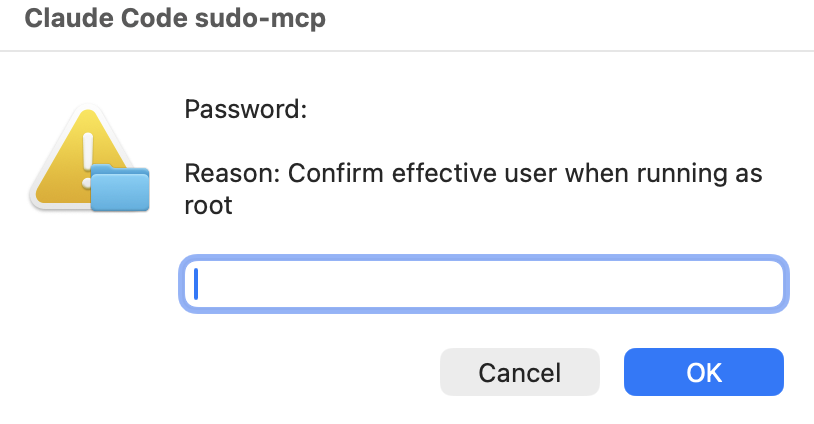
You type the password into the dialog. The command runs as root and the agent gets back stdout, stderr, and the exit code. The password never enters the MCP transport, the model context, the conversation transcript, or ~/.bash_history.
Install
Requires sudo. macOS works out of the box. On Linux you need at least one of ssh-askpass, ksshaskpass, zenity, or kdialog.
Prebuilt binary (recommended)
Grab the archive for your OS/arch from the latest release: https://github.com/0xMH/sudo-mcp/releases/latest
# macOS arm64 example; substitute the asset for your platform
curl -L -o sudo-mcp.tar.gz https://github.com/0xMH/sudo-mcp/releases/latest/download/sudo-mcp_0.3.0_darwin_arm64.tar.gz
tar -xzf sudo-mcp.tar.gz
install -m 0755 sudo-mcp ~/.local/bin/sudo-mcp
Verify the SHA-256 against checksums.txt from the same release before running.
From source
Requires Go 1.22+.
go install github.com/0xMH/sudo-mcp@latest
The binary lands in $(go env GOBIN) (typically ~/go/bin/sudo-mcp). Make sure that directory is on your $PATH, or use the absolute path when registering.
Just ask Claude to do it
Honestly, the easiest way. Open Claude Code and say something like:
Install https://github.com/0xMH/sudo-mcp and wire it into my Claude Code config.
It'll read the repo, pull the binaries, register the MCP server, and update your settings. Took me longer to write this paragraph than it takes Claude to do it.
Wire into Claude Code
Register the server at user scope so it is available in every project:
claude mcp add sudo-mcp --scope user -- ~/go/bin/sudo-mcp
Verify:
claude mcp list
You should see sudo-mcp: ~/go/bin/sudo-mcp - ✓ Connected.
To make the agent actually prefer sudo_run over typing sudo into Bash, deny Bash(sudo *) in ~/.claude/settings.json:
{
  "permissions": {
    "deny": ["Bash(sudo *)", "Bash(sudo)"],
    "allow": ["mcp__sudo-mcp__sudo_run"]
  }
}
Tool reference
sudo_run takes:
argv(string array, required): command and arguments. Pass as a list, not a shell string. Example:["apt", "install", "-y", "htop"]. The server exec's directly with no shell, so injection through arg concatenation is structurally impossible.reason(string, required): one-line justification rendered in the password dialog so the user sees what they are authorizing before typing the password.timeout_seconds(int, optional, default 120, max 3600): hard timeout. On macOS/Linux,sudo-mcprunssudoin its own process group and kills that group if the timeout expires. It also attempts a non-interactive cached-sudokill for root-owned descendants.cwd(string, optional): working directory for the command.
Returns a text block with the exit code, stdout, and stderr. Output is truncated at 256 KiB per stream.
Security properties
- The password is entered into a native OS dialog. The dialog is rendered by the user's window server, not the agent. The agent cannot read it, screenshot it, or replay it.
- The MCP transport carries argv, reason, exit code, stdout, stderr. It never carries credentials.
argvis a list, never a shell string. There is nobash -cinvolved, so no quoting bugs and no injection through reason interpolation.- Sudo's timestamp cache is left at its system default (typically 5 minutes on macOS). Calls inside that window skip the dialog. Drop
-Aand add-kinmain.goif you want a fresh prompt every time. - The server only exposes one tool. There is no shell access, no arbitrary subprocess execution outside of
sudo. - Timeout cleanup is not a sandbox. A command that daemonizes, changes process group/session, or runs under sudoers settings that block the non-interactive cleanup kill may survive the MCP call.
License
MIT. See LICENSE.