MCP server + LangGraph agent for analyzing FDA-style clinical trial protocols. Exposes 4 tools to Claude Code for entity extraction, adverse-event clustering, and summarization. FastAPI, Pandas ETL, AWS-ready Docker.
mcp-clinical-doc-agent


MCP-Orchestrated Clinical Document Agent — May 2026 Python · FastAPI · LangGraph · Anthropic MCP · Claude Code · AWS · Pandas
- Built a FastAPI backend exposing custom MCP server tools to a Claude Code agent for end-to-end document analysis on synthetic FDA-style clinical trial protocols.
- Orchestrated a multi-step agentic workflow with LangGraph: ingestion, entity extraction, adverse-event clustering, and structured summary generation with evaluation guardrails.
- Containerized inference on AWS with Pandas-based ETL for reproducible, analysis-ready outputs; published as an open-source reference implementation on GitHub.
What this project demonstrates
- Model Context Protocol (MCP) server built on the official Anthropic
mcpPython SDK — 4 tools, stdio transport, registerable as a native tool provider in Claude Code and Claude Desktop. - LangGraph state machine that orchestrates the same tools as a deterministic 4-node pipeline with typed state, error capture, and a final eval gate.
- Pydantic v2 schemas for every cross-boundary object (
DocumentRef,ClinicalEntity,AdverseEvent,AdverseEventCluster,ProtocolSummary,WorkflowReport,EvalResult). - FastAPI HTTP surface mirroring the MCP tools so the same business logic runs over HTTP for non-MCP clients.
- Pandas-based ETL that flattens the workflow report into five tidy, join-ready CSVs (
documents,entities,adverse_events,cluster_summary,summaries). - Container-ready for AWS — multi-stage Dockerfile, healthcheck, docker-compose for local parity.
- Offline-first — works with zero external API calls. Set
ANTHROPIC_API_KEYto upgrade the summarizer to Claude Haiku 4.5.
Architecture
┌──────────────────────────────────────────────────────────────────────┐
│  data/*.md   ── 10 synthetic FDA-style clinical trial protocols      │
└──────────────────────────────────────────────────────────────────────┘
                              │
                              ▼
┌──────────────────────────────────────────────────────────────────────┐
│  src/mcp_clinical_doc_agent/tools.py                                 │
│  list_documents · extract_entities · cluster_adverse_events ·        │
│  summarize_protocol  (shared business logic)                         │
└──────────────────────────────────────────────────────────────────────┘
       │                       │                       │
       ▼                       ▼                       ▼
┌─────────────┐         ┌─────────────┐         ┌───────────────────┐
│ MCP server  │         │  FastAPI    │         │  LangGraph        │
│ (stdio)     │         │  HTTP       │         │  workflow         │
│ Claude Code │         │  /docs, /…  │         │  → JSON report    │
│ Claude Desk │         │  Docker     │         │  → eval gate      │
└─────────────┘         └─────────────┘         └───────────────────┘
Quick start
Requires Python 3.11 and uv.
# 1. Clone and install
git clone https://github.com/Aditya-Khadye/mcp-clinical-doc-agent
cd mcp-clinical-doc-agent
uv sync --extra dev

# 2. Run the LangGraph workflow end-to-end (writes reports/run.json)
uv run mcp-clinical-doc-workflow

# 3. Start the MCP server (stdio) for local testing
uv run mcp-clinical-doc-server

# 4. Or start the FastAPI HTTP surface
uv run mcp-clinical-doc-agent   # http://localhost:8000/docs

# 5. Tests
uv run pytest -v
How to use this with Claude Code
This repo ships a project-scoped .mcp.json at the root:
{
  "mcpServers": {
    "clinical-doc-agent": {
      "command": "uv",
      "args": ["--directory", ".", "run", "mcp-clinical-doc-server"]
    }
  }
}
To register:
- Open this directory in Claude Code:
cd mcp-clinical-doc-agent && claude. - Run
/mcpinside Claude Code — you should seeclinical-doc-agentas a connected server with 4 tools. - Try prompts like:
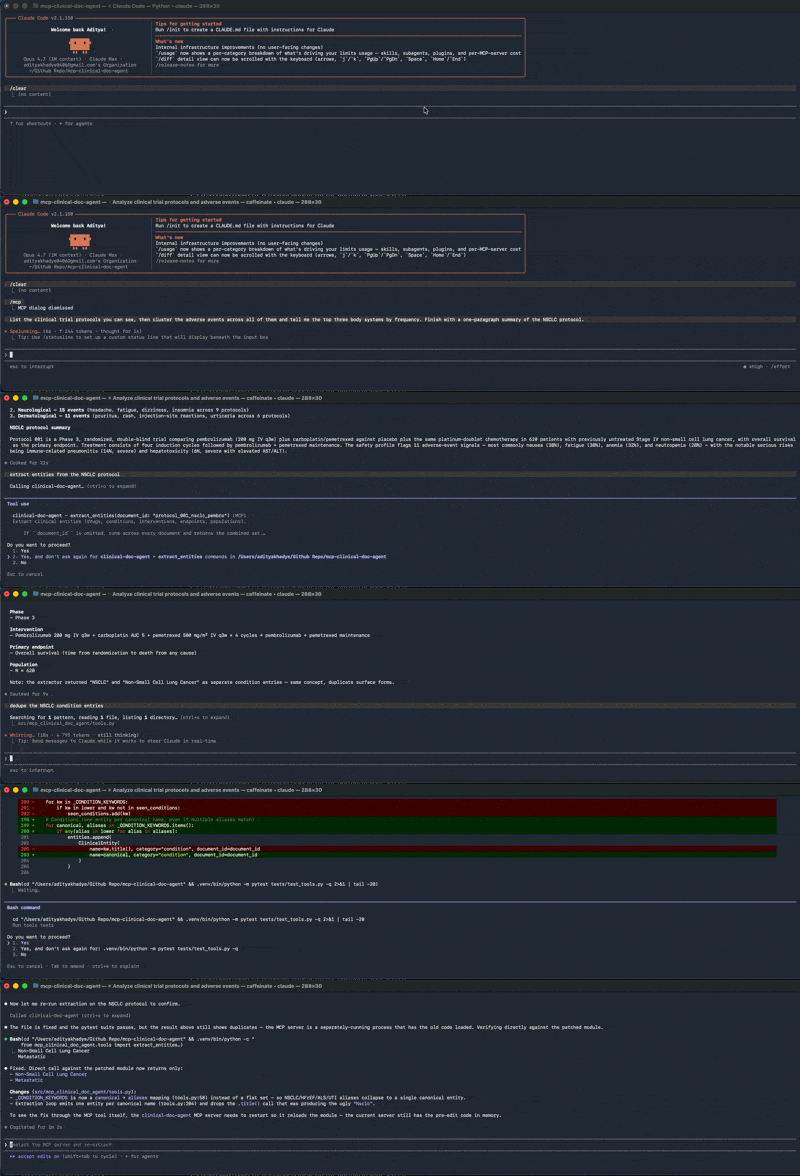
- "List the clinical trial protocols you can see."
- "Cluster the adverse events across all protocols and tell me which body system has the most reported events."
- "Summarize the NSCLC protocol and flag any immune-related adverse events."
Claude Code will call the MCP tools directly — you'll see tool-use blocks render inline.
Claude Desktop
Edit ~/Library/Application Support/Claude/claude_desktop_config.json and merge the contents of claude_desktop_config.example.json, replacing /ABSOLUTE/PATH/TO/... with your local checkout path. Restart Claude Desktop and the server will appear in the tool tray.
The four MCP tools
| Tool | Input | Output |
|---|---|---|
| list_documents | — | [{id, title, path, indication, phase}, …] for every protocol in data/. |
| extract_entities | document_id? (omit to scan all) | List of ClinicalEntity — drugs, conditions, interventions, endpoints, populations, phase. |
| cluster_adverse_events | document_ids? (omit to scan all) | List of AdverseEventCluster bucketed by body system (gastrointestinal, cardiovascular, neurological, dermatological, hematological, hepatic, respiratory, infections, metabolic, other). |
| summarize_protocol | document_id | ProtocolSummary with phase, indication, intervention, primary endpoint, planned N, AE count, and a 3-4 sentence narrative. |
The summarizer uses Claude Haiku 4.5 when ANTHROPIC_API_KEY is set; otherwise it falls back to a deterministic template so the demo runs offline.
The LangGraph workflow
A 4-node StateGraph over AgentState:
START → ingest → extract → cluster → summarize → END
                                                  ↓
                                          evaluate(report)
Each node calls one MCP tool and updates the shared state. evaluate() runs after the graph and applies six pass/fail checks on the assembled report:
documents >= 5each_doc_has_>=3_entitiesadverse_events >= 25distinct_clusters >= 4summary_text >= 80 charssummary_mentions_AE
Output is a Pydantic-validated WorkflowReport written to reports/run.json. The CLI exits non-zero on eval failure.
uv run mcp-clinical-doc-workflow --output reports/run.json --etl-dir reports/etl
Pandas ETL — analysis-ready outputs
After the eval gate passes, the report is flattened into five tidy CSVs under reports/etl/:
| File | Granularity | Joins on |
|---|---|---|
| documents.csv | one row per protocol | id |
| entities.csv | one row per extracted entity | document_id → documents.id |
| adverse_events.csv | one row per AE mention (with cluster_label) | document_id → documents.id |
| cluster_summary.csv | one row per body-system cluster, with event_count and top 3 events | cluster_label |
| summaries.csv | one row per protocol summary | document_id → documents.id |
Example cluster_summary.csv:
cluster_label,event_count,distinct_terms,top_events
gastrointestinal,19,6,nausea(7); diarrhea(5); constipation(3)
neurological,15,4,headache(7); fatigue(4); dizziness(3)
dermatological,11,4,injection site reaction(4); rash(3); pruritus(3)
hepatic,11,4,elevated ast(4); elevated alt(4); transaminitis(2)
Drop these directly into a notebook with pd.read_csv(...), or load into Athena / Snowflake / DuckDB. A small demo script is included:
uv run python scripts/analyze.py
…which prints (1) per-protocol entity counts by category, (2) top adverse events overall, and (3) AE burden per protocol joined against documents.csv.
Example tail of a run:
[workflow] eval: PASS
  ✓ documents>=5
  ✓ each_doc_has_>=3_entities
  ✓ adverse_events>=25
  ✓ distinct_clusters>=4
  ✓ summary_text>=`80`_chars
  ✓ summary_mentions_AE
  · Processed 10 documents.
  · Total adverse events across clusters: 79.
  · Distinct AE body-system clusters: 9.
Docker / AWS deployment
Build and run locally with docker-compose:
docker-compose up --build
curl http://localhost:8000/health
curl http://localhost:8000/documents | jq .
curl -X POST http://localhost:8000/adverse-events/clusters \
     -H 'content-type: application/json' -d '{}' | jq '.[].cluster_label'
The Dockerfile is a multi-stage build (python:3.11-slim-bookworm + uv) with a built-in healthcheck. To push to ECR:
aws ecr create-repository --repository-name mcp-clinical-doc-agent
aws ecr get-login-password --region us-east-1 | docker login --username AWS --password-stdin <acct>.dkr.ecr.us-east-1.amazonaws.com
docker build -t mcp-clinical-doc-agent .
docker tag mcp-clinical-doc-agent:latest <acct>.dkr.ecr.us-east-1.amazonaws.com/mcp-clinical-doc-agent:latest
docker push <acct>.dkr.ecr.us-east-1.amazonaws.com/mcp-clinical-doc-agent:latest
From there, deploy to ECS Fargate, App Runner, or EKS. The container exposes port 8000, serves a /health endpoint, and reads ANTHROPIC_API_KEY from env.
Project layout
mcp-clinical-doc-agent/
├── .mcp.json                          # Claude Code project config
├── claude_desktop_config.example.json # Claude Desktop snippet
├── Dockerfile                         # Multi-stage build for AWS
├── docker-compose.yml
├── pyproject.toml                     # uv-managed
├── data/
│   └── protocol_*.md                  # 10 synthetic FDA-style protocols
├── src/mcp_clinical_doc_agent/
│   ├── tools.py                       # 4 tool implementations
│   ├── schema.py                      # Pydantic v2 models
│   ├── server.py                      # MCP server (stdio)
│   ├── api.py                         # FastAPI HTTP surface
│   ├── etl.py                         # Pandas ETL: report -> 5 CSVs
│   └── graph/
│       ├── workflow.py                # LangGraph state machine
│       ├── nodes.py                   # ingest / extract / cluster / summarize
│       └── eval.py                    # Pass/fail report gate
├── tests/                             # pytest — tools + workflow + etl
├── scripts/
│   ├── run_workflow.py
│   └── analyze.py                     # Pandas demo over the ETL CSVs
├── .github/workflows/ci.yml           # tests + lint + smoke-test on push/PR
└── reports/                           # JSON + CSV output (gitignored)
Data
The data/ directory contains 10 synthetic clinical trial protocols (~1-2 pages each in markdown) covering oncology (NSCLC, pembrolizumab), cardiology (HFrEF, SGLT2 inhibitor), endocrinology (T2D, dual GIP/GLP-1), rheumatology (RA, JAK1 inhibitor), psychiatry (treatment-resistant MDD, psilocybin analogue), dermatology (atopic dermatitis, IL-31R biologic), gastroenterology (Crohn's, anti-TL1A), neurology (early AD, anti-amyloid mAb), neurogenetics (SOD1 ALS, antisense oligonucleotide), and infectious disease (cUTI, novel cephalosporin).
Every protocol has the same canonical sections (Phase, Indication, Intervention, Primary Endpoint, N, Adverse Events) so the heuristic extractor can locate fields reliably.
Demo
Claude Code connecting to the MCP server, calling all four tools in sequence, and producing a natural-language answer:
License
MIT — see LICENSE.