MCP server exposing pmcontrols (CPM, PERT, crashing, EVM, earned schedule) as validated tools for AI agents.
pmcontrols-mcp


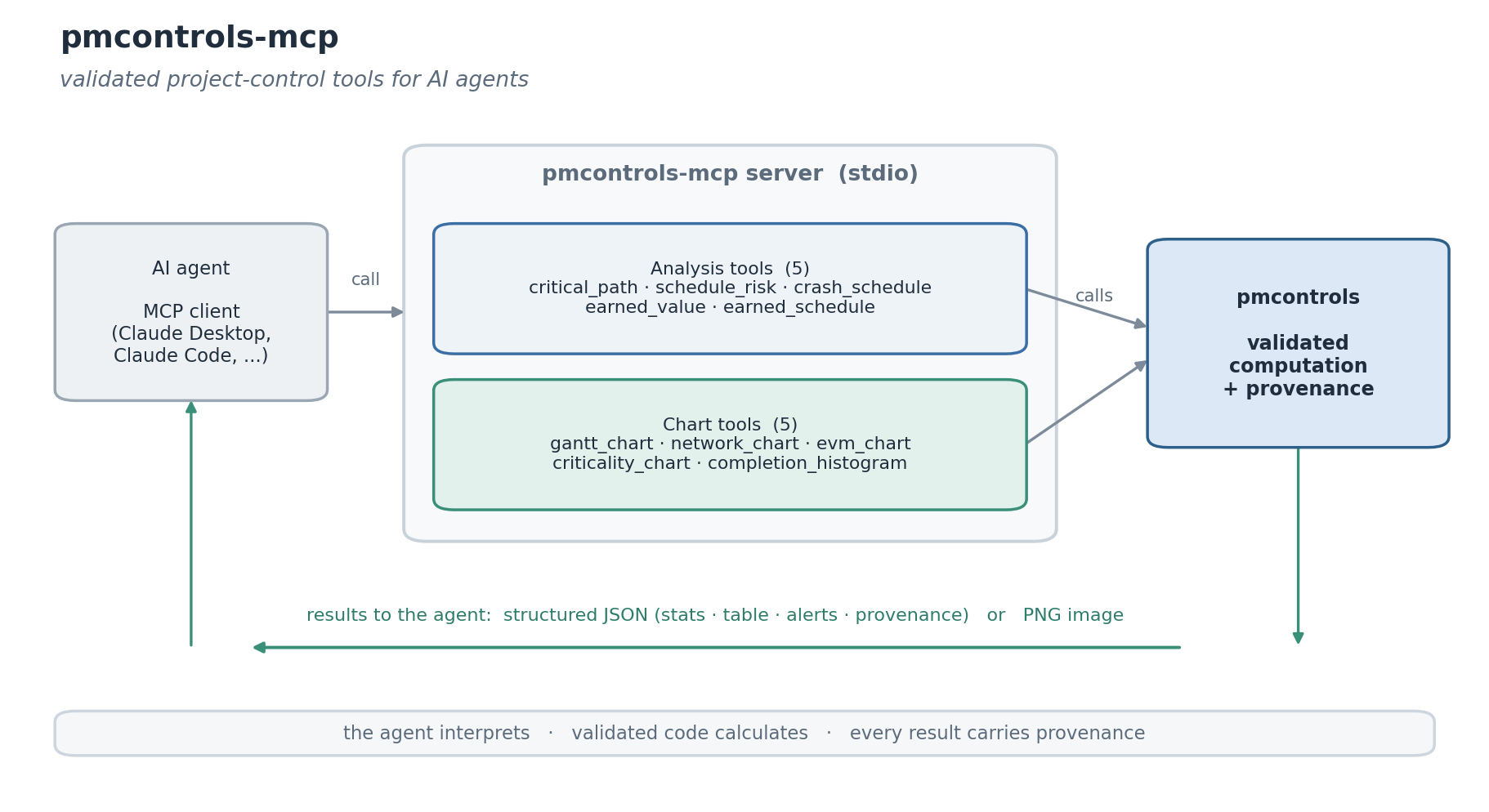
An MCP server that exposes pmcontrols, the validated project scheduling and earned value library for Python, as tools for AI agents: from critical-path and earned-value analysis to ready-to-show charts (Gantt, network, S-curve, criticality, completion histogram).
Agents asked to plan a project or report its status tend to generate the arithmetic themselves: a backward pass done by eye, an earned-value index inverted, an earned schedule mistaken for schedule variance. Generated project metrics fail silently. The calculation belongs in a deterministic, versioned, validated library that the agent calls, which leaves the agent to choose the analysis and explain the result.
Tools
Analysis tools return the library's structured payload: named statistics, a tidy table, structured alerts, and provenance (library version, input hash, timestamp).
| Tool | Purpose |
| ---- | ------- |
| critical_path | CPM forward and backward pass: ES, EF, LS, LF, slack, critical path |
| schedule_risk | PERT three-point analysis with a Monte Carlo completion distribution and criticality indices |
| crash_schedule | minimum-cost schedule compression to a deadline, solved as a linear program |
| earned_value | the full EVM indicator set with Lipke earned schedule, against a planned-value baseline |
| earned_schedule | the earned schedule for a given earned value |
Chart tools return a PNG image the client can display.
| Tool | Purpose |
| ---- | ------- |
| gantt_chart | a Gantt chart of the schedule, critical path highlighted |
| network_chart | the activity network with the critical path |
| evm_chart | the earned value S-curve (PV/EV/AC + forecast) |
| criticality_chart | Monte Carlo per-activity criticality bars |
| completion_histogram | Monte Carlo completion-time histogram |
Installation
pip install pmcontrols-mcp
Or run it without installing, with uv:
uvx pmcontrols-mcp
Configuration
Add the server to your MCP client's configuration:
{
  "mcpServers": {
    "pmcontrols": {
      "command": "pmcontrols-mcp"
    }
  }
}
The server communicates over stdio and works with any MCP-compatible client.
Example
Calling critical_path with a list of activities returns a structured
result the agent reads directly, instead of computing the schedule itself:
{
  "method": "cpm",
  "stats": {"project_duration": 15.0, "n_activities": 8.0, "n_critical": 5.0},
  "meta": {
    "critical_activities": ["A", "C", "E", "G", "H"],
    "version": "0.2.1",
    "input_hash": "sha256:...",
    "computed_at": "2026-06-15T09:14:02+00:00"
  },
  "table": {"activity": ["A", "B", "..."], "slack": [0.0, 1.0, "..."]}
}
Every result carries provenance (library version, input hash, timestamp), so a figure an agent reports can be recomputed and audited later.
Design
The reasoning behind routing project-control arithmetic through a validated tool, rather than letting a model generate it, is set out in Project control is not a language task.
Related
pmcontrols is the underlying library this server wraps.
License
MIT. Written and maintained by Atakan Arikan, MSc Student at Tsinghua University and Politecnico di Milano.