Control MCP servers directly from any android (phone, tablet, watch, TV, car, fridge, toaster,...) and allow any AI to control the android as an MCP tool as well.
android_mcp — Your AI's Gateway to Every Android Device
Turn any Android device into an AI-controlled tool. Phones, tablets, TVs, watches, cars — one app, unlimited possibilities.
Voice chat with AI on your TV. Let AI manage your phone. Control any Android device remotely. Your AI finally has hands — and they work everywhere Android runs.

-brightgreen.svg)


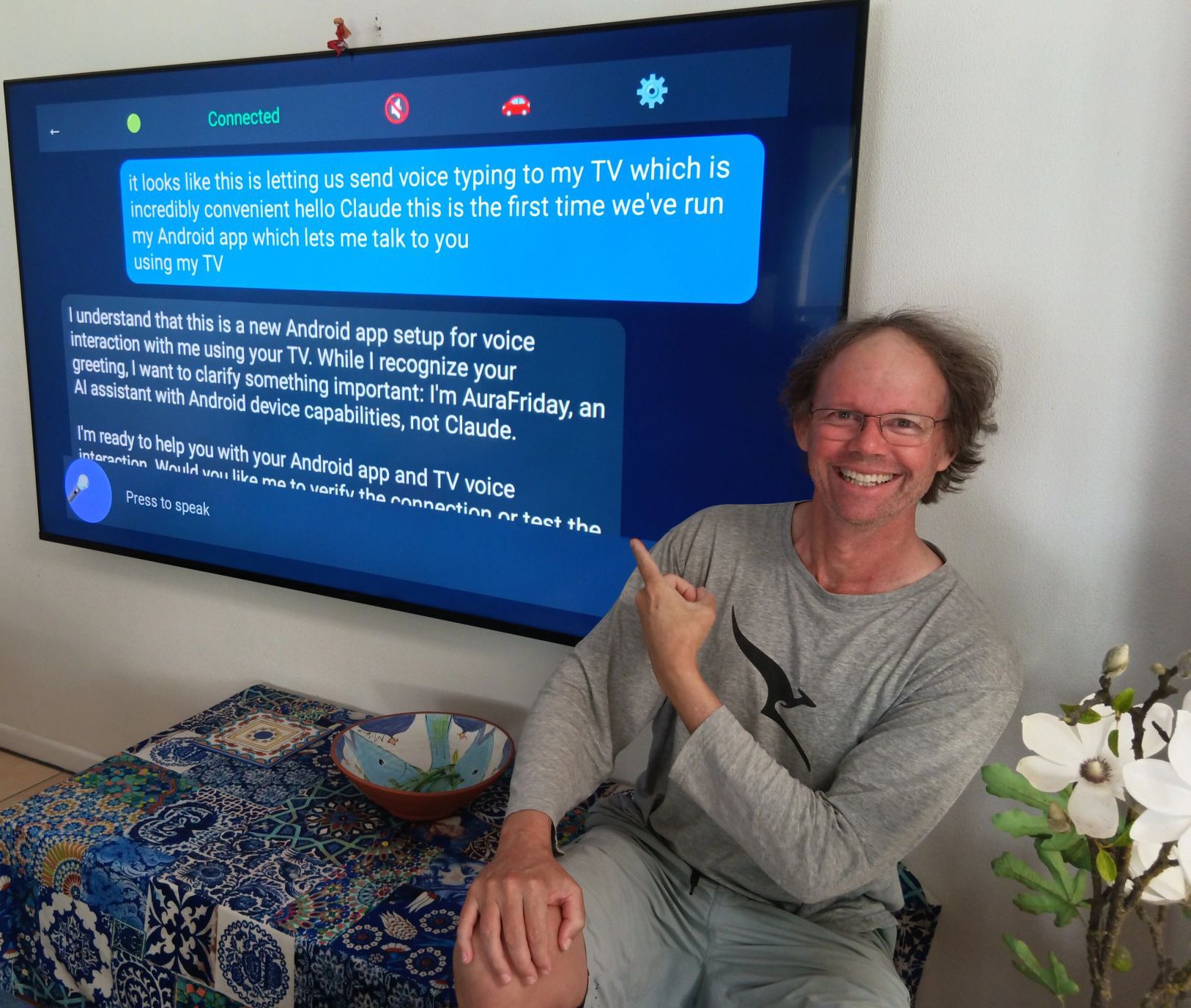
🔄 Old Devices, Cheap Devices — All Become Powerful
That drawer full of old phones? Not e-waste. That $40 smartwatch? Not just a watch. That $60 Android TV? Not just for Netflix.
AuraFriday runs on Android 5.0 Lollipop and newer — devices from 2014 onwards. But here's the thing: you don't need to raid your junk drawer. Brand new Android devices are incredibly cheap:
| Device | Price | What You Get | What AI Can Make It | |--------|-------|--------------|---------------------| | Android smartwatch | ~$40 | Touchscreen, camera, WiFi, SIM, sensors, battery — in a tiny package | Wearable AI assistant, health monitor, discreet security camera | | Android TV box | ~$30 | HDMI out, WiFi, Bluetooth, USB ports | Smart home hub, digital signage, kiosk | | Android TV | ~$60 | Large screen, camera, mic, speakers, WiFi | Smart receptionist, video conferencing, surveillance | | Budget phone | ~$50 | Full smartphone capabilities | Dedicated automation brain, security camera, sensor hub | | Budget tablet | ~$80 | Large touchscreen, cameras, sensors | Control panel, monitoring station, assisted living device |
The hardware is commodity. The intelligence is what matters.
What Any Android Device Can Become
| Device | New Purpose | How AI Helps | |--------|-------------|--------------| | Any camera-equipped device | Security system | AI monitors feed, alerts on motion, recognizes faces, tracks patterns | | Any screen | Smart reception kiosk | Recognizes visitors, greets by name, notifies staff, logs arrivals | | Any mic + speaker | Voice assistant hub | Hands-free control of your entire digital life | | Any device with sensors | Environmental monitor | Track temperature, humidity, air quality — AI analyzes trends | | Any WiFi device | Automation controller | AI orchestrates smart home, robots, other devices | | Any device | Whatever you imagine | Just describe it. AI figures out the rest. |
The Magic: AI Does It For You
No more:
- ❌ Hours researching how to repurpose old devices
- ❌ Testing abandoned apps that no longer work
- ❌ Frustrating configuration and troubleshooting
- ❌ Learning complex automation platforms
Instead:
- ✅ Tell AI what you want: "Turn this old phone into a baby monitor"
- ✅ AI figures out how to do it
- ✅ AI configures everything
- ✅ AI tests that it actually works
- ✅ AI fixes problems when they arise
Just ask. AI handles the rest.
You: "I want this old tablet to monitor my front door
      and alert me when someone approaches"

AI: [Enables camera access]
    [Sets up motion detection]
    [Configures notifications to your main phone]
    [Tests the detection]
    [Adjusts sensitivity based on test results]

    "Done! Your tablet is now monitoring the front door.
     I've set it to ignore small movements like leaves
     but alert you for person-sized motion. Want me to
     adjust the sensitivity?"
You: "Turn this $60 TV into a smart receptionist for
      my small business"

AI: [Enables camera for face detection]
    [Sets up visitor recognition database]
    [Creates welcome screen with company branding]
    [Configures staff notifications]
    [Sets up voice greeting system]

    "Your smart receptionist is ready! When someone
     approaches, it will:
     - Recognize returning visitors by face
     - Greet them by name and notify you
     - Ask new visitors to sign in
     - Display your welcome message

     No extra hardware needed — just the TV's built-in
     camera and mic. Want me to customize the greeting?"
No extra hardware. No cables. No complex setup. No monthly fees.
Just cheap Android devices + AI intelligence = unlimited possibilities.
This is the future of device ownership: Nothing becomes obsolete. Cheap becomes powerful. AI makes it effortless.
The Problem: AI Can't Touch Your Phone
Your AI assistant is brilliant. It can write code, analyze data, answer questions. But ask it to:
- Send a WhatsApp message → "I can't access your phone"
- Check your calendar → "I don't have access to that"
- Take a photo → "I'm unable to interact with your device"
- Read your notifications → "I can't see your screen"
AI is trapped in a text box. It can think, but it can't do.
Until now.
The Solution: MCP-Link for Android
AuraFriday transforms any Android device into an MCP (Model Context Protocol) tool that AI can control directly.
You: "Send a WhatsApp message to Mom saying I'll be late"

AI: [Connects to your phone via MCP]
    [Opens WhatsApp]
    [Finds "Mom" in contacts]
    [Types message]
    [Sends]
    "Done! Message sent to Mom."
No jailbreaking. No root required. No sketchy permissions. Just install the app, connect to your MCP server, and your AI gains the ability to do things on your device.
Why This Changes Everything
♻️ Maximum Value, Minimum Cost
Android 5.0 Lollipop (2014) and newer. Old devices. Cheap devices. All devices.
While other apps drop support for "old" hardware, we embrace it. That 2015 tablet isn't trash — it's a security camera. That $40 smartwatch isn't just a watch — it's a wearable AI with camera, sensors, and cellular. That $60 TV isn't just for streaming — it's a smart receptionist that recognizes faces.
AI doesn't care about your hardware's price tag. It cares what it can do.
🎯 One App, Every Device
Phone in your pocket. Tablet on your desk. TV in your living room. Watch on your wrist.
Same app. Same AI connection. Same capabilities. AuraFriday detects what device it's running on and adapts:
| Device | Interface | Input | AI Capabilities | |--------|-----------|-------|-----------------| | Phone | Touch + Voice | Full keyboard | Complete device control | | Tablet | Touch + Voice | Full keyboard | Large-screen workflows | | TV | D-pad + Voice | Remote control | Hands-free AI assistant | | Watch | Touch + Voice | Limited | Quick commands, notifications | | Car | Voice only | Steering wheel buttons | Eyes-free, driving-safe |
🔌 Bidirectional MCP Connection
Your device becomes a tool AND a client.
┌─────────────────┐         ┌─────────────────┐
│   MCP Server    │◄───────►│  AuraFriday App │
│  (Your AI Hub)  │   SSE   │  (Any Android)  │
└─────────────────┘         └─────────────────┘
        │                           │
        ▼                           ▼
   AI can call               App can call
   device tools              server tools
   (camera, SMS,             (sqlite, browser,
    sensors, etc.)            llm, python, etc.)
- AI → Device: Take screenshots, send messages, read notifications, control apps
- Device → AI: Chat interface, voice commands, tool execution results
🧠 Reflection-Powered Capabilities
No hardcoded features. AI learns what your device can do.
Traditional apps: "Here are 50 buttons for 50 features."
AuraFriday: "Here's the entire Android API. AI figures out what to call."
// AI can execute ANY Android code via Rhino JavaScript engine
val result = rhinoEngine.execute("""
    // Get all contacts
    const contacts = Android.getContentResolver()
        .query('content://contacts/people', null, null, null, null);

    // AI decides what to do with them
    return contacts.map(c => c.display_name);
""")
The AI isn't limited to what we thought to implement. It has access to everything Android exposes.
📺 TV-First Voice Interface
Your living room becomes an AI command center.
No keyboard. No mouse. Just your voice and a remote.
[Press mic button on remote]
You: "What's the weather tomorrow?"

[AI responds on screen with voice]
AI: "Tomorrow will be sunny, 24°C, perfect for that
     hike you mentioned wanting to do."

You: "Add it to my calendar"

AI: [Accesses calendar via MCP]
    "Done! Added 'Hiking' to tomorrow at 9 AM."
D-pad navigation works throughout. Number keys trigger shortcuts. Voice input for everything else.
Real-World Use Cases
🚗 Hands-Free Driving Assistant
You: "Text Sarah I'm on my way"
AI: [Sends SMS via device]

You: "What's traffic like?"
AI: [Checks maps, reads aloud]
    "Heavy traffic on I-95. Taking back roads
     will save you 12 minutes."

You: "Do it"
AI: [Updates navigation]
Eyes on road. Hands on wheel. AI handles everything else.
📱 Remote Phone Management
You (at computer): "Check if I have any important
                    notifications on my phone"

AI: [Connects to phone via MCP]
    [Reads notification shade]
    "You have 3 unread messages from your boss,
     a package delivery notification, and
     a reminder about your dentist appointment."

You: "Reply to my boss saying I'll review
      the document by end of day"

AI: [Opens messaging app]
    [Sends reply]
    "Done!"
Your phone, controlled from anywhere.
🏠 Smart Home Voice Hub
[TV displays AuraFriday interface]

You: "Dim the lights and play some jazz"

AI: [Calls smart home APIs via MCP tools]
    [Starts Spotify via device control]
    "Lights dimmed to 30%. Playing 'Jazz Classics'
     on your living room speakers."
One interface for everything.
⌚ Wrist-Based Quick Actions
[Raise wrist, tap AuraFriday]

You: "Remind me to call the dentist when I get home"

AI: [Creates geofenced reminder]
    "Got it. I'll remind you when you arrive home."
Tiny screen, full AI power.
Technical Architecture
Core Components
┌────────────────────────────────────────────────────────┐
│                    AuraFriday App                       │
├────────────────────────────────────────────────────────┤
│  ┌──────────────┐  ┌──────────────┐  ┌──────────────┐ │
│  │   DivKit UI  │  │  MCP Client  │  │ Rhino Engine │ │
│  │  (Adaptive)  │  │    (SSE)     │  │ (JavaScript) │ │
│  └──────────────┘  └──────────────┘  └──────────────┘ │
│         │                 │                 │          │
│         ▼                 ▼                 ▼          │
│  ┌─────────────────────────────────────────────────┐  │
│  │              Reflection Bridge                   │  │
│  │     (AI can call ANY Android API at runtime)    │  │
│  └─────────────────────────────────────────────────┘  │
│                          │                             │
│         ┌────────────────┼────────────────┐           │
│         ▼                ▼                ▼           │
│  ┌──────────┐    ┌──────────┐    ┌──────────┐        │
│  │ Sensors  │    │ Content  │    │  System  │        │
│  │ Camera   │    │ Contacts │    │ Settings │        │
│  │ Location │    │ Calendar │    │ Apps     │        │
│  └──────────┘    └──────────┘    └──────────┘        │
└────────────────────────────────────────────────────────┘
Why DivKit Instead of WebView?
WebView doesn't work everywhere. Old Android TVs, budget phones, embedded devices — WebView is often broken, slow, or missing features.
DivKit renders natively. Same JSON layout definition, native Android rendering. Works on Android 5.0+, every device type, consistent performance.
{
  "type": "container",
  "items": [
    {
      "type": "text",
      "text": "Hello from AI!",
      "font_size": 24,
      "text_color": "#FFFFFF"
    }
  ]
}
AI generates UI dynamically. DivKit renders it instantly. No WebView overhead.
Why Rhino JavaScript?
AI thinks in code. When AI needs to do something complex, it writes JavaScript.
// AI-generated code to find and call a contact
const contacts = Android.query('content://contacts');
const mom = contacts.find(c => c.name.includes('Mom'));
if (mom) {
    Android.call('ACTION_CALL', mom.phone);
}
Rhino executes JavaScript with full access to Android APIs via our reflection bridge. AI isn't limited to predefined functions — it can compose any operation.
MCP SSE Connection
Persistent, bidirectional, resilient.
// Auto-reconnecting SSE client
class McpSseClient {
    fun connect(serverUrl: String) {
        // Establishes SSE connection
        // Registers device as MCP tool
        // Handles reverse calls from AI
        // Auto-reconnects on disconnect
    }
}
Your device stays connected. AI can reach it anytime. Connection drops? Automatic reconnection with exponential backoff.
Device-Specific Adaptations
📱 Phone Mode
- Full touch interface
- Keyboard input
- All sensors available
- Background service for always-on AI access
📺 TV Mode
- D-pad navigation with visual focus indicators
- Voice input via remote mic
- Large text, high contrast UI
- Number key shortcuts (1=Chat, 2=Settings, etc.)
⌚ Watch Mode
- Minimal UI, maximum voice
- Quick action tiles
- Complication support
- Battery-optimized polling
🚗 Car Mode
- Voice-only interaction
- Steering wheel button support
- "Eyes on road" static display option
- Integration with Android Auto
Installation
From APK (Recommended for Development)
# Connect your device
adb devices

# Install the app
adb install -r AuraFriday/app/build/outputs/apk/debug/app-debug.apk

# Grant permissions
adb shell pm grant com.aurafriday android.permission.RECORD_AUDIO
adb shell pm grant com.aurafriday android.permission.CAMERA
# ... (see full permission list in docs)

# Launch
adb shell am start -n com.aurafriday/.MainActivity
Configuration
On first launch, configure your MCP server:
- Server URL: Your MCP-Link server's SSE endpoint
- Device Name: How this device appears to AI (e.g., "Living Room TV")
- Permissions: Review and grant requested permissions
Building from Source
Prerequisites
- JDK 17+
- Android SDK (API 34)
- Gradle 8.2+
Build
cd AuraFriday

# Debug build
./gradlew assembleDebug

# Release build
./gradlew assembleRelease

# Build for all device types
./gradlew assemble
Project Structure
AuraFriday/
├── app/
│   ├── src/main/
│   │   ├── java/com/aurafriday/
│   │   │   ├── MainActivity.kt      # Entry point
│   │   │   ├── chat/                 # Chat UI components
│   │   │   ├── mcp/                  # MCP client & tools
│   │   │   └── ui/                   # DivKit integration
│   │   ├── res/                      # Resources
│   │   └── AndroidManifest.xml       # Permissions
│   └── build.gradle.kts              # Dependencies
└── gradle/                           # Build config
Permissions Philosophy
Maximum access. Maximum capability. User control.
AuraFriday requests extensive permissions because AI needs them to be useful:
| Permission | Why AI Needs It |
|------------|-----------------|
| CAMERA | Take photos, scan documents, video calls |
| RECORD_AUDIO | Voice commands, transcription |
| READ_CONTACTS | "Call Mom", "Text John" |
| READ_CALENDAR | "What's my schedule?" |
| SEND_SMS | "Text Sarah I'm running late" |
| ACCESS_FINE_LOCATION | "Navigate to the nearest coffee shop" |
| READ_EXTERNAL_STORAGE | "Find that PDF I downloaded" |
| SYSTEM_ALERT_WINDOW | Overlay UI for quick actions |
Users control what AI can access. Permissions can be revoked anytime. AI adapts to available capabilities.
Roadmap
✅ Phase 1: Foundation (Complete)
- [x] DivKit UI framework (works on Android 5.0+)
- [x] MCP SSE client with auto-reconnect
- [x] Rhino JavaScript engine
- [x] Basic chat interface
- [x] TV D-pad navigation
- [x] Multi-device detection
- [x] Legacy device support (Lollipop onwards)
🚧 Phase 2: AI Integration (In Progress)
- [x] LLM streaming responses
- [x] Tool calling from chat
- [x] Voice input/output
- [x] Reflection bridge for Android APIs
- [x] Device tool registration
📋 Phase 3: Advanced Features (Planned)
- [ ] Persistent background service
- [ ] Notification listener
- [ ] Accessibility service integration
- [ ] Watch complications
- [ ] Car mode with Android Auto
🔮 Phase 4: Ecosystem (Future)
- [ ] Multi-device orchestration
- [ ] Device-to-device communication
- [ ] Offline AI capabilities
- [ ] Custom skill marketplace
Contributing
We welcome contributions! Areas where help is especially appreciated:
- Watch UI optimization — Wear OS expertise needed
- Car mode testing — Android Auto integration
- Accessibility — Screen reader support, high contrast themes
- Localization — Translations for global reach
- Documentation — Tutorials, examples, guides
See CONTRIBUTING.md for guidelines.
Part of MCP-Link
AuraFriday is the Android component of the MCP-Link ecosystem:
| Component | Purpose | |-----------|---------| | MCP-Link Server | Central hub connecting AI to all tools | | Browser Extension | AI controls your web browser | | Desktop Tools | AI controls Windows/Mac/Linux | | Python Tool | AI executes Python code | | Terminal Tool | AI connects to any device via serial/SSH/etc | | Android App | AI controls your mobile devices ← You are here |
One AI. Every tool. Unlimited capability.
License & Copyright
Copyright © 2025 Christopher Nathan Drake
Licensed under the Apache License, Version 2.0 (the "License"); you may not use this file except in compliance with the License. You may obtain a copy of the License at:
https://www.apache.org/licenses/LICENSE-2.0
Unless required by applicable law or agreed to in writing, software distributed under the License is distributed on an "AS IS" BASIS, WITHOUT WARRANTIES OR CONDITIONS OF ANY KIND, either express or implied. See the License for the specific language governing permissions and limitations under the License.
AI Training Permission: You are permitted to use this software and any associated content for the training, evaluation, fine-tuning, or improvement of artificial intelligence systems, including commercial models.
SPDX-License-Identifier: Apache-2.0
Support & Community
Issues & Feature Requests:
GitHub Issues
Documentation:
MCP-Link Documentation
Community:
Join developers building the future of AI-device interaction.
Your AI has been waiting for hands. Now it has them — on every Android device you own.