Security scanner for MCP (Model Context Protocol) servers. Detect authentication gaps, credential exposure, SSRF risks, and misconfigurations. Maps findings to OWASP MCP Top 10.
MCP Security Scanner


mcp-security-scan is a fast, open-source, command-line tool that scans your Model Context Protocol (MCP) server configurations for security vulnerabilities. It helps you identify and fix issues like missing authentication, credential exposure, SSRF risks, and excessive permissions before they can be exploited.
Recent scans of the MCP registry revealed that 41% of public MCP servers have no authentication [1]. This tool helps you avoid common pitfalls and secure your AI agents.
Key Features
- \u2694\uFE0F Comprehensive Security Scanning: Detects a wide range of vulnerabilities, mapped to the OWASP MCP Top 10 [2].
- \uD83D\uDD0E Auto-Discovery: Automatically finds MCP configurations from popular clients like Claude Desktop, Cursor, VS Code, and more.
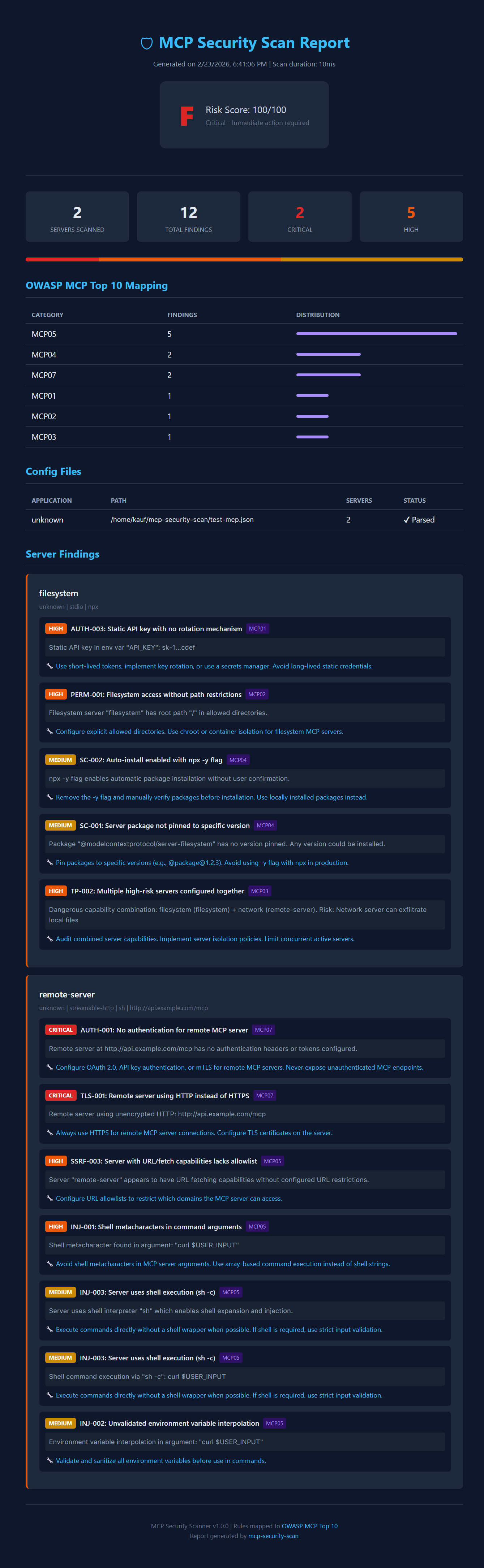
- \uD83D\uDCA1 Rich Terminal Reports: Provides clear, color-coded reports with severity levels, risk scores, and actionable remediation advice.
- \uD83D\uDCCB Multiple Export Formats: Export reports to JSON for CI/CD integration or HTML for easy sharing.
- \uD83D\uDE80 Zero-Config & Fast: Run instantly with
npxwithout any setup. Scans are completed in milliseconds. - \uD83D\uDD13 Open Source: MIT licensed and free for everyone.
Quick Start
No installation is required. Run it directly using npx:
npx mcp-security-scan
This command will automatically discover and scan all known MCP configuration files on your system.
Usage
Usage: mcp-security-scan [options]

Security scanner for MCP (Model Context Protocol) servers.
Detect authentication gaps, credential exposure, SSRF risks, and misconfigurations.
Findings mapped to OWASP MCP Top 10.

Options:
  -v, --version              output the version number
  -c, --config <path>        Path to specific MCP config file to scan
  -f, --format <format>      Output format: terminal, json, html (default: "terminal")
  -o, --output <path>        Write report to file (default: stdout)
  -s, --severity <level>     Minimum severity to report: critical, high, medium, low, info (default: "low")
  -a, --analyzers <names>    Comma-separated list of analyzers to run
  --no-color                 Disable colored output
  --verbose                  Enable verbose output
  --list-analyzers           List all available analyzers
  --list-rules               List all security rules
  -h, --help                 display help for command
Examples
-
Scan a specific config file and save the report as HTML:
npx mcp-security-scan -c ~/.cursor/mcp.json -f html -o report.html -
Run only the
authandsecretsanalyzers:npx mcp-security-scan -a auth,secrets -
Integrate with CI/CD (exits with non-zero code on critical/high findings):
npx mcp-security-scan -f json -o report.json
Security Checks
The scanner covers a wide range of security issues based on the OWASP MCP Top 10. Here are some examples:
| Category | Example Checks |
| :--- | :--- |
| Authentication | No auth on remote servers, Basic Auth over HTTP, exposed bearer tokens. |
| Secret Exposure | Hardcoded API keys, secrets in command arguments, credentials in URLs. |
| Transport Security | Unencrypted HTTP/WebSocket connections. |
| SSRF Risk | Wildcard host binding, internal network URLs, fetch tools without allowlists. |
| Command Injection | Shell metacharacters in args, shell execution (sh -c), env interpolation. |
| Permissions | Filesystem access without path restrictions, sudo usage, broad capabilities. |
| Supply Chain | Unpinned package versions, npx -y auto-install, unscoped packages. |
| Tool Poisoning | Dangerous server combinations (e.g., filesystem + network). |
Supported MCP Clients
The scanner automatically detects configuration files from:
- Claude Desktop
- Claude Code
- Cursor (Global & Project-level)
- VS Code (User & Workspace)
- Windsurf (Codeium)
- Continue.dev
- Zed Editor
- Cline (VS Code Extension)
- Generic
.mcp.jsonfiles
Contributing
Contributions are welcome! Please open an issue or submit a pull request.
License
This project is licensed under the MIT License.
References
[1] Hacker News. (2026, February 21). Key finding from our scans: 41% of registered MCP servers have no authentication at all. Retrieved from https://news.ycombinator.com/noobcomments?next=47107150
[2] OWASP Foundation. (n.d.). OWASP MCP Top 10. Retrieved from https://owasp.org/www-project-mcp-top-10/