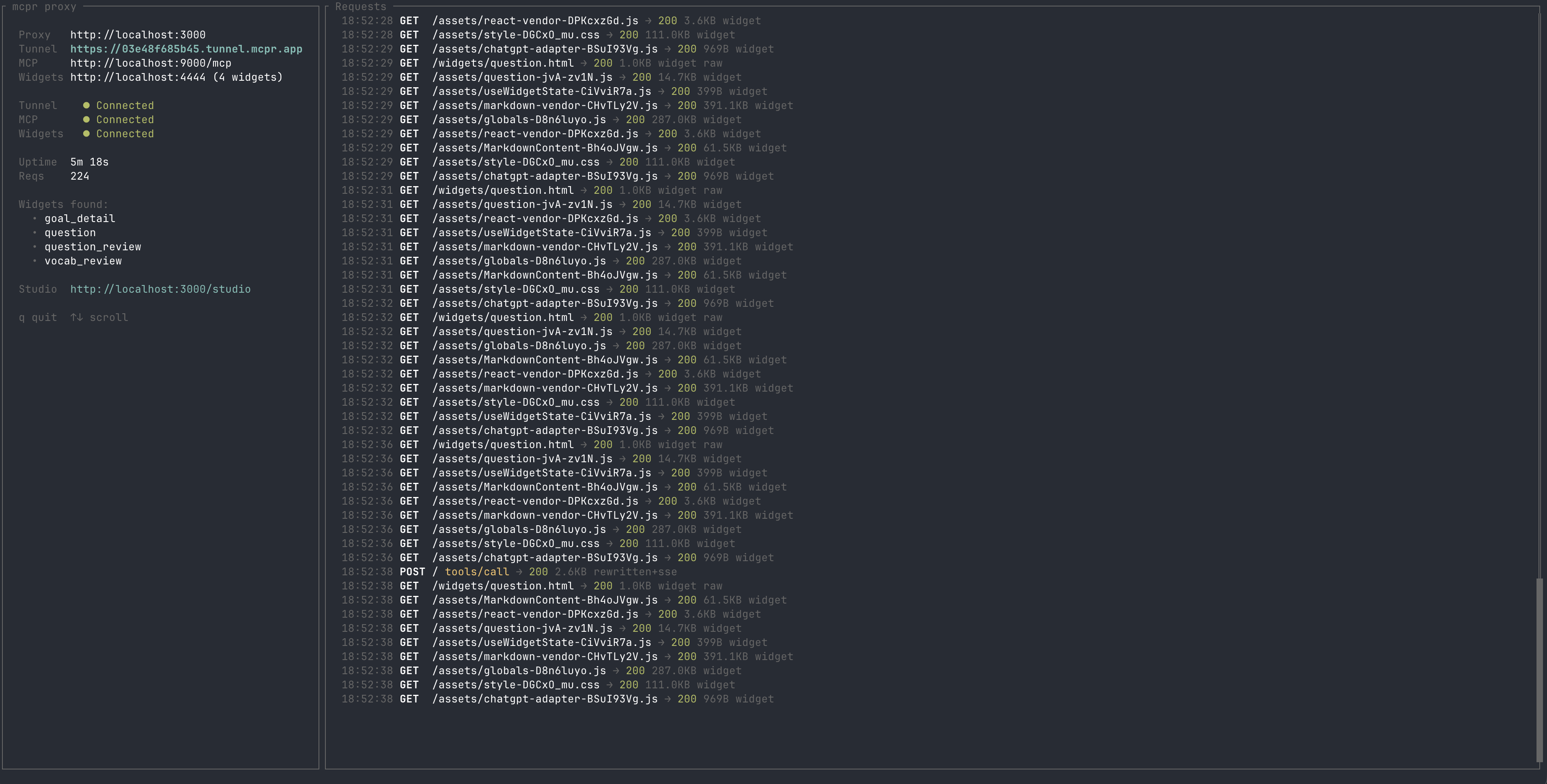
The proxy layer for MCP apps. Develop, debug, and monitor your MCP server and widgets locally — then connect to ChatGPT, Claude, or any AI client through a single URL.
mcpr
Proxy layer for MCP Apps (ChatGPT App SDK, Claude Customize) — from localhost to production. Tunnel, debug, deploy, and monitor your MCP server and widgets through one endpoint.
Local dev          →  Team Development      →  Production
───────────────────────────────────────────────────────────
tunnel + Studio       branch preview URLs      stable proxy
CSP rewriting         test per PR              request tracking
mcp/ui debugger       share with reviewers     performance monitoring
                                               widget session replay
Install
curl -fsSL https://raw.githubusercontent.com/cptrodgers/mcpr/main/scripts/install.sh | sh
Or build from source:
cargo install --path .
Features
Single endpoint for MCP + widgets
Your MCP server and widget frontend run as separate processes. mcpr merges them behind one URL — /mcp routes to your backend, everything else serves your widgets. Ready to test your mcp with real AI application (ChatGPT/Claude)
Your machine                          AI client (ChatGPT / Claude)
┌─────────────────┐
│ MCP backend     │◄──┐
│ (localhost:9000) │   │
└─────────────────┘   │
                      │   mcpr        tunnel
┌─────────────────┐   ├──────────── ◄──────────── https://abc123.tunnel.example.com
│ Widget frontend │◄──┘
│ (localhost:4444) │
└─────────────────┘
One command gives you a public HTTPS endpoint. No ngrok, no port forwarding, no subscription. The URL stays the same across restarts — configure your AI client once, keep developing.
mcpr --mcp http://localhost:9000 --widgets http://localhost:4444
# → https://abc123.tunnel.mcpr.app — paste in ChatGPT or Claude
mcpr Studio
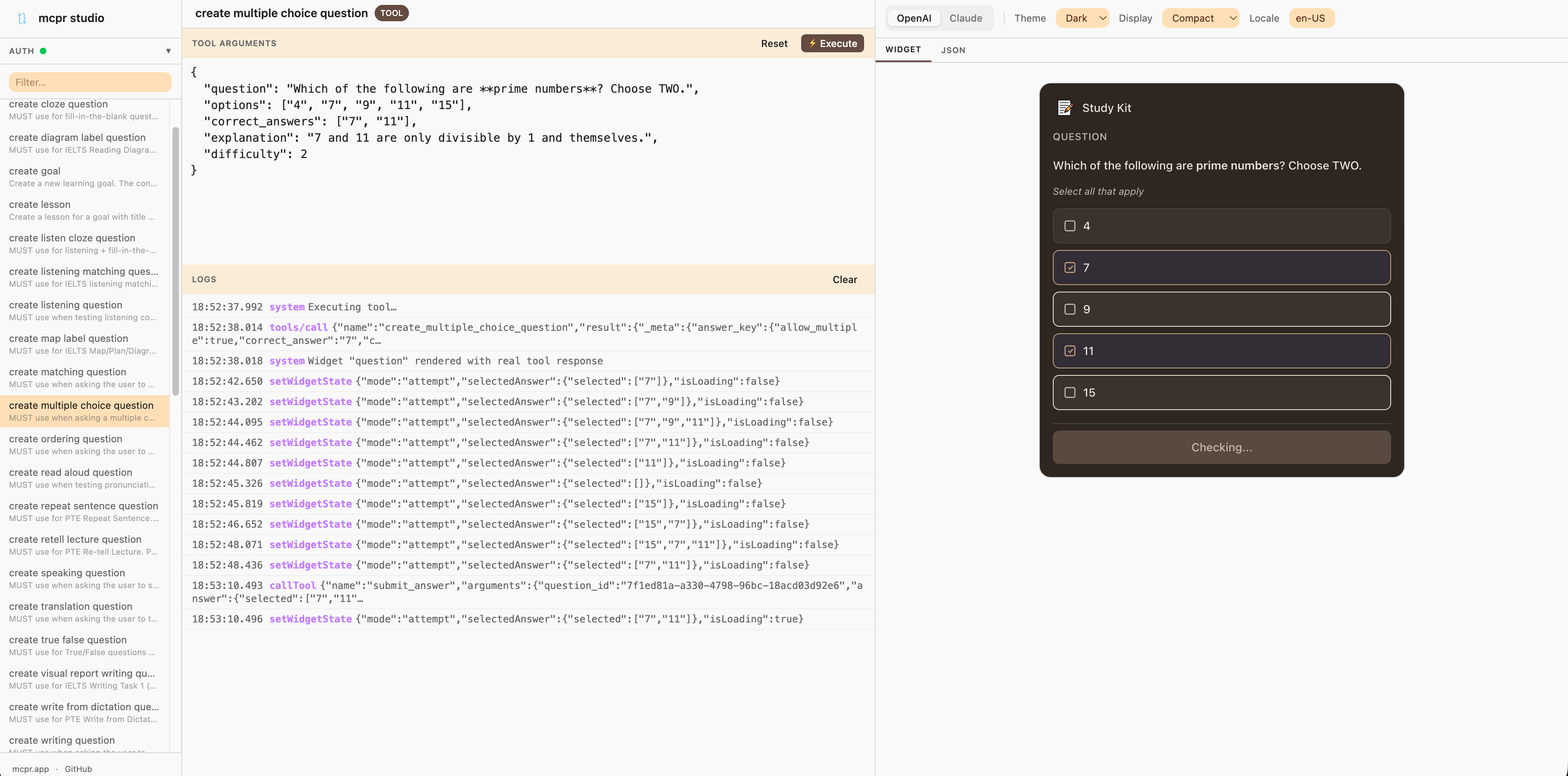
Built-in widget debugger at /studio/. Execute real MCP tools, preview widget rendering, switch between OpenAI and Claude platform simulation, and inspect every action your widget fires.
See docs/STUDIO.md for details.
Auto CSP and domain rewriting
AI clients enforce Content Security Policy on widgets — your MCP server has to return the right CSP domains, widget domains, and OAuth URLs for each environment. Without a proxy, you'd hardcode these per deployment or redeploy every time the domain changes.
mcpr handles this at the proxy layer. It rewrites CSP headers, widget domains, and OAuth discovery URLs automatically in MCP responses — for both OpenAI and Claude formats. Your MCP server stays environment-agnostic. Zero config changes, zero redeploys.
Use Cases
Local development
Develop your MCP server and widgets locally. mcpr tunnels both to a single HTTPS endpoint with auto CSP rewriting — test with ChatGPT or Claude instantly, iterate without deploying.
Widget debugging — no AI client needed
mcpr Studio lets you develop and debug widgets entirely offline. Preview rendering, edit mock data as JSON, simulate both OpenAI and Claude platforms, and inspect every action — without waiting for a real AI model to call your tools.
Quick Start
1. Create a config file:
# mcpr.toml
mcp = "http://localhost:9000"
widgets = "http://localhost:4444"
2. Run mcpr:
mcpr
On first run, mcpr generates a stable tunnel URL and saves the token to mcpr.toml. Paste the URL in ChatGPT or Claude — it stays the same across restarts.
Configuration
mcpr looks for mcpr.toml in the current directory (then parent dirs). See config_examples/ for ready-to-use templates.
Priority: CLI args > environment variables > mcpr.toml > defaults
CLI
mcpr [OPTIONS]

Options:
  --mcp <URL>              Upstream MCP server (required)
  --widgets <URL|PATH>     Widget source (URL = proxy, PATH = static serve)
  --port <PORT>            Local proxy port (required in local/relay mode, random in tunnel mode)
  --csp <DOMAIN>           Extra CSP domains (repeatable)
  --csp-mode <MODE>        CSP mode: "extend" (default) or "override"
  --relay-url <URL>        Custom relay server (env: MCPR_RELAY_URL)
  --no-tunnel              Local-only, no tunnel
  --relay                  Run as relay server
  --relay-domain <DOMAIN>  Relay base domain (required in relay mode)
Modes
Tunnel (default) — Connects to a relay, gets a public HTTPS URL. Token is auto-generated and saved for stable URLs across restarts.
Local-only — No tunnel. For local clients (Claude Desktop, VS Code, Cursor):
mcpr --no-tunnel
# Client connects to http://localhost:3000/mcp
Static widgets — Serve pre-built widgets from disk instead of proxying a dev server:
mcpr --widgets ./widgets/dist
Relay — Self-host your own tunnel relay. Requires wildcard DNS and TLS termination:
mcpr --relay --port 8080 --relay-domain tunnel.yourdomain.com
See docs/DEPLOY_RELAY_SERVER.md for full relay setup instructions.
Usage with AI Clients
ChatGPT: Settings → Apps → Add app → paste your tunnel URL
claude.ai: Customize connector.
Claude Desktop (local):
{
  "mcpServers": {
    "my-app": { "url": "http://localhost:3000/mcp" }
  }
}
Roadmap
- [ ] Request/response tracking and logging
- [ ] Widget session replay (capture + reproduce widget behavior with real data)
- [ ] Performance monitoring
- [ ] Branch/PR preview endpoints
- [ ] Configurable rewrite rules
- [ ] Built-in OAuth integration
- [ ] Production deployment mode
Contributing
Contributions are welcome! Please open an issue or submit a pull request.
License
Apache 2.0 — see LICENSE for details.