Turnkey installer + tutorial for hooking Ghidra to Claude, gemini-cli, or Ollama via the Model Context Protocol.
ghidra-mcp-setup
A turnkey installer + tutorial for hooking Ghidra up to an LLM via the Model Context Protocol, so the model can list functions, read decompiled code, rename symbols, and reason about binaries directly in your chat.
Works with:
- Claude Desktop (cloud)
- Claude Code (CLI)
- gemini-cli (cloud)
- Ollama via Open WebUI (local LLMs)
This wraps LaurieWired/GhidraMCP —
the canonical Ghidra MCP plugin — with a Python venv, a shell-agnostic launcher,
and pre-generated client configs.
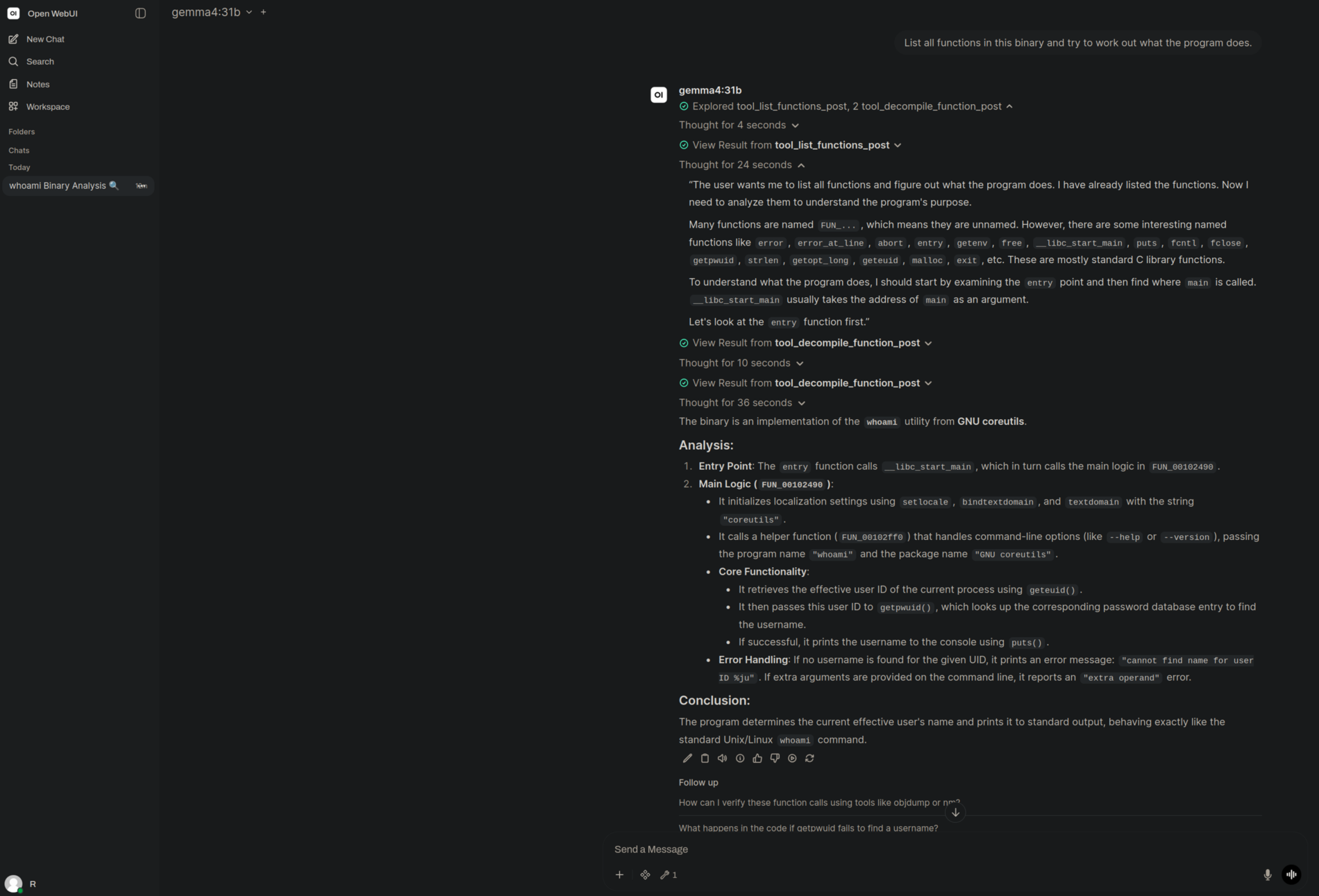
Gemma 4 31B (running locally on Ollama) chained list_functions and two
decompile_function calls through GhidraMCP, then correctly identified a
stripped binary as GNU coreutils whoami — from the entry → __libc_start_main
flow and the geteuid → getpwuid → puts call pattern. No symbols, no
cloud. Click to see the full reasoning trace.
Prerequisites
- Linux or macOS (the installer is bash; works under fish or bash)
git,python3(3.9+),curl- JDK 21+ (only needed when you actually launch Ghidra)
- Ghidra 11.3+ installed somewhere on disk
Quickstart
git clone https://github.com/YOUR_USER/ghidra-mcp-setup.git
cd ghidra-mcp-setup
./install.sh
That:
- Clones the LaurieWired bridge source into
./GhidraMCP/ - Creates a Python venv at
./venv/and installs the bridge's deps (mcp,requests) - Downloads the latest Ghidra plugin ZIP into
./extensions/ - Writes ready-to-paste configs into
./configs/generated/
Then follow TUTORIAL.md to install the plugin inside Ghidra and wire up your chosen MCP client (3–5 more minutes).
What you end up with
ghidra-mcp-setup/
├── install.sh                  ← run this first
├── run-bridge.sh               ← shell-agnostic launcher (uses venv/bin/python)
├── TUTORIAL.md                 ← step-by-step walkthrough
├── ghidra-mcp-guide.md         ← background reading (plugin variants, RE workflow)
├── GhidraMCP/                  ← cloned bridge source (created by install.sh)
├── venv/                       ← Python venv (created by install.sh)
├── extensions/                 ← Ghidra plugin ZIPs (created by install.sh)
└── configs/
    ├── claude-desktop.json     ← template w/ __INSTALL_DIR__ placeholder
    ├── claude-code.mcp.json
    ├── gemini-cli.json
    ├── ollama-openwebui.md
    └── generated/              ← same configs with absolute paths filled in
Why a venv?
System Python on Arch, Debian, Ubuntu and other PEP-668 distros refuses to let
pip install packages globally. The usual workarounds (--break-system-packages,
--user) leak into your user environment. A project-local venv is cleaner and
trivially deletable — rm -rf venv/ and you're back to a clean slate.
The included run-bridge.sh invokes venv/bin/python directly, so MCP clients
don't need to know anything about activating a venv — and so the same setup
works whether you use fish or bash.
Uninstall
rm -rf venv GhidraMCP extensions configs/generated
(And remove the "ghidra" entry from your MCP client config.)
Security
The installer does no sudo, no curl | bash, no system-wide writes; it only
touches files under this repo and your venv. The plugin release URL is
validated against the expected GitHub host and filename pattern before any
download. See SECURITY.md for the full threat model, what
the installer hardens against, and what's out of scope.
To pin the upstream to a specific tag/commit instead of tracking main:
GHIDRAMCP_REF=v1.4 ./install.sh
To refresh an existing checkout:
./install.sh --update
To use a non-default Ghidra plugin port (e.g. because Open WebUI is on 8080):
GHIDRA_PORT=9090 ./install.sh
# then change the port in Ghidra: Configure → gear → Options for GhidraMCPPlugin
License
MIT. See LICENSE.
The bundled bridge source is from LaurieWired/GhidraMCP under its own license.