Persistent AI project memory MCP server with Supabase for OpenCode, Antigravity, Claude Code, and Codex
Project Memory MCP



Persistent project memory for AI models and coding agents. Project Memory MCP stores architecture, decisions, tasks, warnings, preferences, and session state in Supabase so OpenCode, Claude Code CLI, Qwen Code, Codex, or any MCP-compatible client can resume work without losing context.
It is designed to behave like a normal MCP server: install it once, expose one mcpServers entry, and reuse the same server across every client that accepts MCP.

🧠 Long-term project memory across AI tools
Documentation
·
OpenCode
·
Claude Code CLI
·
Codex
Table of Contents
- Why it matters
- Quick Start
- Client Setup
- Natural Language Usage
- Features
- Architecture Snapshot
- Documentation
- API Reference
- Examples
- Screenshots
- Support the Project
- Contributing
- Author
Why it matters
AI tools often forget the project state between sessions. Project Memory MCP fixes that by keeping a durable memory layer for your app, system, and implementation history.
| 🎯 Search intent Project Memory MCP, AI project memory, Supabase persistent context | ⚙️ Core job Store architecture, decisions, tasks, warnings, and session state | 🌍 Interfaces OpenCode, Claude Code CLI, Qwen Code, Codex, native MCP clients |
| Memory layer | Benefit | | --- | --- | | 🧠 Decisions | Keep technical reasoning consistent across sessions | | 🏗️ Architecture | Remember how the system is organized and why | | ✅ Tasks | Resume work from the exact task status | | ⚠️ Warnings | Preserve risks, blockers, and caveats | | 🔁 Session state | Continue implementation where the last AI client stopped |
Quick Start
macOS and Linux:
git clone https://github.com/dannymaaz/project-memory-mcp.git
cd project-memory-mcp
python3 -m venv .venv
source .venv/bin/activate
pip install -r requirements.txt
pip install -e .
cp .env.example .env
project-memory-mcp
Windows PowerShell:
git clone https://github.com/dannymaaz/project-memory-mcp.git
cd project-memory-mcp
py -m venv .venv
.venv\Scripts\Activate.ps1
pip install -r requirements.txt
pip install -e .
Copy-Item .env.example .env
project-memory-mcp
Then add your Supabase values to .env, run schema.sql in Supabase SQL Editor, and register mcp.json in your MCP-compatible client.
Standard MCP pattern
After pip install -e ., clients can launch the server with a normal MCP command entry:
{
  "mcpServers": {
    "project-memory-mcp": {
      "command": "project-memory-mcp",
      "env": {
        "SUPABASE_URL": "https://your-project.supabase.co",
        "SUPABASE_KEY": "your-anon-key",
        "OWNER_ID": "your-owner-id",
        "DEFAULT_MODEL": "gemini-pro",
        "PROJECT_MEMORY_INTERFACE": "native"
      }
    }
  }
}
If a client accepts a standard MCP JSON with mcpServers, you can usually reuse that same block and only adjust the path, interface, or environment values.
Quick Links
- Docs site:
https://dannymaaz.github.io/project-memory-mcp/ - SQL schema:
schema.sql - MCP config:
mcp.json
Client Setup
You can keep this repository exactly in the current folder if that is where you want it to live.
For other users who clone it from GitHub, the best pattern is still the same: clone it once, keep a private .env, and connect multiple clients to the same installation.
1. Install from GitHub
macOS and Linux:
git clone https://github.com/dannymaaz/project-memory-mcp.git
cd project-memory-mcp
python3 -m venv .venv
source .venv/bin/activate
pip install -r requirements.txt
pip install -e .
cp .env.example .env
Windows PowerShell:
git clone https://github.com/dannymaaz/project-memory-mcp.git
cd project-memory-mcp
py -m venv .venv
.venv\Scripts\Activate.ps1
pip install -r requirements.txt
pip install -e .
Copy-Item .env.example .env
Then:
- Fill in
.envwith your Supabase values. - Run
schema.sqlin Supabase SQL Editor. - Keep the repository in a stable folder.
- Reuse that same folder for all your IDEs and AI clients.
The installed MCP command is the same on Windows, macOS, and Linux:
project-memory-mcp
2. Keep one central installation
Do not copy the server into every project. A single installation is enough.
Recommended pattern:
- one folder for the MCP server,
- one
.envfile inside that folder, - many repos or apps connected to the same memory backend.
Use any stable folder you control. Do not publish personal local paths in public configs or screenshots.
3. Configure it like any other MCP server
The simplest pattern is to register one command everywhere:
{
  "mcpServers": {
    "project-memory-mcp": {
      "command": "project-memory-mcp",
      "env": {
        "SUPABASE_URL": "https://your-project.supabase.co",
        "SUPABASE_KEY": "your-anon-key",
        "OWNER_ID": "your-owner-id",
        "DEFAULT_MODEL": "gemini-pro",
        "PROJECT_MEMORY_INTERFACE": "native"
      }
    }
  }
}
That same block works as the base for Antigravity, OpenCode, Claude Code, Codex, and most other MCP-compatible clients.
4. Do I need to start it after every reboot?
Usually no.
If a client is configured to launch project-memory-mcp, it normally starts the server on demand when the client needs it. In normal use, that means you do not have to manually rerun the server every time you turn on the PC.
You only need to start it yourself when:
- testing the server directly,
- debugging outside the client,
- or using a custom setup that does not automatically spawn MCP servers.
5. Configure each client
OpenCode
Run OpenCode from the repository root or point it to the included mcp.json:
opencode --mcp-config mcp.json
Make sure PROJECT_MEMORY_INTERFACE=opencode is available in the MCP environment.
If OpenCode accepts a direct MCP JSON entry, you can paste the same mcpServers.project-memory-mcp block there.
Codex
Register the server using mcp.json or the equivalent Codex MCP settings, then run:
codex --config mcp.json
Claude Code CLI
Run Claude Code with the shared MCP config:
claude-code --mcp-config mcp.json
Set PROJECT_MEMORY_INTERFACE=claude-code for that client.
Claude Desktop
Edit the Claude Desktop MCP config file and add a local server entry.
Windows path:
%APPDATA%\Claude\claude_desktop_config.json
macOS path:
~/Library/Application Support/Claude/claude_desktop_config.json
Linux path:
Check your local Claude Desktop app data folder
Example config:
{
  "mcpServers": {
    "project-memory-mcp": {
      "command": "project-memory-mcp",
      "env": {
        "SUPABASE_URL": "https://your-project.supabase.co",
        "SUPABASE_KEY": "your-anon-key",
        "OWNER_ID": "your-owner-id",
        "DEFAULT_MODEL": "gemini-pro",
        "PROJECT_MEMORY_INTERFACE": "claude-code"
      }
    }
  }
}
After saving the file, restart Claude Desktop.
Antigravity
If your Antigravity build supports external MCP servers, register the same server there using the same command and environment values:
project-memory-mcp
Use the same mcpServers JSON block as the base config and set the interface to native or antigravity in your client flow.
Common Windows path:
%USERPROFILE%\.gemini\antigravity\mcp_config.json
That means Antigravity can detect the server from a normal MCP JSON config file, just like other clients.
Qwen Code
PROJECT_MEMORY_INTERFACE=qwen-code qwen --mcp-config mcp.json
Natural Language Usage
In most MCP-compatible clients, you do not have to manually say which tool to call.
If the client exposes Project Memory MCP tools and tool use is enabled, the model can decide on its own when to call tools like load_unified_context, save_cross_interface_decision, update_task_status, or sync_session_state.
Typical natural-language prompts:
- "Resume this project and tell me where we left off."
- "Load the stored project memory before continuing the refactor."
- "Save this architecture decision and mark the current task as in progress."
- "Check active warnings before we keep coding."
When the model sees those requests, it can map them to the right MCP tools automatically.
Manual tool calls are still useful when:
- you are debugging an integration,
- you want exact control over the payload,
- or your client does not allow automatic tool use.
If your client disables tool use, the model cannot call MCP tools by itself. In that case, enable MCP/MCP tools in the client or trigger the tool explicitly.
Features
- 🧩 Persistent project context backed by Supabase.
- 🔀 Multi-client continuity for OpenCode, Claude Code CLI, Qwen Code, Codex, and native MCP flows.
- ✂️ Context optimization with interface-aware and model-aware trimming.
- 🔐 Row Level Security across every persistent table.
- 🧪 Pytest coverage for the server and optimizer.
- 🌐 Public bilingual docs optimized for GitHub and Google search.
Architecture Snapshot
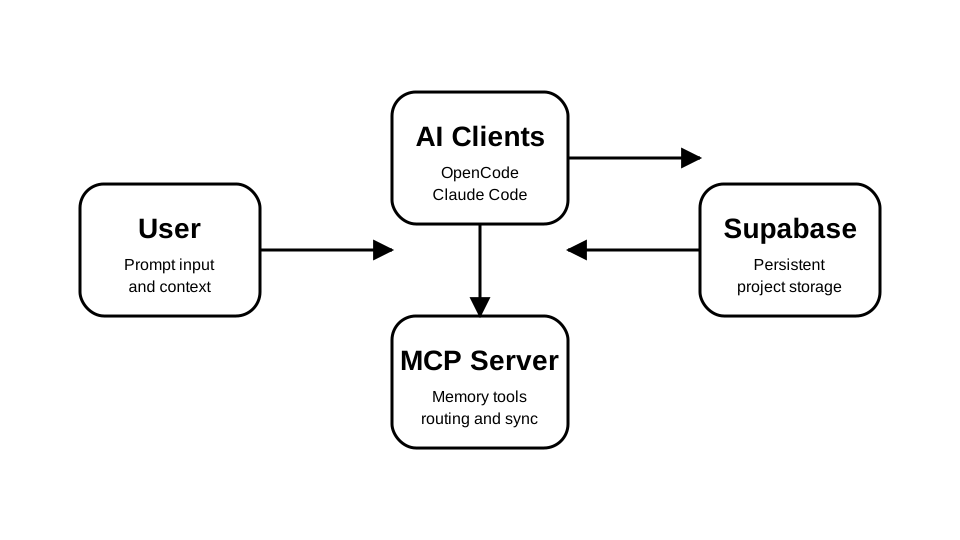 Minimal flow User → AI Client → MCP Server → Supabase | What persists Architecture Decisions Tasks Warnings Preferences Sessions Session state |
Documentation
- Public docs:
docs/index.html - SEO sitemap:
docs/sitemap.xml - GitHub Pages target:
https://dannymaaz.github.io/project-memory-mcp/ - Locales:
docs/locales/en.jsonanddocs/locales/es.json
API Reference
Main tools exposed by the server in src/server.py:
load_unified_contextsave_cross_interface_decisionupdate_task_statuscreate_sessionend_sessionadd_warningget_active_warningssync_session_stateget_interface_analytics
Examples
examples/antigravity/README.mdexamples/claude-desktop/README.mdexamples/opencode/README.mdexamples/claude-code/README.mdexamples/qwen-plugin/README.mdexamples/codex-plugin/README.mdexamples/native-chat/README.md
SEO Highlights
- Uses Project Memory MCP, AI project memory, and Supabase persistent context in high-signal sections.
- Keeps core keywords near the top for GitHub search and repository previews.
- Ships Open Graph, Twitter Card, JSON-LD, canonical URL, hreflang, and sitemap for Google indexing.
- Includes bilingual docs and MCP-oriented examples for broader discoverability.
Screenshots
Architecture preview | Brand mark |
Support the Project
If Project Memory MCP helps your workflow, you can support development here:


Contributing
See CONTRIBUTING.md for setup, style, PR process, and issue reporting.
Author
Community
- Open a GitHub issue for bugs, ideas, or integration notes.
- Use the docs site to onboard collaborators quickly.
- Extend the schema and examples as your AI workflows grow.
Search Keywords
Project Memory MCP, AI project memory, Supabase persistent context, AI agent memory, OpenCode memory, Claude Code CLI memory, Qwen Code memory, Codex memory, multi-interface AI, context optimization, Danny Maaz.