🚀 SuperMCP - Create multiple isolated MCP servers using a single connector. Build powerful Model Context Protocol integrations for databases (PostgreSQL, MSSQL) with FastAPI backend, React dashboard, and token-based auth. Perfect for multi-tenant apps and AI assistants.
SuperMCP
A comprehensive platform for creating, deploying, and managing Model Context Protocol (MCP) connectors that bridge AI assistants with databases, APIs, and other data sources.




📹 Introduction Video
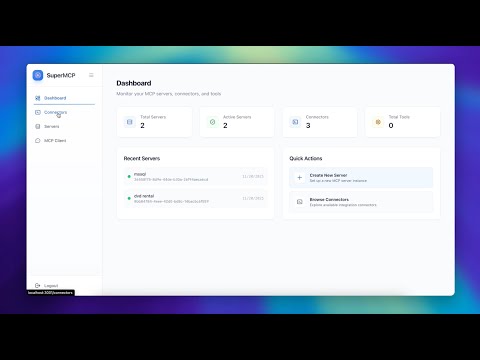
🎯 What is SuperMCP?
SuperMCP is a powerful platform that enables you to create multiple isolated MCP servers using a single standalone connector. This unique architecture allows you to:
- Multi-Server from One Connector: Deploy one connector instance and create unlimited isolated MCP servers with different configurations
- Isolated Configurations: Each MCP server has its own credentials, connection settings, and security tokens
- Resource Efficient: Share connection pools and resources across servers while maintaining isolation
- Simplified Management: Manage all your database connections from a single connector deployment
How It Works
Instead of deploying multiple connector instances for different databases, SuperMCP lets you:
- Deploy Once: Set up a single PostgreSQL or MSSQL connector
- Create Multiple Servers: Configure as many isolated MCP servers as needed
- Independent Access: Each server operates independently with its own tokens and credentials
- Centralized Control: Manage everything from one unified dashboard
This approach dramatically reduces infrastructure complexity while providing maximum flexibility for multi-tenant applications, development environments, and enterprise deployments.
🏗️ Architecture
SuperMCP consists of three main components working together:
┌─────────────────────────────────────────────────────────────────┐
│                     Frontend (React + Tailwind)                 │
│                      http://localhost:3000                      │
│  • Connector Management  • Server Configuration                │
│  • Visual Dashboard      • Real-time Monitoring                │
└──────────────────────┬──────────────────────────────────────────┘
                       │
                       │ REST API
                       ▼
┌─────────────────────────────────────────────────────────────────┐
│                    Backend (FastAPI + SQLModel)                 │
│                      http://localhost:9000                      │
│  • User Authentication    • Connector Registry                 │
│  • Configuration Storage  • API Endpoints                      │
│  • Server Management      • Token Management                   │
└──────────────────────┬──────────────────────────────────────────┘
                       │
                       │ MCP Protocol
                       ▼
┌─────────────────────────────────────────────────────────────────┐
│                    Connectors (Microservices)                   │
│  PostgreSQL (:8027) │ MSSQL (:8028) │ Custom Connectors        │
│  • Connection Pooling  • Async Operations                      │
│  • Schema Introspection • Query Execution                      │
│  • Transaction Support  • Tool Registration                    │
└─────────────────────────────────────────────────────────────────┘
🚀 Key Features
Database & Integration
- Database Connectors: Production-ready connectors for PostgreSQL, MSSQL with connection pooling, async operations, and schema introspection
- MCP Protocol: Full Model Context Protocol implementation for standardized tool registration and execution
- API Integration: RESTful API for programmatic access with FastAPI-Users authentication
- Multi-Server Support: Single connector managing multiple server instances with independent configurations
Security & Management
- Secure Data Layer: Securely connect to your data sources with encrypted credential storage and protected token-based authentication
- Authentication & Authorization: All servers are fully protected by token-based authentication with granular access control
- Visual Management: Intuitive React-based dashboard for managing connectors, servers, tokens, and configurations
- Schema Validation: Pydantic-based validation with auto-generated forms and type safety
Performance & Deployment
- Docker Deployment: Fully containerized with Docker Compose, supporting development and production environments
- Connection Pooling: Intelligent connection pooling with LRU eviction, TTL management, and per-server limits
- Custom Tools: Create custom tools using templates defined by connectors for reusable workflows
- Custom Connectors: Build custom connectors for any data source and share them with your teams
🎯 Use Cases
- Multi-Tenant Applications: Create isolated database connections for each tenant with dynamic connector instances and secure credential management
- Data Integration Hub: Integrate multiple heterogeneous data sources into a unified access layer with standardized tooling
- API Gateway: Build a centralized gateway for database access with authentication, rate limiting, and monitoring
- Developer Tools: Provide developers with easy access to database tools, query execution, and schema exploration
- AI Data Access: Enable AI assistants to query and interact with databases through standardized MCP protocol
- DataOps Platform: Create a comprehensive platform for database operations, migrations, and management
🛠️ Technology Stack
Backend
- FastAPI 0.109+ - Modern Python web framework
- SQLModel 0.0.14+ - SQL databases with Python type hints
- PostgreSQL 12+ - Database with JSONB support
- FastAPI-Users - Authentication and user management
- Alembic - Database migrations
- Pydantic 2.5+ - Data validation and settings
Frontend
- React 19 - UI framework
- Tailwind CSS 3 - Utility-first styling
- react-jsonschema-form - Dynamic form generation
- Fetch API - HTTP client for REST calls
Connectors
- FastMCP - MCP server framework
- AsyncPG - PostgreSQL async driver
- aioodbc - MSSQL async driver
- UV - Fast Python package installer
DevOps
- Docker & Docker Compose - Containerization
- Caddy - Reverse proxy and HTTPS
- PostgreSQL - Primary database
📚 Core Concepts
Connectors
Standalone microservices that implement MCP protocol to interface with specific data sources. Each connector runs independently on its own port.
Servers
Instances of connectors with specific configurations (credentials, host, database). One connector can manage multiple servers.
Tools
Callable operations exposed by connectors (e.g., list_tables, execute_query, test_connection).
Templates
Pre-configured tool patterns with parameter validation for common workflows.
Connection Pools
Managed connection pools with automatic cleanup, LRU eviction, and configurable limits.
🔒 Security Features
Credential Management
- Encrypted storage in PostgreSQL
- Never logged or exposed in responses
- Secure transmission to connectors
- Support for environment variables
Authentication & Authorization
- FastAPI-Users authentication
- Cookie-based sessions
- JWT token support
- User role management
Connection Security
- SSL/TLS for database connections
- Certificate validation options
- Encrypted data in transit
- Secure connection strings
Query Safety
- Parameterized queries prevent SQL injection
- Input validation via Pydantic
- Query timeout limits
- Permission-based access control
🚦 Quick Start
Prerequisites
- Python 3.12+
- Docker & Docker Compose
- UV package manager
- Node.js 18+
- PostgreSQL 12+
Installation
- Clone the repository
git clone https://github.com/dhanababum/supermcp.git
cd supermcp
- Start the Backend
cd app
uv sync
uv run python src/main.py
# Server runs on http://localhost:9000
- Start the Frontend
cd web
npm install
npm start
# Opens http://localhost:3000
- Start Connectors
# PostgreSQL Connector
cd connectors/postgres
uv run python main.py

# MSSQL Connector
cd connectors/mssql
uv run python main.py
📖 Documentation
For complete documentation, visit our documentation site or check the /docs directory.
- Getting Started: Quick setup guide to get SuperMCP running in minutes
- Architecture: Detailed system architecture and component interactions
- Connectors Overview: Learn about MCP connectors and how to build your own
- API Reference: Complete API documentation with examples
- Development Guide: Local development setup and best practices
- AI Tools Integration: Integrate SuperMCP with Cursor, Claude Code, and Windsurf
🤝 Contributing
Contributions are welcome! Please feel free to submit a Pull Request.
- Fork the repository
- Create your feature branch (
git checkout -b feature/AmazingFeature) - Commit your changes (
git commit -m 'Add some AmazingFeature') - Push to the branch (
git push origin feature/AmazingFeature) - Open a Pull Request
🌟 Why SuperMCP?
- Production Ready: Built with enterprise-grade tools like FastAPI, SQLModel, and PostgreSQL
- Developer Friendly: Beautiful dashboard, comprehensive docs, and extensive examples
- Extensible: Easy to add new connectors following provided patterns
- Performant: Async operations, connection pooling, and optimized queries
- Secure: Authentication, encryption, and query safety built-in
- Modern Stack: Latest versions of React, FastAPI, and Python 3.12+
📄 License
This project is licensed under the MIT License - see the LICENSE file for details.
🤝 Community & Support
- Issues: GitHub Issues
- Discussions: GitHub Discussions
👨💻 Author
Dhana Babu
Ready to get started? Follow our Quick Start Guide to have SuperMCP running in minutes!