MCP server providing semantic memory and persistent storage capabilities for Claude using ChromaDB and sentence transformers.
mcp-memory-service
Persistent Shared Memory for AI Agent Pipelines
Open-source memory backend for multi-agent systems. Agents store decisions, share causal knowledge graphs, and retrieve context in 5ms — without cloud lock-in or API costs.
Works with LangGraph · CrewAI · AutoGen · any HTTP client · Claude Desktop · OpenCode













🎬 See It in Action
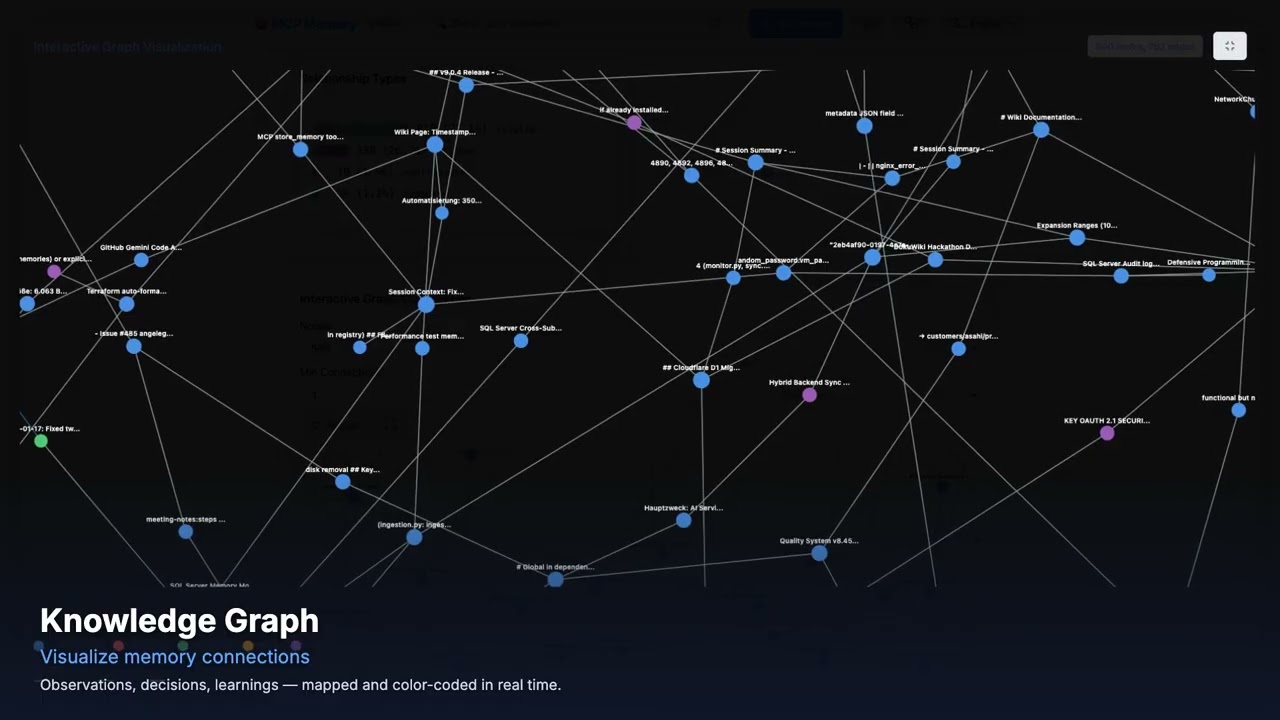
Watch the Web Dashboard Walkthrough on YouTube — Semantic search, tag browser, document ingestion, analytics, quality scoring, and API docs in under 2 minutes.
🌐 Works with claude.ai (Browser)
Unlike desktop-only MCP servers, mcp-memory-service supports Remote MCP for native claude.ai integration.
What this means:
- ✅ Use persistent memory directly in your browser (no Claude Desktop required)
- ✅ Works on any device (laptop, tablet, phone)
- ✅ Enterprise-ready (OAuth 2.0 + HTTPS + CORS)
- ✅ Self-hosted OR cloud-hosted (your choice)
5-Minute Setup:
# 1. Start server with Remote MCP enabled
MCP_STREAMABLE_HTTP_MODE=1 \
MCP_SSE_HOST=0.0.0.0 \
MCP_SSE_PORT=8765 \
MCP_OAUTH_ENABLED=true \
python -m mcp_memory_service.server

# 2. Expose via Cloudflare Tunnel (or your own HTTPS setup)
cloudflared tunnel --url http://localhost:8765
# → Outputs: https://random-name.trycloudflare.com

# 3. In claude.ai: Settings → Connectors → Add Connector
# Paste the URL: https://random-name.trycloudflare.com/mcp
# OAuth flow will handle authentication automatically
Production Setup: See Remote MCP Setup Guide for Let's Encrypt, nginx, and firewall configuration. Step-by-Step Tutorial: Blog: 5-Minute claude.ai Setup | Wiki Guide
Why Agents Need This
| Without mcp-memory-service | With mcp-memory-service | |---|---| | Each agent run starts from zero | Agents retrieve prior decisions in 5ms | | Memory is local to one graph/run | Memory is shared across all agents and runs | | You manage Redis + Pinecone + glue code | One self-hosted service, zero cloud cost | | No causal relationships between facts | Knowledge graph with typed edges (causes, fixes, contradicts) | | Context window limits create amnesia | Autonomous consolidation compresses old memories |
Key capabilities for agent pipelines:
- Framework-agnostic REST API — 15 endpoints, no MCP client library needed
- Knowledge graph — agents share causal chains, not just facts
X-Agent-IDheader — auto-tag memories by agent identity for scoped retrievalconversation_id— bypass deduplication for incremental conversation storage- SSE events — real-time notifications when any agent stores or deletes a memory
- Embeddings run locally via ONNX — memory never leaves your infrastructure
Agent Quick Start
pip install mcp-memory-service
MCP_ALLOW_ANONYMOUS_ACCESS=true memory server --http
# REST API running at http://localhost:8000
import httpx

BASE_URL = "http://localhost:8000"

# Store — auto-tag with X-Agent-ID header
async with httpx.AsyncClient() as client:
    await client.post(f"{BASE_URL}/api/memories", json={
        "content": "API rate limit is 100 req/min",
        "tags": ["api", "limits"],
    }, headers={"X-Agent-ID": "researcher"})
    # Stored with tags: ["api", "limits", "agent:researcher"]

# Search — scope to a specific agent
    results = await client.post(f"{BASE_URL}/api/memories/search", json={
        "query": "API rate limits",
        "tags": ["agent:researcher"],
    })
    print(results.json()["memories"])
Framework-specific guides: docs/agents/
Real-World: Multi-Agent Cluster with Shared Memory
"After I work with one of the cluster agents on something I want my local agent to know about, the cluster agent adds a special tag to the memory entry that my local agent recognizes as a message from a cluster agent. So they end up using it as a comms bridge — and it's pretty delightful." — @jeremykoerber, issue #591
A 5-agent openclaw cluster uses mcp-memory-service as shared state and as an inter-agent messaging bus — without any custom protocol. Cluster agents tag memories with a sentinel like msg:cluster, and the local agent filters on that tag to receive cross-cluster signals. The memory service becomes the coordination layer with zero additional infrastructure.
# Cluster agent stores a learning and flags it for the local agent
await client.post(f"{BASE_URL}/api/memories", json={
    "content": "Rate limit on provider X is 50 RPM — switch to provider Y after 40",
    "tags": ["api", "limits", "msg:cluster"],       # sentinel tag
}, headers={"X-Agent-ID": "cluster-agent-3"})

# Local agent polls for cluster messages
results = await client.post(f"{BASE_URL}/api/memories/search", json={
    "query": "messages from cluster",
    "tags": ["msg:cluster"],
})
This pattern — tags as inter-agent signals — emerges naturally from the tagging system and requires no additional infrastructure.
Real-World: Self-Hosted Docker Stack with Cloudflare Tunnel
"The quality of life that session-independent memory adds to AI workflows is immense. File-based memory demands constant discipline. Semantic recall from a live database doesn't. Storing data on my own hardware while making it remotely accessible across platforms turned out to be a feature I didn't know I needed." — @PL-Peter, discussion #602
A production-tested self-hosted deployment using Docker containers behind a Cloudflare tunnel, with AuthMCP Gateway handling authentication:
| Layer | Role | |-------|------| | Cloudflare Tunnel | Name-based routing, subnet-based access control, authentication before hitting self-hosted resources | | AuthMCP Gateway | Auth/aggregation with locally managed users, admin UI, per-user MCP server access control, bearer token auth | | mcp-memory-service | Two Docker containers sharing one SQLite backend — one for MCP, one for the web UI (document ingestion) |
Security best practices for this setup:
- Use Cloudflare ZeroTrust with subnet-based access control (e.g., allow Anthropic subnets + your own IPs)
- Add Client IP Address Filtering to all Cloudflare API tokens (Dashboard → My Profile → API Tokens → Edit → Client IP Address Filtering) to limit abuse if a token leaks
- If using IPv6, include your IPv6 /64 network in the allowlist (Python prefers IPv6 by default)
- Set
MCP_OAUTH_ACCESS_TOKEN_EXPIRE_MINUTES=1440to extend OAuth tokens to 24 hours (refresh tokens not yet supported) - Consider an auth proxy like AuthMCP or mcp-auth-proxy for robust session management
Comparison with Alternatives
vs. Commercial Memory APIs
| | Mem0 | Zep | DIY Redis+Pinecone | mcp-memory-service | |---|---|---|---|---| | License | Proprietary | Enterprise | — | Apache 2.0 | | Cost | Per-call API | Enterprise | Infra costs | $0 | | 🌐 claude.ai Browser | ❌ Desktop only | ❌ Desktop only | ❌ | ✅ Remote MCP | | OAuth 2.0 + DCR | ❓ Unknown | ❓ Unknown | ❌ | ✅ Enterprise-ready | | Streamable HTTP | ❌ | ❌ | ❌ | ✅ (SSE deprecated) | | Framework integration | SDK | SDK | Manual | REST API (any HTTP client) | | Knowledge graph | No | Limited | No | Yes (typed edges) | | Auto consolidation | No | No | No | Yes (decay + compression) | | On-premise embeddings | No | No | Manual | Yes (ONNX, local) | | Privacy | Cloud | Cloud | Partial | 100% local | | Hybrid search | No | Yes | Manual | Yes (BM25 + vector) | | MCP protocol | No | No | No | Yes | | REST API | Yes | Yes | Manual | Yes (15 endpoints) |
vs. MCP-Native Alternatives
MemPalace is an MCP-native alternative that went viral in April 2026 with strong LongMemEval claims. A community code review (Issue #27) subsequently showed that the headline numbers reflect the underlying vector store rather than the advertised Palace architecture, and the maintainers acknowledged most points. We keep the comparison here for transparency, but readers should interpret the scores with that context in mind.
| | MemPalace | mcp-memory-service | |---|---|---| | LongMemEval R@5 (raw ChromaDB, zero LLM) | 96.6%¹ | 86.0% (session) / 80.4% (turn) | | LongMemEval R@5 (with reranking) | 100%² | — | | Storage granularity | Session-level | Turn-level + session-level | | Team / multi-device sync | ❌ Local only | ✅ Cloudflare sync | | REST API / Web dashboard | ❌ | ✅ | | OAuth 2.1 + multi-user | ❌ | ✅ | | Knowledge graph | ❌ | ✅ (typed edges) | | Auto consolidation | ❌ | ✅ (decay + compression) | | Compatible AI tools | Claude-focused | 13+ tools | | License | MIT | Apache 2.0 |
Why the benchmark gap? Two independent factors:
- Ingestion granularity. MemPalace stores each conversation as a single unit (session-level). LongMemEval asks "which session contains the answer?" — a question that session-level storage answers structurally. mcp-memory-service defaults to turn-level storage (one entry per message), which enables fine-grained retrieval ("what exactly did the user say about X?") but spreads a session's signal across many entries. Using
memory_store_session(added in v10.35.0) brings our score to 86.0% R@5. - What the 96.6% actually measures. Per Issue #27, MemPalace's headline number is produced in "raw mode" — plain text stored in ChromaDB with default embeddings. The Palace architecture (Wings, Rooms, Halls) is not active in that configuration; "Halls" exist only as metadata strings with no effect on ranking. The 96.6% is therefore a ChromaDB + default-embedding baseline, not a measurement of MemPalace's structural retrieval features. A direct "apples-to-apples" architectural comparison is not possible with the published numbers.
¹ Measured in MemPalace "raw mode" (plain text in ChromaDB with default embeddings). Per Issue #27, the Palace structural features are bypassed in this configuration.
² 100% result uses optional LLM reranking (~500 API calls) on a partially tuned test set. Clean held-out score (as reported by the maintainers): 98.4% R@5.
Stop Re-Explaining Your Project to AI Every Session
Your AI assistant forgets everything when you start a new chat. After 50 tool uses, context explodes to 500k+ tokens—Claude slows down, you restart, and now it remembers nothing. You spend 10 minutes re-explaining your architecture. Again.
MCP Memory Service solves this.
It automatically captures your project context, architecture decisions, and code patterns. When you start fresh sessions, your AI already knows everything—no re-explaining, no context loss, no wasted time.
🎥 2-Minute Video Demo

Technical showcase: Performance, Architecture, AI/ML Intelligence & Developer Experience
⚡ Works With Your Favorite AI Tools
🤖 Agent Frameworks (REST API)
LangGraph · CrewAI · AutoGen · Any HTTP Client · OpenClaw/Nanobot · Custom Pipelines
🖥️ CLI & Terminal AI (MCP)
Claude Code · Gemini CLI · Gemini Code Assist · OpenCode · Codex CLI · Goose · Aider · GitHub Copilot CLI · Amp · Continue · Zed · Cody
🎨 Desktop & IDE (MCP)
Claude Desktop · VS Code · Cursor · Windsurf · Kilo Code · Raycast · JetBrains · Replit · Sourcegraph · Qodo
💬 Chat Interfaces (MCP)
ChatGPT (Developer Mode) · claude.ai (Remote MCP via HTTPS)
Works seamlessly with any MCP-compatible client or HTTP client - whether you're building agent pipelines, coding in the terminal, IDE, or browser.
💡 NEW: ChatGPT now supports MCP! Enable Developer Mode to connect your memory service directly. See setup guide →
🚀 Get Started in 60 Seconds
Not sure which setup fits your needs? See the Setup Guide — a decision tree walks you to the right path in under a minute.
1. Install:
pip install mcp-memory-service
2. Configure your AI client:
Claude Desktop
Add to your config file:
- macOS:
~/Library/Application Support/Claude/claude_desktop_config.json - Windows:
%APPDATA%\Claude\claude_desktop_config.json - Linux:
~/.config/Claude/claude_desktop_config.json
{
  "mcpServers": {
    "memory": {
      "command": "memory",
      "args": ["server"]
    }
  }
}
Restart Claude Desktop. Your AI now remembers everything across sessions.
Claude Code
claude mcp add memory -- memory server
Restart Claude Code. Memory tools will appear automatically.
OpenCode
Start the HTTP API:
MCP_ALLOW_ANONYMOUS_ACCESS=true memory server --http
Install the local plugin:
git clone https://github.com/doobidoo/mcp-memory-service.git
cd mcp-memory-service
mkdir -p ~/.config/opencode/plugins
cp opencode/memory-plugin.js ~/.config/opencode/plugins/
cp opencode/memory-plugin.config.example.json ~/.config/opencode/memory-plugin.json
OpenCode automatically loads local plugins from ~/.config/opencode/plugins/ and .opencode/plugins/.
See OpenCode integration guide for configuration, project-local installs, and current limitations.
The current OpenCode integration ships as repository files for the local plugin directory. If you installed only the PyPI package, clone the repository once to copy the plugin files.
The plugin defaults to
http://127.0.0.1:8000, butmemoryService.endpointandOPENCODE_MEMORY_ENDPOINTlet you target any reachable HTTP deployment.
🌐 claude.ai (Browser — Remote MCP)
No local installation required on the client — works directly in your browser:
# 1. Start server with Remote MCP
MCP_STREAMABLE_HTTP_MODE=1 python -m mcp_memory_service.server

# 2. Expose publicly (Cloudflare Tunnel)
cloudflared tunnel --url http://localhost:8765

# 3. Add connector in claude.ai Settings → Connectors with the tunnel URL
See Remote MCP Setup Guide for production deployment with Let's Encrypt, nginx, and Docker.
🔧 Advanced: Custom Backends & Team Setup
For production deployments, team collaboration, or cloud sync:
git clone https://github.com/doobidoo/mcp-memory-service.git
cd mcp-memory-service
python scripts/installation/install.py
Choose from:
- SQLite (local, fast, single-user)
- Cloudflare (cloud, multi-device sync)
- Hybrid (best of both: 5ms local + background cloud sync)
💡 Why You Need This
The Problem
| Session 1 | Session 2 (Fresh Start) | |-----------|-------------------------| | You: "We're building a Next.js app with Prisma and tRPC" | AI: "What's your tech stack?" ❌ | | AI: "Got it, I see you're using App Router" | You: Explains architecture again for 10 minutes 😤 | | You: "Add authentication with NextAuth" | AI: "Should I use Pages Router or App Router?" ❌ |
The Solution
| Session 1 | Session 2 (Fresh Start) | |-----------|-------------------------| | You: "We're building a Next.js app with Prisma and tRPC" | AI: "I remember—Next.js App Router with Prisma and tRPC. What should we build?" ✅ | | AI: "Got it, I see you're using App Router" | You: "Add OAuth login" | | You: "Add authentication with NextAuth" | AI: "I'll integrate NextAuth with your existing Prisma setup." ✅ |
Result: Zero re-explaining. Zero context loss. Just continuous, intelligent collaboration.
🌐 SHODH Ecosystem Compatibility
MCP Memory Service is fully compatible with the SHODH Unified Memory API Specification v1.0.0, enabling seamless interoperability across the SHODH ecosystem.
Compatible Implementations
| Implementation | Backend | Embeddings | Use Case | |----------------|---------|------------|----------| | shodh-memory | RocksDB | MiniLM-L6-v2 (ONNX) | Reference implementation | | shodh-cloudflare | Cloudflare Workers + Vectorize | Workers AI (bge-small) | Edge deployment, multi-device sync | | mcp-memory-service (this) | SQLite-vec / Hybrid | MiniLM-L6-v2 (ONNX) | Desktop AI assistants (MCP) |
Unified Schema Support
All SHODH implementations share the same memory schema:
- ✅ Emotional Metadata:
emotion,emotional_valence,emotional_arousal - ✅ Episodic Memory:
episode_id,sequence_number,preceding_memory_id - ✅ Source Tracking:
source_type,credibility - ✅ Quality Scoring:
quality_score,access_count,last_accessed_at
Interoperability Example: Export memories from mcp-memory-service → Import to shodh-cloudflare → Sync across devices → Full fidelity preservation of emotional_valence, episode_id, and all spec fields.
✨ Quick Start Features
🧠 Persistent Memory – Context survives across sessions with semantic search
🔍 Smart Retrieval – Finds relevant context automatically using AI embeddings
⚡ 5ms Speed – Instant context injection, no latency
🔄 Multi-Client – Works across 20+ AI applications
☁️ Cloud Sync – Optional Cloudflare backend for team collaboration
🔒 Privacy-First – Local-first, you control your data
📊 Web Dashboard – Visualize and manage memories at http://localhost:8000
🧬 Knowledge Graph – Interactive D3.js visualization of memory relationships 🆕
🖥️ Dashboard Preview (v9.3.0)
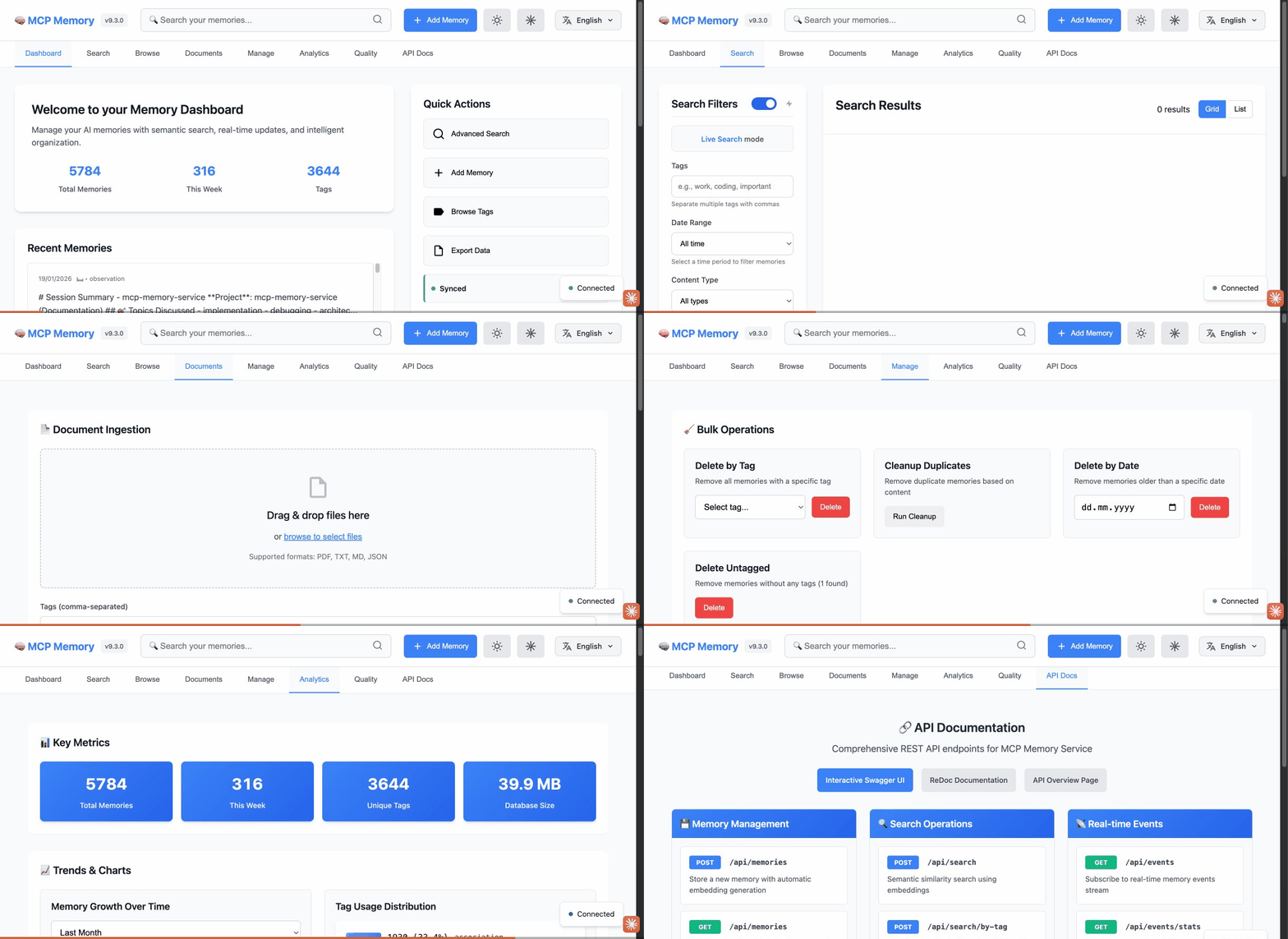
8 Dashboard Tabs: Dashboard • Search • Browse • Documents • Manage • Analytics • Quality (NEW) • API Docs
📖 See Web Dashboard Guide for complete documentation.
Latest Release: v10.38.3 (April 17, 2026)
fix: Server tab auto-check, list_memories total_pages, knowledge graph edge rendering
What's New:
- Server tab auto-check: Dashboard now auto-checks for updates on Server tab open and shows an accurate initial label before the first check completes. (PR #728)
list_memoriestotal_pages: REST APIlist_memoriesresponse now includestotal_pagesfield for correct pagination. (PR #731)- Knowledge graph edge rendering: Fixed invisible edges for non-canonical relationship types by providing fallback colors for undefined CSS variables. (PR #730)
- 1,547 Python tests passing.
Previous Releases:
- v10.38.2 - fix(windows): PS 7+ cert bypass, per-call SkipCertificateCheck, chicken-egg lib sourcing (PR #723)
- v10.38.1 - fix: OAuth loopback ports (RFC 8252), CLI ingestion NameError, SSE CLI flags, Docker CI bumps (PRs #697, #704, #705, #707-709)
- v10.38.0 - feat: opt-in Claude Code SessionEnd auto-harvest hook — safe-by-default, zero npm deps, 5s timeout, TLS opt-in (PR #711, 1,547 tests)
- v10.37.0 - feat:
POST /api/harvestHTTP endpoint for Session Harvest + CodeQL path-injection hardening (PR #710, 1,547 tests) - v10.36.8 - fix: event-loop blocking paths in
SqliteVecMemoryStorage.initialize()— pragma application and hash-embedding fallback now run in worker thread under_conn_lock(PR #700, 1,537 tests) - v10.36.7 - security: bump pygments to 2.20.0 (CVE-2026-4539/GHSA-5239-wwwm-4pmq) — ReDoS fix via rich transitive dep (PR #698, 1,537 tests)
- v10.36.6 - security: bump cryptography to 46.0.7 (CVE-2026-39892) — buffer overflow fix in non-contiguous buffer handling (PR #690, 1,537 tests)
- v10.36.5 - fix: Cloudflare Vectorize API v1 to v2 + test script fixes — fixed error 1010 "incorrect_api_version", content_hash arg, sys.path correction (PR #689, @mychaelgo, 1,537 tests)
- v10.36.4 - fix(windows): hotfix for Get-McpApiKey returning first char instead of full API key — PowerShell array-enumeration trap fixed (PR #687, 1,537 tests)
Full version history: CHANGELOG.md | Older versions (v10.36.3 and earlier) | All Releases
Migration to v9.0.0
⚡ TL;DR: No manual migration needed - upgrades happen automatically!
Breaking Changes:
- Memory Type Ontology: Legacy types auto-migrate to new taxonomy (task→observation, note→observation)
- Asymmetric Relationships: Directed edges only (no longer bidirectional)
Migration Process:
- Stop your MCP server
- Update to latest version (
git pullorpip install --upgrade mcp-memory-service) - Restart server - automatic migrations run on startup:
- Database schema migrations (009, 010)
- Memory type soft-validation (legacy types → observation)
- No tag migration needed (backward compatible)
Safety: Migrations are idempotent and safe to re-run
Breaking Changes
1. Memory Type Ontology
What Changed:
- Legacy memory types (task, note, standard) are deprecated
- New formal taxonomy: 5 base types (observation, decision, learning, error, pattern) with 21 subtypes
- Type validation now defaults to 'observation' for invalid types (soft validation)
Migration Process: ✅ Automatic - No manual action required!
When you restart the server with v9.0.0:
- Invalid memory types are automatically soft-validated to 'observation'
- Database schema updates run automatically
- Existing memories continue to work without modification
New Memory Types:
- observation: General observations, facts, and discoveries
- decision: Decisions and planning
- learning: Learnings and insights
- error: Errors and failures
- pattern: Patterns and trends
Backward Compatibility:
- Existing memories will be auto-migrated (task→observation, note→observation, standard→observation)
- Invalid types default to 'observation' (no errors thrown)
2. Asymmetric Relationships
What Changed:
- Asymmetric relationships (causes, fixes, supports, follows) now store only directed edges
- Symmetric relationships (related, contradicts) continue storing bidirectional edges
- Database migration (010) removes incorrect reverse edges
Migration Required: No action needed - database migration runs automatically on startup.
Code Changes Required: If your code expects bidirectional storage for asymmetric relationships:
# OLD (will no longer work):
# Asymmetric relationships were stored bidirectionally
result = storage.find_connected(memory_id, relationship_type="causes")

# NEW (correct approach):
# Use direction parameter for asymmetric relationships
result = storage.find_connected(
    memory_id,
    relationship_type="causes",
    direction="both"  # Explicit direction required for asymmetric types
)
Relationship Types:
- Asymmetric: causes, fixes, supports, follows (A→B ≠ B→A)
- Symmetric: related, contradicts (A↔B)
Retrieval Benchmarks
Three benchmarks measure retrieval quality (all-MiniLM-L6-v2, 384d embeddings, zero LLM API calls):
LongMemEval (500 questions, ~45–62 distractor sessions per question):
| Question Type | R@5 | R@10 | NDCG@10 | MRR | |---------------|-----|------|---------|-----| | Overall | 80.4% | 90.4% | 82.2% | 89.1% | | single-session-assistant | 100.0% | 100.0% | 99.3% | 99.1% | | knowledge-update | 84.6% | 96.8% | 86.2% | 95.5% | | single-session-user | 91.4% | 92.9% | 86.0% | 83.8% | | temporal-reasoning | 72.0% | 84.1% | 75.1% | 85.7% | | multi-session | 70.7% | 86.0% | 77.6% | 89.4% |
DevBench (practical developer workflow queries):
| Category | Recall@5 | MRR | |----------|----------|-----| | Overall | 91.1% | 0.861 | | exact | 100% | 1.000 | | semantic | 80.0% | 0.700 | | cross-type | 90.0% | 0.867 |
LoCoMo (ACL 2024 long-term conversational memory):
| Category | Recall@5 | MRR | |----------|----------|-----| | Overall | 49.7% | 0.414 | | multi-hop | 72.0% | 0.600 | | temporal | 33.5% | 0.274 |
Run benchmarks: python scripts/benchmarks/benchmark_longmemeval.py, python scripts/benchmarks/benchmark_devbench.py, python scripts/benchmarks/benchmark_locomo.py
Performance Improvements
- ontology validation: 97.5x faster (module-level caching)
- Type lookups: 35.9x faster (cached reverse maps)
- Tag validation: 47.3% faster (eliminated double parsing)
Testing
- 829/914 tests passing (90.7%)
- 80 new ontology tests with 100% backward compatibility
- All API/HTTP integration tests passing
Support
If you encounter issues during migration:
- Check Troubleshooting Guide
- Review CHANGELOG.md for detailed changes
- Open an issue: https://github.com/doobidoo/mcp-memory-service/issues
📚 Documentation & Resources
- Agent Integration Guides 🆕 – LangGraph, CrewAI, AutoGen, HTTP generic
- OpenCode Integration 🆕 – Local plugin for memory retrieval and context injection
- Remote MCP Setup (claude.ai) 🆕 – Browser integration via HTTPS + OAuth
- Setup Guide – Decision tree + step-by-step paths for all use cases
- Configuration Guide – Backend options and customization
- Architecture Overview – How it works under the hood
- Team Setup Guide – OAuth and cloud collaboration
- Knowledge Graph Dashboard 🆕 – Interactive graph visualization guide
- Troubleshooting – Common issues and solutions
- API Reference – Programmatic usage
- Wiki – Complete documentation
 – AI-powered documentation assistant
- MCP Starter Kit – Build your own MCP server using the patterns from this project
🤝 Contributing
We welcome contributions! See CONTRIBUTING.md for guidelines.
Quick Development Setup:
git clone https://github.com/doobidoo/mcp-memory-service.git
cd mcp-memory-service
pip install -e .  # Editable install
pytest tests/      # Run test suite