chrome-bookmarks-mcp
Chrome Bookmarks MCP
An MCP server that lets AI assistants read and manage your Google Chrome bookmarks on macOS, Windows, and Linux — search, organize, deduplicate, and restructure them with natural language.
Works with any local MCP host: Claude Desktop, ChatGPT (desktop app with MCP), and other agents or IDEs that support the Model Context Protocol.
No Chrome extension. The server edits Chrome's native Bookmarks JSON file directly.
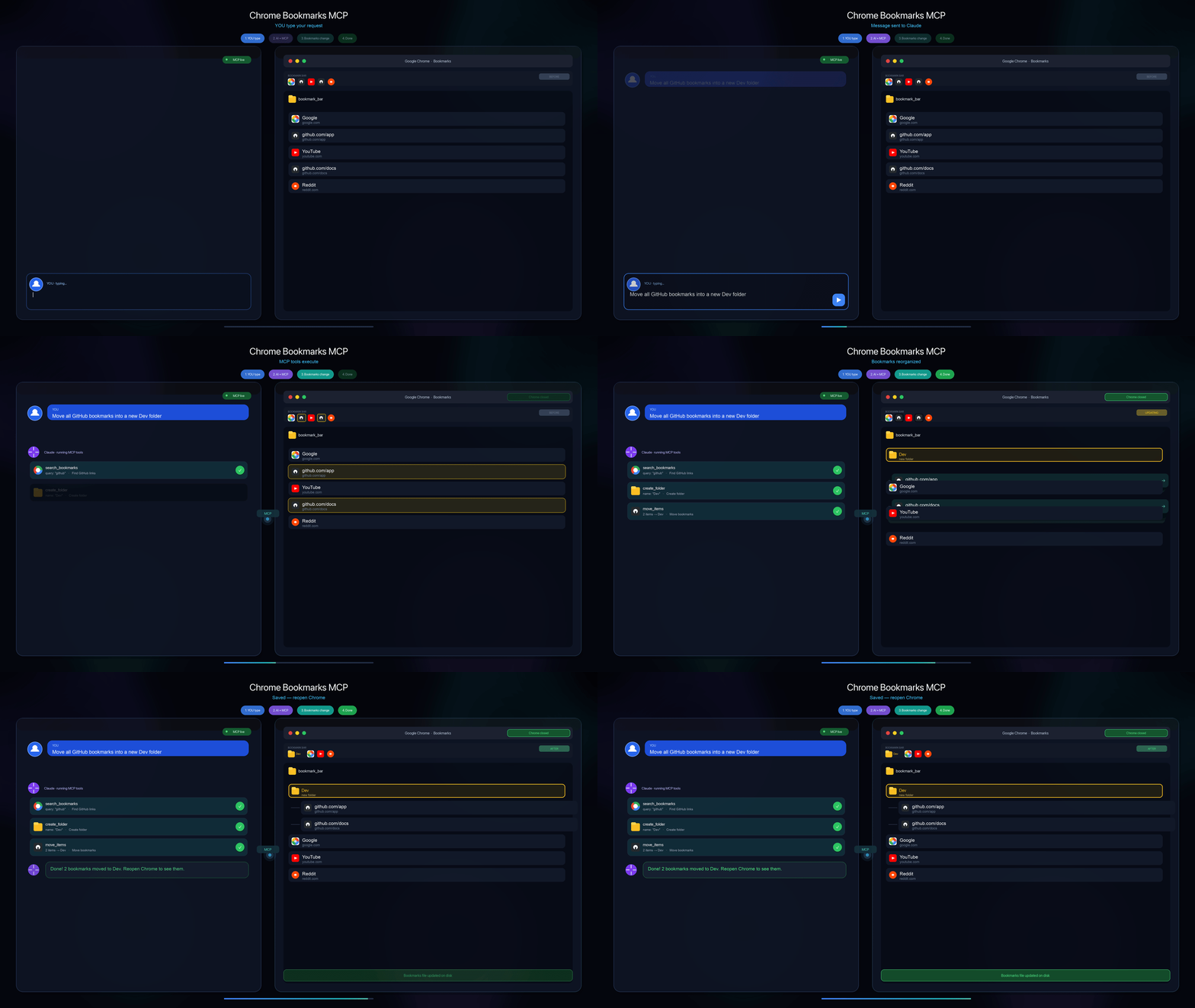
YOU type in chat → MCP tools run → bookmarks reorganize. Quit Chrome before writes.
Try asking
- "Show my bookmark tree"
- "Find duplicate URLs and list them"
- "Move all GitHub links into bookmark_bar/Dev"
- "Back up bookmarks, then sort Work folder by title"










Jump to: Quick start · Connect MCP · Tools
How it works
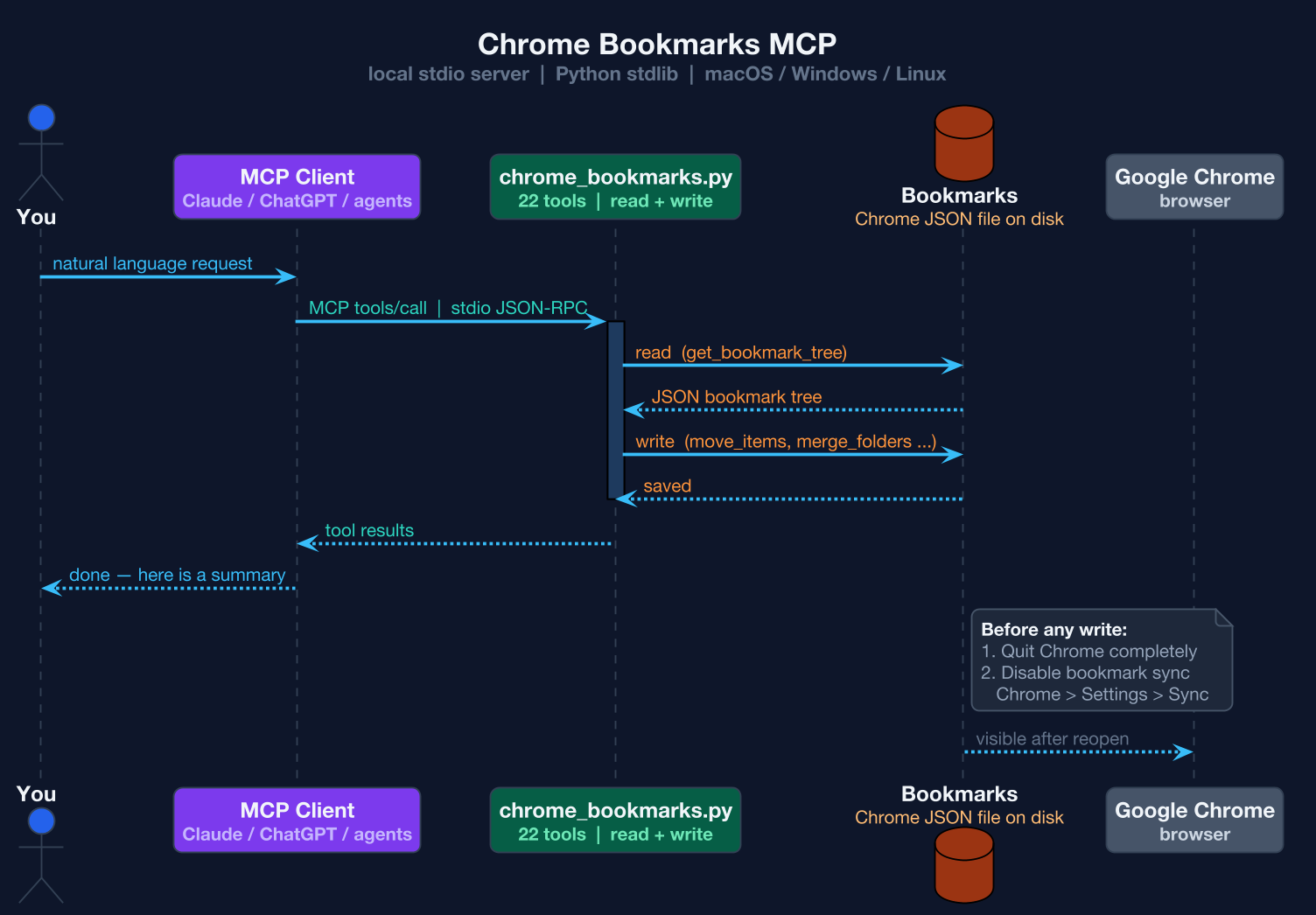
Typical flow
- You ask: "Find duplicate bookmarks and move GitHub links to a Dev folder"
- The client calls MCP tools (
get_bookmark_tree,find_duplicates,move_items, …) - The server updates the
Bookmarksfile on disk - You reopen Chrome — done
Requirements
- macOS, Windows, or Linux
- Python 3.10+ (stdlib only — no pip packages needed to run the server)
- Google Chrome with bookmarks stored locally
- An MCP-compatible client — e.g. Claude Desktop, ChatGPT desktop (with MCP/connectors), or another local agent that can launch stdio MCP servers
The server auto-detects your OS and locates the Chrome Bookmarks file. Override with CHROME_BOOKMARKS_PATH or CHROME_PROFILE if needed.
⚠️ Before writing: quit Chrome and disable bookmark sync
Close Chrome first
Quit Chrome completely before any write operation (add, move, delete, reorganize).
Chrome keeps bookmarks in memory while running. If the browser is open, it can overwrite file changes on exit and your edits will be lost.
Read-only tools (get_bookmark_tree, search_bookmarks, get_bookmark_stats, …) are safer while Chrome is open, but closing Chrome is still recommended for consistency.
Disable bookmark sync
Turn off Chrome bookmark sync — otherwise Google will pull older cloud bookmarks and undo your MCP changes.
Chrome → Settings → Sync and Google services
- Turn off Sync everything, or
- Keep sync on but disable Bookmarks only
On other devices (phone, laptop, work PC): turn off bookmark sync there too, or sign out of Chrome — otherwise another device may push older bookmarks to the cloud and undo your changes.
Do this before bulk edits. After MCP changes: quit Chrome, confirm the local Bookmarks file, then reopen.
Quick start
# Test the server starts (it waits on stdin)
python3 chrome_bookmarks.py
# Ctrl+C to stop
Connect via MCP
This is a stdio MCP server — no cloud hosting. Your chat app or local agent spawns chrome_bookmarks.py on your machine and talks to it over MCP.
Use the same server entry everywhere:
{
  "mcpServers": {
    "chrome-bookmarks": {
      "command": "python3",
      "args": ["/FULL/PATH/TO/chrome_bookmarks.py"]
    }
  }
}
Replace the path with your actual location. OS and Bookmarks path are detected automatically when the server starts.
Supported clients (examples)
| Client | How to add |
|--------|------------|
| Claude Desktop | Config file (see below) → restart app |
| ChatGPT | Desktop app → Settings → MCP / Connectors → add local server with the same command + args |
| Other local agents | Any tool with MCP support — point it at python3 + chrome_bookmarks.py |
Raw LLM APIs (Anthropic Messages, OpenAI Chat Completions, etc.) do not run MCP by themselves — you need a client that hosts MCP tools locally.
Claude Desktop
Config path:
| OS | File |
|----|------|
| macOS | ~/Library/Application Support/Claude/claude_desktop_config.json |
| Windows | %APPDATA%\Claude\claude_desktop_config.json |
| Linux | ~/.config/Claude/claude_desktop_config.json |
Add the JSON block above, restart Claude Desktop — tools appear in chat.
ChatGPT
In the ChatGPT desktop app, open MCP / connector settings and register a local server using the same python3 command and path to chrome_bookmarks.py. Exact menu names may vary by version; look for MCP or Connectors in Settings.
Tips
- Ask in natural language: "Back up my bookmarks, show the tree, then sort Work folder by title"
- The server exposes
create_backup/restore_backup— request a backup before big changes - Folder paths use Chrome root keys:
bookmark_bar,other,synced, or nested paths likebookmark_bar/Work/Projects
Custom integrations (API / SDK)
If you build your own app instead of a chat client:
| Goal | Setup |
|------|--------|
| Chat UI + bookmarks | Claude Desktop, ChatGPT (MCP), or another MCP client |
| Your own code | MCP Python SDK — spawn chrome_bookmarks.py, wire tool results into your API loop |
Available tools (22)
| Read | Write | Organize |
|------|-------|----------|
| get_bookmark_tree | add_bookmark | move_items |
| get_all_bookmarks | add_bookmarks_batch | merge_folders |
| search_bookmarks | rename_bookmark | sort_folder |
| get_bookmark_stats | update_bookmark | reorganize_all |
| find_duplicates | delete_items | create_backup |
| | create_folder | restore_backup |
| | delete_folder | |
| | rename_folder | |
| | clear_folder | |
Bookmarks file location
Detected automatically per OS (profile Default):
| OS | Path |
|----|------|
| macOS | ~/Library/Application Support/Google/Chrome/Default/Bookmarks |
| Windows | %LOCALAPPDATA%\Google\Chrome\User Data\Default\Bookmarks |
| Linux | ~/.config/google-chrome/Default/Bookmarks (or Chromium / Flatpak) |
Backups are saved next to the file as Bookmarks_backup_YYYYMMDD_HHMMSS.
Override: set CHROME_BOOKMARKS_PATH to a full path, or CHROME_PROFILE (e.g. Profile 1) to switch profile.
Stats & community


Star History
License
MIT — see LICENSE.