WhatsApp MCP server
WhatsApp MCP
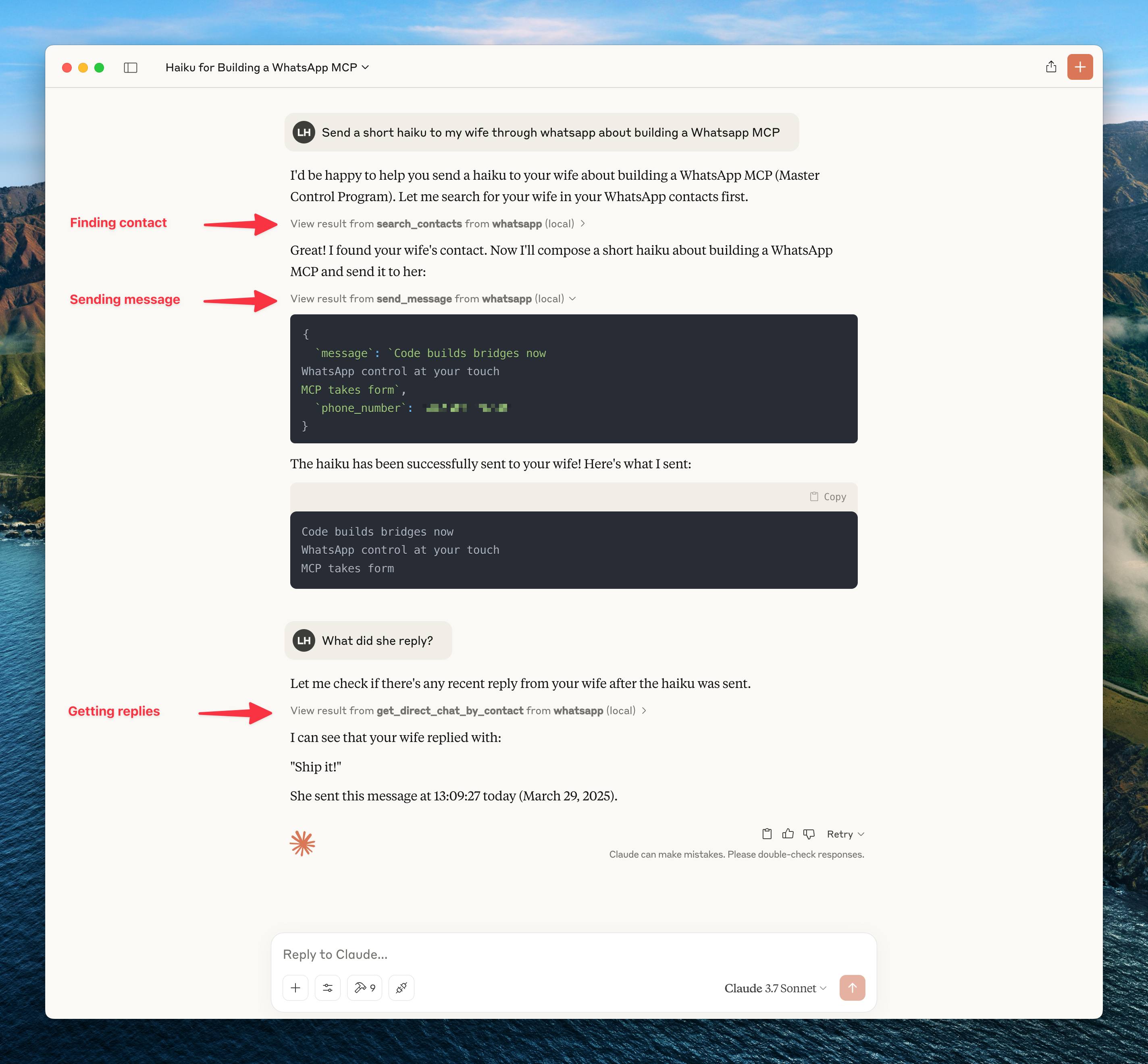
MCP server for WhatsApp that connects to your personal WhatsApp account via the WhatsApp Web multi-device API (using the whatsmeow library). Single Go binary — no Python or separate bridge process needed. All messages are stored locally in SQLite and only sent to the LLM when accessed through tools.
Installation
Option A — Install script (macOS / Linux, no Go required)
curl -fsSL https://raw.githubusercontent.com/ihiteshgupta/whatsapp-mcp/main/install.sh | sh
Installs the whatsapp-mcp binary to /usr/local/bin.
Option B — Homebrew (macOS / Linux)
brew install ihiteshgupta/tap/whatsapp-mcp
Requires the Homebrew tap to be set up. See ihiteshgupta/homebrew-tap.
Option C — go install (Go users)
go install github.com/ihiteshgupta/whatsapp-mcp/whatsapp-bridge-v2/cmd/whatsapp-mcp@latest
Option D — Build from source
git clone https://github.com/ihiteshgupta/whatsapp-mcp.git
cd whatsapp-mcp/whatsapp-bridge-v2
go build -o whatsapp-mcp ./cmd/whatsapp-mcp
Windows: CGO is required for SQLite. Install MSYS2, add
ucrt64\binto PATH, then rungo env -w CGO_ENABLED=1before building.
Configure your MCP client
Claude Desktop / Claude Code
Add to your Claude config:
- Claude Desktop:
~/Library/Application Support/Claude/claude_desktop_config.json - Claude Code:
~/.claude.json
{
  "mcpServers": {
    "whatsapp": {
      "command": "/usr/local/bin/whatsapp-mcp",
      "args": []
    }
  }
}
Replace
/usr/local/bin/whatsapp-mcpwith the actual path if you built from source (e.g./path/to/whatsapp-mcp/whatsapp-bridge-v2/whatsapp-mcp).
Cursor
Add to ~/.cursor/mcp.json:
{
  "mcpServers": {
    "whatsapp": {
      "command": "/usr/local/bin/whatsapp-mcp",
      "args": []
    }
  }
}
3. Authenticate
- Start your MCP client (Claude Desktop, Claude Code, or Cursor)
- A QR code will appear in the terminal and be saved to
~/.whatsapp-mcp/qrcode.png - Scan with WhatsApp on your phone (Settings → Linked Devices → Link a Device)
- Wait for history sync to complete
- Session persists in
~/.whatsapp-mcp/whatsapp.db— re-authentication needed every ~20 days
Data Storage
All data is stored locally in ~/.whatsapp-mcp/ (no config file needed):
~/.whatsapp-mcp/whatsapp.db— WhatsApp session (whatsmeow)~/.whatsapp-mcp/messages.db— Messages, chats, contacts, groups~/.whatsapp-mcp/qrcode.png— QR code image (created on first launch)
MCP Tools (55 total)
Messaging (8)
| Tool | Description |
| --- | --- |
| send_message | Send text message |
| reply_to_message | Reply to a specific message |
| forward_message | Forward a message |
| edit_message | Edit a sent message |
| delete_message | Delete a message |
| react_to_message | Add emoji reaction |
| star_message | Star a message |
| unstar_message | Unstar a message |
Chats (11)
| Tool | Description |
| --- | --- |
| list_chats | List all chats |
| get_chat | Get chat details |
| list_messages | Get messages from a chat |
| archive_chat | Archive a chat |
| unarchive_chat | Unarchive a chat |
| pin_chat | Pin a chat |
| unpin_chat | Unpin a chat |
| mute_chat | Mute chat notifications |
| unmute_chat | Unmute a chat |
| mark_chat_read | Mark chat as read |
| delete_chat | Delete a chat |
Contacts (6)
| Tool | Description |
| --- | --- |
| search_contacts | Search contacts |
| get_contact | Get contact details |
| block_contact | Block a contact |
| unblock_contact | Unblock a contact |
| get_blocked_contacts | List blocked contacts |
| check_phone_registered | Check if a phone number is registered |
Groups (13)
| Tool | Description |
| --- | --- |
| create_group | Create a new group |
| get_group_info | Get group info |
| leave_group | Leave a group |
| add_group_members | Add members |
| remove_group_members | Remove members |
| promote_admin | Promote to admin |
| demote_admin | Demote from admin |
| set_group_name | Change group name |
| set_group_topic | Change group topic |
| set_group_photo | Change group photo |
| get_invite_link | Get invite link |
| revoke_invite_link | Revoke invite link |
| join_via_invite | Join via invite link |
Media (7)
| Tool | Description |
| --- | --- |
| send_image | Send an image |
| send_video | Send a video |
| send_audio | Send audio/voice message |
| send_document | Send a document |
| send_location | Send a location |
| send_contact_card | Send a contact card |
| download_media | Download media from a message |
Presence (5)
| Tool | Description |
| --- | --- |
| subscribe_presence | Subscribe to presence updates |
| send_typing | Send typing indicator |
| send_recording | Send recording indicator |
| set_online | Set presence online |
| set_offline | Set presence offline |
Status (4)
| Tool | Description |
| --- | --- |
| post_text_status | Post text status |
| post_image_status | Post image status |
| get_status_updates | Get status updates |
| delete_status | Delete status |
Bridge (2)
| Tool | Description |
| --- | --- |
| get_bridge_status | Get health status |
| get_connection_history | Get connection history |
Troubleshooting
- QR Code not appearing: Check stderr output, or open
~/.whatsapp-mcp/qrcode.png - Session expired: Delete
~/.whatsapp-mcp/whatsapp.dband restart to re-authenticate - Out of sync: Delete both
~/.whatsapp-mcp/*.dbfiles and restart - Windows CGO error (
Binary was compiled with 'CGO_ENABLED=0'): Install MSYS2, adducrt64\binto PATH, rungo env -w CGO_ENABLED=1 - Device limit reached: Remove a device in WhatsApp → Settings → Linked Devices
Security Note
As with all MCP servers, be aware of prompt injection risks. This server can read your WhatsApp messages and send messages on your behalf — only connect trusted AI clients.
Development
cd whatsapp-bridge-v2
go test ./...
go build ./...
License
MIT