MCP server by JosefKuchar
Leap Year MCP Server
This project implements a simple MCP server in Rust for determining if a given year is a leap year according to the rules defined below.
Running the server
Docker
The most straightforward way to run the server is using Docker. You can build the image and run the container with the following command:
docker compose up --build -d
Local
The other option is to run the server locally. You need to have Rust installed on your machine. You can then build and run the server with the following command:
cargo run --release
or you can build the server first and then run it:
cargo build --release
./target/release/leap-year
Server configuration
By default, the server binds to [::]:8080, which means it listens on all available interfaces on port 8080. You can change this by providing a different address and port using the --bind option (see cargo run -- --help for more details).
In order to change the port inside the Docker container, you can modify the docker-compose.yml file to map a different host port to the container's port 8080.
Client configuration
You can interact with the server using any MCP client. The server expects requests to be sent to the /mcp endpoint.
Testing
This project includes unit tests for the leap year logic. You can run the tests with the following command:
cargo test
The tests are also run automatically in the CI pipeline defined in .gitlab-ci.yml.
Credits
Rust MCP SDK - examples and boilerplate code
Assignment
Leap Years
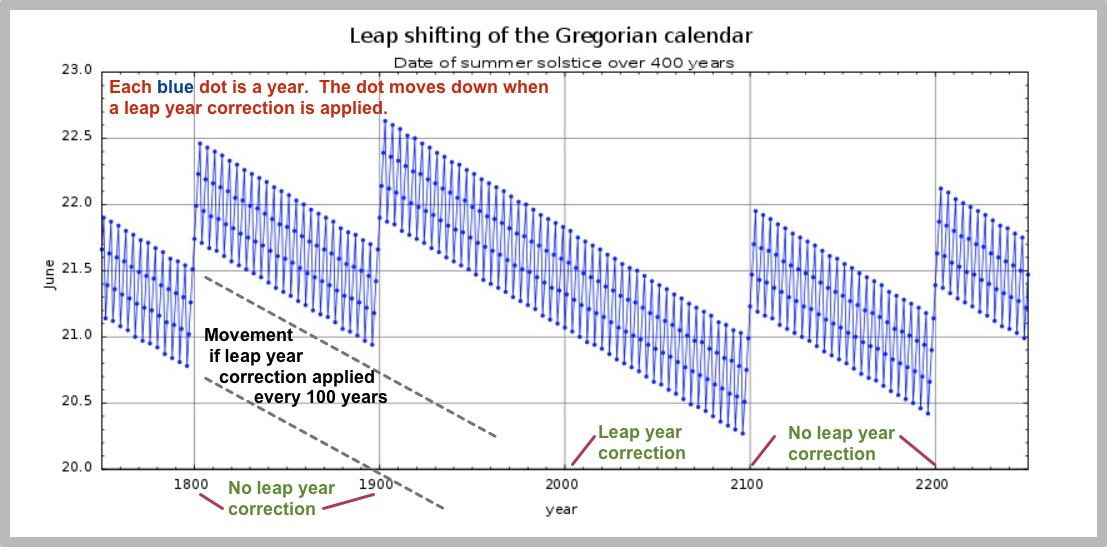
Prior to 1582, the Julian Calendar was in wide use and defined leap years as every year divisible by 4. However, it was found in the late 16th century that the calendar year had drifted from the solar year by approximately 10 days.
The Gregorian Calendar was defined in order to thin out the number of leap years in order to more closely align the calendar year with the solar year. It was adopted in Papal countries on October 15, 1582, skipping 10 days from the Julian Calendar date. Protestant countries adopted it after some time.
The following diagram shows visually how both calendars work in practice.
User Story
As a user, I want to know if a year is a leap year, so that I can plan for an extra day on February 29th during those years.
Acceptance Criteria
- All years divisible by
400ARE leap years (so, for example,2000was indeed a leap year as well as1600), - All years divisible by
100but not by400are NOT leap years (so, for example,1700,1800, and1900were NOT leap years, NOR will2100be a leap year), - All years divisible by
4but not by100ARE leap years (e.g.,1976,1996,2004), - All years not divisible by
4are NOT leap years (e.g.2011,2013,2014). - All years below
1582divisible by4ARE leap years (e.g.1300,1400,1492,1500,1580)