MCP server for AI 3D model generation with multiple providers (Tripo3D, Meshy). Text-to-3D and Image-to-3D.
mcp-3d-gen
Multi-provider AI 3D model generation MCP server, focused on free-tier models.
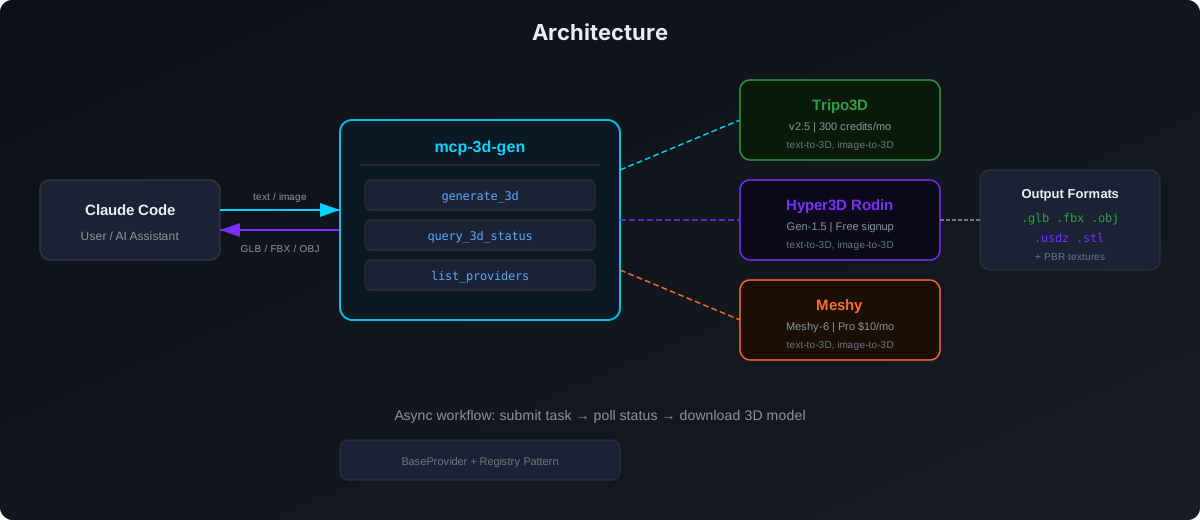
Architecture
Supported Providers
| Provider | Model | Free Tier | Output Formats | |---|---|---|---| | Tripo3D | v2.5 | 300 credits/month (~10 models) | GLB/FBX/OBJ | | Hyper3D Rodin | Rodin Gen-1.5 | Free credits on signup (~10 models) | GLB/FBX/OBJ/USDZ/STL | | Meshy | Meshy-6 | API requires Pro ($10/mo, 1000 credits) | GLB/FBX/OBJ/USDZ |
Installation
Claude Code (Global)
claude mcp add -s user mcp-3d-gen \
  --env TRIPO_API_KEY=your_key \
  --env HYPER3D_API_KEY=your_key \
  --env MESHY_API_KEY=your_key \
  -- uv --directory /path/to/mcp-3d-gen run model-gen
Only configure the providers you want to use. At least one API key is required.
API Key Registration Guide
1. Tripo3D — 300 Credits/Month Free (Studio)
| Item | Detail |
|---|---|
| Platform | Tripo3D |
| Website | https://www.tripo3d.ai |
| API Platform | https://platform.tripo3d.ai |
| Free Tier | Basic plan: 300 credits/month (~10 models), 1 concurrent task |
| Env Var | TRIPO_API_KEY |
Steps:
- Visit https://www.tripo3d.ai and click Sign Up (supports Email or Google)
- After login, go to the API Platform: https://platform.tripo3d.ai
- Navigate to API Keys page: https://platform.tripo3d.ai/api-keys
- Click Create API Key to generate a new key
- Copy the key (format:
tsk_xxxxxxxxxxxxxxxx)
Pricing: Basic plan is free with 300 credits/month. Text-to-3D costs ~30 credits/model. Free outputs are public (CC BY 4.0). Paid plans: Professional ($11.94/month, 3,000 credits), Advanced ($29.94/month, 8,000 credits).
Note: API access requires a separate API Platform account at platform.tripo3d.ai. The Studio (web UI) and API Platform share the same login but have separate credit pools.
2. Meshy — 100 Credits/Month Free (API requires Pro)
| Item | Detail |
|---|---|
| Platform | Meshy |
| Website | https://www.meshy.ai |
| API Settings | https://www.meshy.ai/settings/api |
| Free Tier | Free plan: 100 credits/month, but API access starts from Pro ($10/month) |
| Env Var | MESHY_API_KEY |
Steps:
- Visit https://www.meshy.ai and click Sign Up (supports Email, Google, Apple)
- After login, go to Settings > API: https://www.meshy.ai/settings/api
- Click Create API Key to generate a new key
- Copy the key (format:
msy_xxxxxxxxxxxxxxxx) - If on free plan, you can use the test mode key
msy_dummy_api_key_for_test_mode_12345678to explore endpoints (no credits consumed, returns test data)
Pricing: Free plan has 100 credits/month but no API access (web UI only). Pro plan ($10/month or $20/month) unlocks API with 1,000 credits. Text-to-3D costs 5-20 credits/model. Studio ($48-60/month) has 4,000 credits.
Important: API & plugin access is a Pro+ feature. Free users can only generate via the web UI. Consider starting with Tripo3D if you want free API access.
3. Hyper3D Rodin — Free Credits on Signup
| Item | Detail |
|---|---|
| Platform | Hyper3D |
| Website | https://hyper3d.ai |
| API Docs | https://developer.hyper3d.ai |
| Free Tier | Free credits on signup (~10 models, 0.5 credits/model) |
| Env Var | HYPER3D_API_KEY |
Steps:
- Visit https://hyper3d.ai and click Sign Up (supports Email or Google)
- After login, go to Subscribe page: https://hyper3d.ai/subscribe
- Navigate to API Keys section in your account settings
- Create a new API key and copy it
Pricing: Each generation costs 0.5 credits (Regular tier). Free signup credits give you ~10 models. Paid plans: Education ($15/month, 30 credits), Creator ($20-30/month, 30 credits with discounts). HighPack addon (4K textures) costs +1 credit.
Formats: Supports GLB, FBX, OBJ, USDZ, and STL output. PBR materials with base color, metallic, normal, and roughness maps.
Environment Variables
| Variable | Provider | Required |
|---|---|---|
| TRIPO_API_KEY | Tripo3D | At least one |
| HYPER3D_API_KEY | Hyper3D Rodin | provider must |
| MESHY_API_KEY | Meshy | be configured |
| MODEL_OUTPUT_DIR | Output path | Optional, default: ./output |
Tools
- generate_3d — Generate a 3D model from text or image. Params:
prompt,image_url(optional, for image-to-3D),provider,output_format. - query_3d_status — Check generation status and download the result.
- list_providers — Show all available providers and their free tier info.
Architecture
src/model_gen/
├── __init__.py
├── server.py              # MCP server + tool definitions
└── providers/
    ├── __init__.py        # BaseProvider + registry
    ├── tripo.py           # Tripo3D
    ├── hyper3d.py         # Hyper3D Rodin
    └── meshy.py           # Meshy
Adding a New Provider
- Create a new file under
src/model_gen/providers/ - Implement the
BaseProviderabstract class withgenerate()andquery()methods - Register it in
server.py:_init_providers()with an env var check
Related Projects
- mcp-video-gen — AI video, speech & music generation MCP server
- mcp-image-gen — AI image generation MCP server
License
MIT