MCP server by kongyo2
mcp-kanri




mcp-kanri is a Windows 11 desktop app for managing MCP (Model Context Protocol)
server configurations. From a single MCP registration, it generates and lets
you copy CLI commands for Claude Code / Codex / Gemini / Qwen, the
mcpServers JSON used by Claude Desktop / Cursor / VS Code / Google
Antigravity / Cline, and the config.toml snippet used by Codex — all with
one click.
The UI is fully bilingual (日本語 / English) and the language can be switched at any time from the sidebar footer. The initial language is detected from the operating system locale.
日本語
Windows 11 向けの MCP (Model Context Protocol) 設定管理デスクトップアプリです。
1 つの MCP サーバ登録から Claude Code / Codex / Gemini / Qwen といった各 CLI
コマンドや、Claude Desktop / Cursor / VS Code / Google Antigravity / Cline 用の
mcpServers JSON、Codex の config.toml までワンクリックで生成・コピー
できます。
UI は日本語と英語に対応しており、サイドバー下部から切り替えられます。 初回起動時は OS のロケールから自動判定します。
スクリーンショット
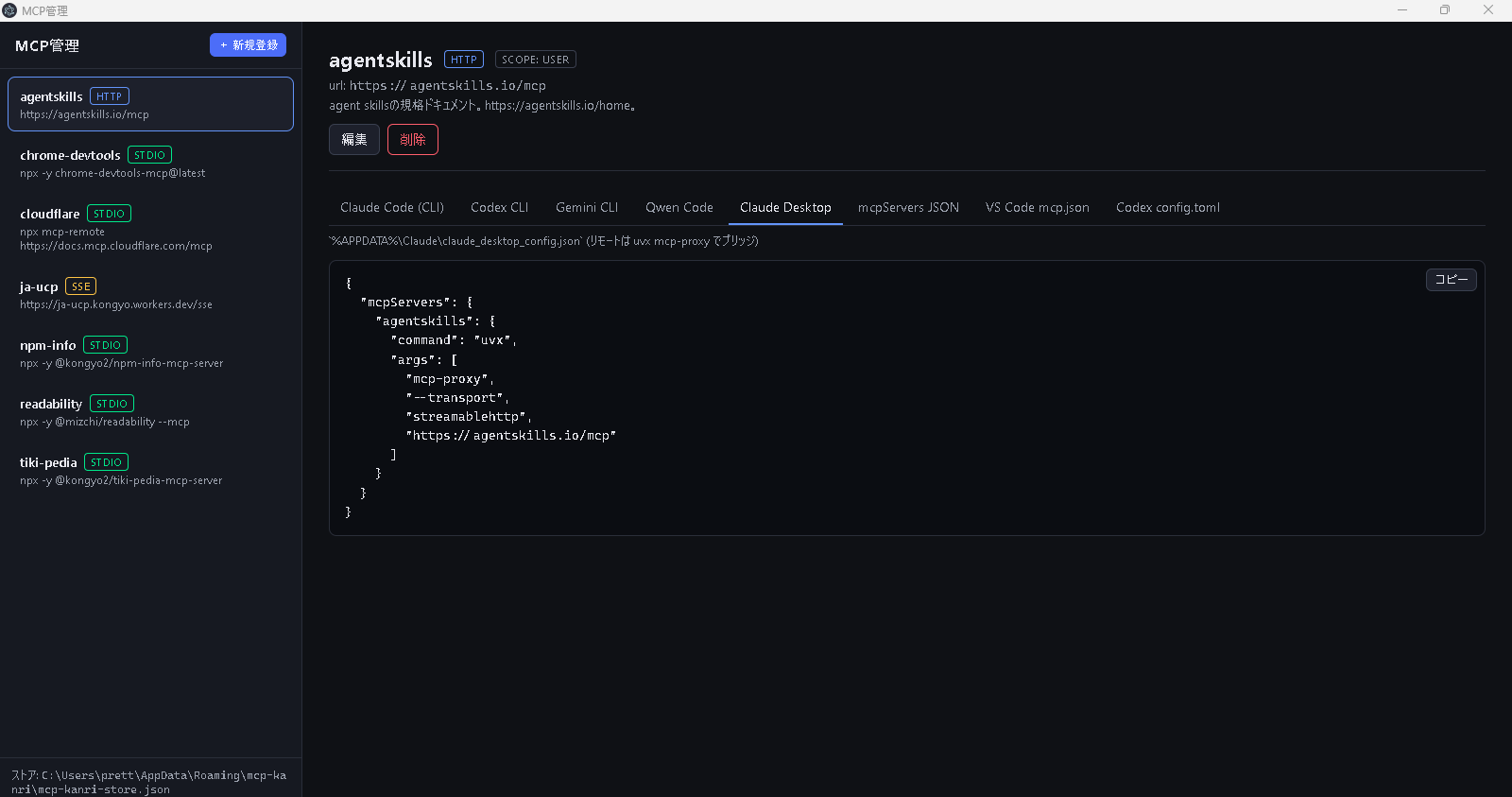
Claude Desktop 用 claude_desktop_config.json をワンクリックで生成
リモート (HTTP / SSE) の MCP サーバは Claude Desktop 本体が直接対応していないため、
uvx mcp-proxy で stdio に橋渡しする形に自動変換します。
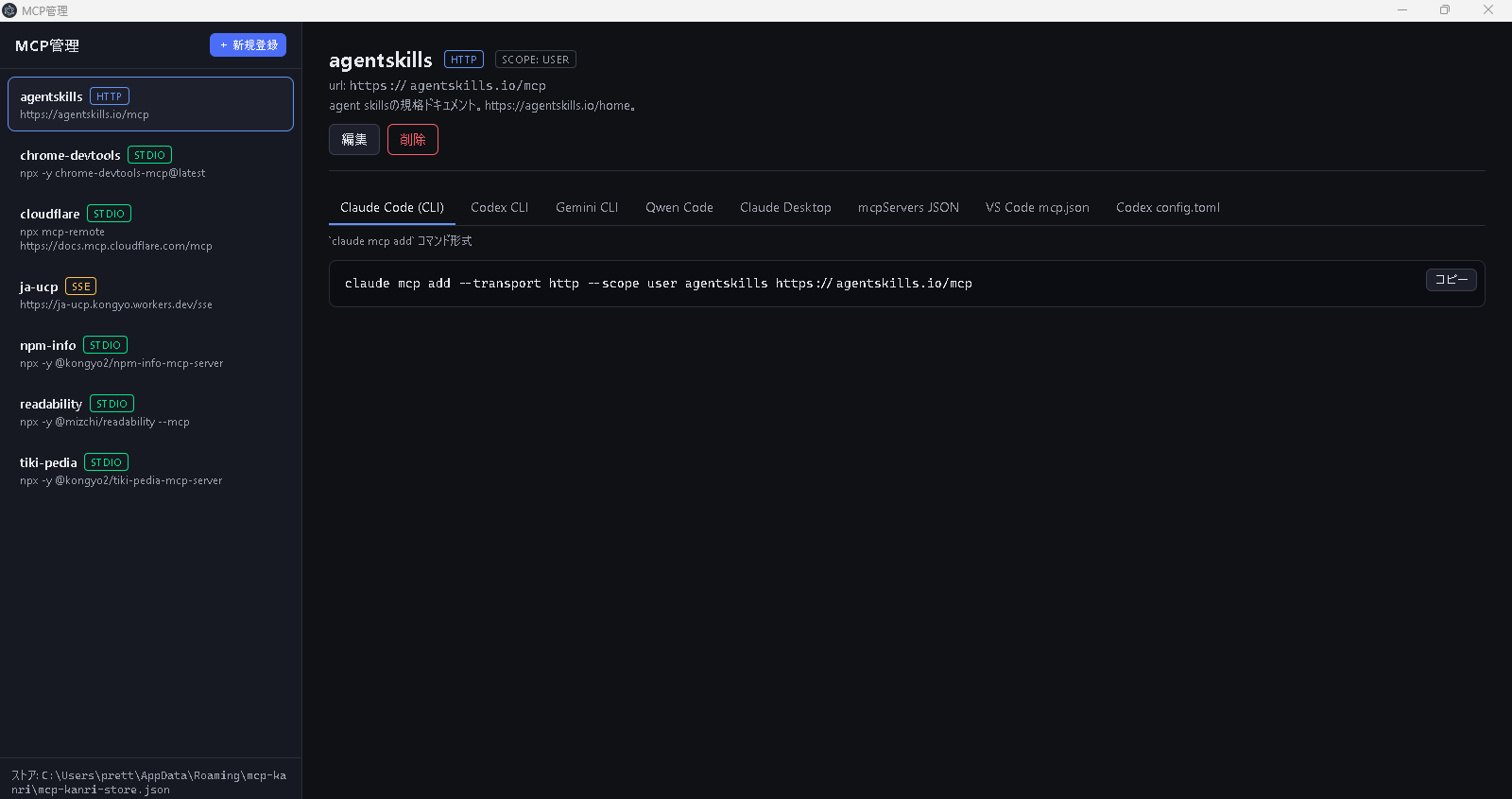
Claude Code (CLI) の claude mcp add コマンドも同じ登録から生成
タブを切り替えるだけで、同じ MCP サーバ定義を別フォーマットへ瞬時に変換します。
主な機能
- MCP サーバ登録の一元管理: stdio / Streamable HTTP / SSE の 3 トランスポート
に対応。
command+args+env、またはurl+headersをフォームで編集 できます。 - 10 種類の出力フォーマットを自動生成: 1 つの登録から下記の貼り付け先を
すべて出力します。
Claude Code (CLI)—claude mcp add ...コマンドCodex CLI—codex mcp add ...コマンドGemini CLI—gemini mcp add ...コマンドQwen Code—qwen mcp add ...コマンドClaude Desktop—%APPDATA%\Claude\claude_desktop_config.jsonmcpServers JSON— Cursor / Windsurf などの共通形式VS Code mcp.json— トップレベルキーがserversの VS Code 形式Codex config.toml—~/.codex/config.toml用の TOML 抜粋Antigravity mcp_config.json— Google Antigravity Editor 用~/.gemini/antigravity/mcp_config.json(リモートはurlではなくserverUrlキー)Cline (cline_mcp_settings.json)— VS Code 拡張saoudrizwan.claude-devのcline_mcp_settings.json用 JSON (Streamable HTTP のtypeは"streamableHttp"で"http"ではない)
- クライアント差分の自動吸収: クライアントごとの仕様差をアプリ側で
解決します。例:
- Claude Desktop は本体が stdio のみ対応のため、リモートサーバは
uvx mcp-proxyで stdio に変換します。Streamable HTTP の場合は--transport streamablehttpを明示し、複数ヘッダは--headers K Vを 繰り返す形式で正しく出力します。 - Codex CLI は SSE をネイティブ未対応のため、
npx -y mcp-remoteで stdio に橋渡しした形式で出力。 - Gemini CLI / Qwen Code は
--セパレータが必要なケースを正しく挿入。 Authorization: Bearer ${ENV_VAR}形式のヘッダは Codex のbearer_token_env_var/--bearer-token-env-varに自動変換。- Google Antigravity はリモート URL のキー名が
serverUrl(camelCase) で他のクライアントと異なるため、自動で書き換えます。SSE はネイティブ 未対応なのでnpx -y mcp-remoteで stdio に橋渡しします (https://antigravity.google/docs/mcp)。 - Cline は Streamable HTTP の
typeリテラルが"streamableHttp"(camelCase) で、Cursor / VS Code / Claude の"http"とは異なるため、 自動で書き換えます (clinesrc/services/mcp/schemas.ts参照)。 保存先は VS Code globalStorage のsaoudrizwan.claude-dev/settings/cline_mcp_settings.jsonです。
- Claude Desktop は本体が stdio のみ対応のため、リモートサーバは
- スコープ対応:
local/project/userを切り替えて出力。各 CLI の 仕様に合わせて自動で正規化します (Gemini / Qwen はlocalをprojectに 丸めるなど)。 - 安全なシェルクオート: 値に空白や特殊文字を含む場合のみ
'...'で くるみ、POSIX シェルにそのまま貼って動く形式で出力します。 - ワンクリックコピー: 生成結果はコピー ボタン 1 つで貼り付けられます。
- 永続化: 登録は
%APPDATA%\mcp-kanri\mcp-kanri-store.jsonに バージョニング付き JSON で保存されます。 - 多言語対応 (日本語 / English): サイドバー下部のスイッチで言語を切り替え
られます。選択は
localStorageに保存され、main プロセス側のエラーメッセージ も同じ言語で返ります。
English
mcp-kanri is a Windows 11 desktop app for managing MCP (Model Context Protocol)
configurations. From a single MCP server registration, it generates and copies
the CLI commands for Claude Code / Codex / Gemini / Qwen, the mcpServers JSON
for Claude Desktop / Cursor / VS Code / Google Antigravity / Cline, and the
config.toml snippet for Codex, all with a single click.
Screenshots
Generate claude_desktop_config.json for Claude Desktop with one click
Claude Desktop itself does not support remote (HTTP / SSE) MCP servers
directly, so remote servers are automatically rewritten to a stdio command
that bridges through uvx mcp-proxy.
Generate the claude mcp add command for Claude Code (CLI) from the same registration
Switching tabs is enough to convert the same MCP server definition into another format on the fly.
Highlights
- Centralised MCP server registry: supports the three transports
(
stdio/ Streamable HTTP / SSE). Editcommand+args+env, orurl+headers, from a form. - Ten output formats generated automatically: a single registration is
rendered into all of the following:
Claude Code (CLI)—claude mcp add ...commandCodex CLI—codex mcp add ...commandGemini CLI—gemini mcp add ...commandQwen Code—qwen mcp add ...commandClaude Desktop—%APPDATA%\Claude\claude_desktop_config.jsonmcpServers JSON— common form for Cursor / Windsurf, etc.VS Code mcp.json— VS Code form whose top-level key isserversCodex config.toml— TOML excerpt for~/.codex/config.tomlAntigravity mcp_config.json— Google Antigravity Editor's~/.gemini/antigravity/mcp_config.json(remote uses theserverUrlkey, noturl)Cline (cline_mcp_settings.json)— JSON for the VS Code extensionsaoudrizwan.claude-dev. Its Streamable HTTPtypeliteral is"streamableHttp", not"http".
- Per-client quirks handled for you:
- Because Claude Desktop only speaks stdio natively, remote servers are
rewritten via
uvx mcp-proxy. For Streamable HTTP sources we emit--transport streamablehttpexplicitly and repeat--headers K Vonce per header. - Because Codex CLI does not support SSE natively, SSE servers are bridged
to stdio via
npx -y mcp-remote. - For Gemini CLI / Qwen Code, the
--separator is inserted whenever the server-side args could collide with known flags. Authorization: Bearer ${ENV_VAR}headers are converted to Codex'sbearer_token_env_var/--bearer-token-env-varautomatically.- Google Antigravity uses
serverUrl(camelCase) for remote URLs, which differs from every other client; the converter rewrites the key automatically. SSE is not supported natively, so SSE entries are bridged to stdio vianpx -y mcp-remote(https://antigravity.google/docs/mcp). - Cline's Streamable HTTP
typeliteral is"streamableHttp"(camelCase), not"http"like Cursor / VS Code / Claude. The converter rewrites it automatically (see clinesrc/services/mcp/schemas.ts). The settings file lives in the VS Code globalStorage atsaoudrizwan.claude-dev/settings/cline_mcp_settings.json.
- Because Claude Desktop only speaks stdio natively, remote servers are
rewritten via
- Scope aware: emits
local/project/user, normalised to each CLI's accepted values (e.g. Gemini / Qwen collapselocaltoproject). - Safe shell quoting: values are single-quoted only when they contain whitespace or special characters, so the output can be pasted into any POSIX shell as-is.
- One-click copy: every generated block has a copy button.
- Persistent storage: registrations live in
%APPDATA%\mcp-kanri\mcp-kanri-store.jsonas versioned JSON. - Bilingual UI (日本語 / English): switch languages from the sidebar
footer. The choice is persisted in
localStorageand the main process honours it for error messages too.
License
MIT