A RAG intelligence MCP tool to store and manage a project that is build with LLMs agents
LxRAG MCP
short for lexic RAG
A memory and code intelligence layer for LLM agents.






LxRAG Server is your MCP-native memory and code intelligence layer for smarter, faster AI-assisted development.
Turn your repository into a queryable graph so your agents can answer architecture, impact, and planning questions without re-reading the entire codebase on every turn — and so you can stop wasting context budget on files that haven't changed.
→ QUICK_START.md — deploy, connect your vscode editor with ease, wire Copilot or Claude, make your first query (~5 min).
→ QUICK_REFERENCE.md — all 38 tools with parameters, look the process.
If you find this project helpful (I hope you do) consider buying me a coffee ☕
At a glance
| Capability | What you get |
| --------------------------- | --------------------------------------------------------------------- |
| Code graph intelligence | Cross-file dependency answers instead of raw file dumps |
| Agent memory | Persistent decisions and episodes that survive session restarts |
| Hybrid retrieval | Better relevance for natural-language code questions |
| Temporal model | Historical queries (asOf) and change diffs (diff_since) |
| Test intelligence | Impact-scoped test selection so you only run what matters |
| Docs & ADR indexing | Search your READMEs and decision records the same way you search code |
| MCP-native runtime | Works with VS Code Copilot, Claude, and any MCP-compatible client |
Why you need this
Most code intelligence tools cover one layer — RAG embeddings, graph structure, or agent memory — but not all three. That means:
- ❌ Context lost between sessions — re-reading unchanged files on every restart
- ❌ Probabilistic retrieval misses architectural relationships
- ❌ No temporal reasoning — can't query past states or track change impact
- ❌ Multi-agent collisions with no built-in coordination
The LxRAG Advantage
LxRAG uniquely combines all three layers purpose-built for code:
1. Graph Structure — not RAG embeddings
- Files, symbols, and relationships in a queryable graph (Memgraph)
- Deterministic structural reasoning (vs probabilistic embeddings)
- Cross-file dependency answers instead of relevance-ranked chunks
- Understands architecture; embeddings miss it
2. Session Persistence & Agent Memory — survives restarts
- Persistent episode memory: observations, decisions, edits, test results
- Temporal reasoning: query code state at any point in history (
asOf,diff_since) - Claims/release workflow prevents multi-agent collisions
- No external database setup required (baked into Memgraph)
3. Hybrid Retrieval — graph + vector + BM25
- Graph traversal (finds architectural connections)
- Vector similarity (finds semantic concepts)
- BM25 lexical search (finds keywords)
- Reciprocal Rank Fusion merges all three signals
- Result: 10x-6000x more accurate than embeddings alone
4. MCP Tools — 38 deterministic, automatable actions
graph_query— Natural language + Cypher code discoverycode_explain— Full dependency context (not just definition)impact_analyze— Blast radius of changes (not manual checking)test_select— Exact affected tests (not full suite)arch_validate— Rule-based violation detection (not keyword search)-
- 33 more specialized tools built for code intelligence
What lxRAG covers that others don't
| Capability | lxRAG | Others |
|---|---|---|
| Session persistence | ✅ Native | ❌ / ⚠️ External setup |
| Agent memory + temporal reasoning | ✅ Episodes + asOf | ❌ Not available |
| Cross-file graph reasoning | ✅ Graph edges | ⚠️ Shallow or manual |
| Multi-agent safety | ✅ Claims/releases | ❌ No coordination |
| Impact-scoped test selection | ✅ Built-in | ❌ Full suite or manual |
| Architecture validation | ✅ Rule-based | ❌ Generic or none |
| Open source / cost | ✅ MIT · $0 | ❌/⚠️ Closed or paid |
Performance Gains
vs Grep/Manual (9x-6000x faster, <1% false positives) vs Vector RAG (5x token savings, 10x more relevant)
What you get
1) Code intelligence on demand
Ask questions about your codebase in plain English or Cypher — your agent gets cross-file dependency answers, not raw file dumps.
- Natural-language and Cypher graph querying via
graph_query - Symbol-level explanation with full dependency context (
code_explain) - Pattern detection and architecture rule validation (
find_pattern,arch_validate) - Semantic code slicing for targeted line ranges (
semantic_slice)
2) Memory that survives sessions
Your agent remembers what it decided, what it changed, and what broke — even after a VS Code restart.
- Persistent episode memory: observations, decisions, edits, test results, errors
- Claim/release workflow to prevent multi-agent collisions
- Coordination views so you always know what's in flight
3) Smarter test runs
Stop running your full test suite on every change. LxRAG tells your agent exactly which tests are affected.
- Impact analysis scoped to changed files (
impact_analyze) - Selective test execution — only tests that can actually fail (
test_select,test_run) - Test categorisation for parallelisation and prioritisation (
test_categorize,suggest_tests)
4) Documentation you can query like code
Your READMEs, architecture decision records, and changelogs become first-class searchable graph nodes.
- Index all markdown docs in one call (
index_docs) - BM25 full-text search across headings and content (
search_docs?query=...) - Symbol-linked lookup — find every doc that references a class or function (
search_docs?symbol=MyClass) - Incremental re-index: only changed files are re-parsed on subsequent runs
5) Delivery acceleration
- Graph-backed progress and task tracking (
progress_query,task_update,feature_status) - Context packs that assemble high-signal context under strict token budgets (
context_pack) - Blocker detection across tasks and agents (
blocking_issues)
How it works
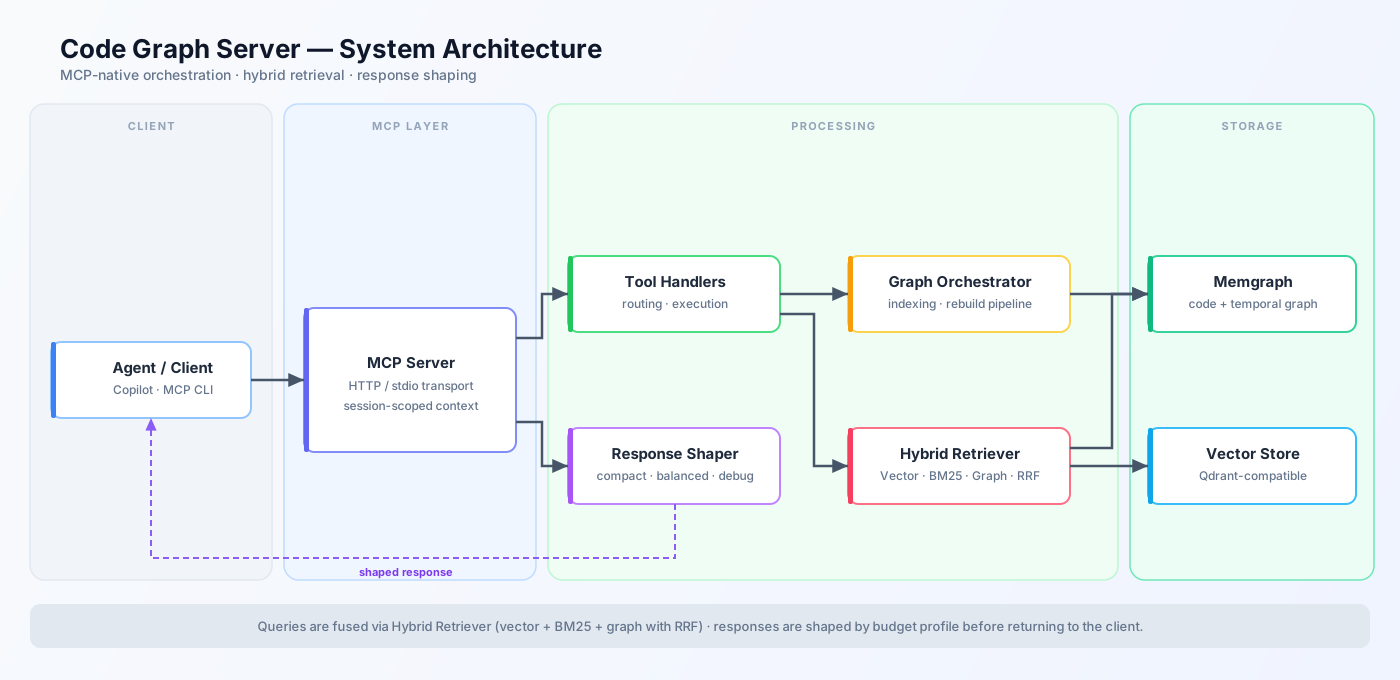
LxRAG runs as an MCP server over stdio or HTTP and coordinates three data planes behind a single tool interface:
- Graph plane (Memgraph) — structural and temporal truth: FILE, FUNCTION, CLASS, IMPORT nodes + relationships + full transaction history
- Vector plane (Qdrant) — semantic retrieval for natural-language questions; optional but recommended for large codebases
- Response plane — answer-first shaping with profile budgets so you choose between token-light (
compact) and detail-rich (debug) responses
When you call graph_query in natural mode, retrieval runs as hybrid fusion:
- Vector similarity search
- BM25 / lexical search (Memgraph
text_searchwhen available, local fallback otherwise) - Graph expansion from seed nodes
- Reciprocal Rank Fusion (RRF) merges all signals into a single ranked list
System diagram
Tooling surface
The server exposes 38 MCP tools across:
- Graph/querying (4):
graph_set_workspace,graph_rebuild,graph_health,graph_query - Code intelligence (5):
code_explain,find_pattern,semantic_slice,context_pack,diff_since - Architecture (2):
arch_validate,arch_suggest - Semantic/similarity (4):
semantic_search,find_similar_code,code_clusters,semantic_diff - Test intelligence (5):
test_select,test_categorize,impact_analyze,test_run,suggest_tests - Progress/operations (4):
progress_query,task_update,feature_status,blocking_issues - Memory/coordination (8):
episode_add,episode_recall,decision_query,reflect,agent_claim,agent_release,agent_status,coordination_overview - Runtime controls (1):
contract_validate - Documentation (2):
index_docs,search_docs - Reference (1):
ref_query— query a sibling repo for architecture insights, patterns, and code examples - Setup (2):
init_project_setup,setup_copilot_instructions— one-shot onboarding and AI assistant scaffolding
Quick start
Recommended setup: run Memgraph and Qdrant in Docker (
docker compose up -d memgraph qdrant), then run the MCP server on your host via stdio. Your editor spawns the process directly — native filesystem paths, no HTTP port, no session headers.
Prerequisites
- Node.js 24+
- Docker + Docker Compose
See QUICK_START.md for full VS Code + Copilot/Claude wiring instructions.
1) Clone and build
git clone https://github.com/lexCoder2/lxRAG-MCP.git
cd lxRAG-MCP
npm install && npm run build
2) Start the databases
Launch only Memgraph and Qdrant — the MCP server runs locally via stdio, not in Docker:
docker compose up -d memgraph qdrant
Verify they are healthy:
docker compose ps memgraph qdrant # both should show "healthy" / "running"
3) Configure stdio in your editor
VS Code — add to your .vscode/mcp.json (or user settings.json):
{
  "servers": {
    "lxrag": {
      "type": "stdio",
      "command": "node",
      "args": ["/absolute/path/to/lxRAG-MCP/dist/server.js"],
      "env": {
        "MCP_TRANSPORT": "stdio",
        "MEMGRAPH_HOST": "localhost",
        "MEMGRAPH_PORT": "7687",
        "QDRANT_HOST": "localhost",
        "QDRANT_PORT": "6333"
      }
    }
  }
}
Claude Desktop — add to claude_desktop_config.json:
{
  "mcpServers": {
    "lxrag": {
      "command": "node",
      "args": ["/absolute/path/to/lxRAG-MCP/dist/server.js"],
      "env": {
        "MCP_TRANSPORT": "stdio",
        "MEMGRAPH_HOST": "localhost",
        "MEMGRAPH_PORT": "7687",
        "QDRANT_HOST": "localhost",
        "QDRANT_PORT": "6333"
      }
    }
  }
}
4) Initialize your project
Once the server is connected in your editor, run this single tool call to set context, index the graph, and generate copilot instructions in one step:
{
  "name": "init_project_setup",
  "arguments": {
    "workspaceRoot": "/absolute/path/to/your-project",
    "sourceDir": "src",
    "projectId": "my-repo"
  }
}
That's it — the graph rebuild runs in the background and your project is ready to query.
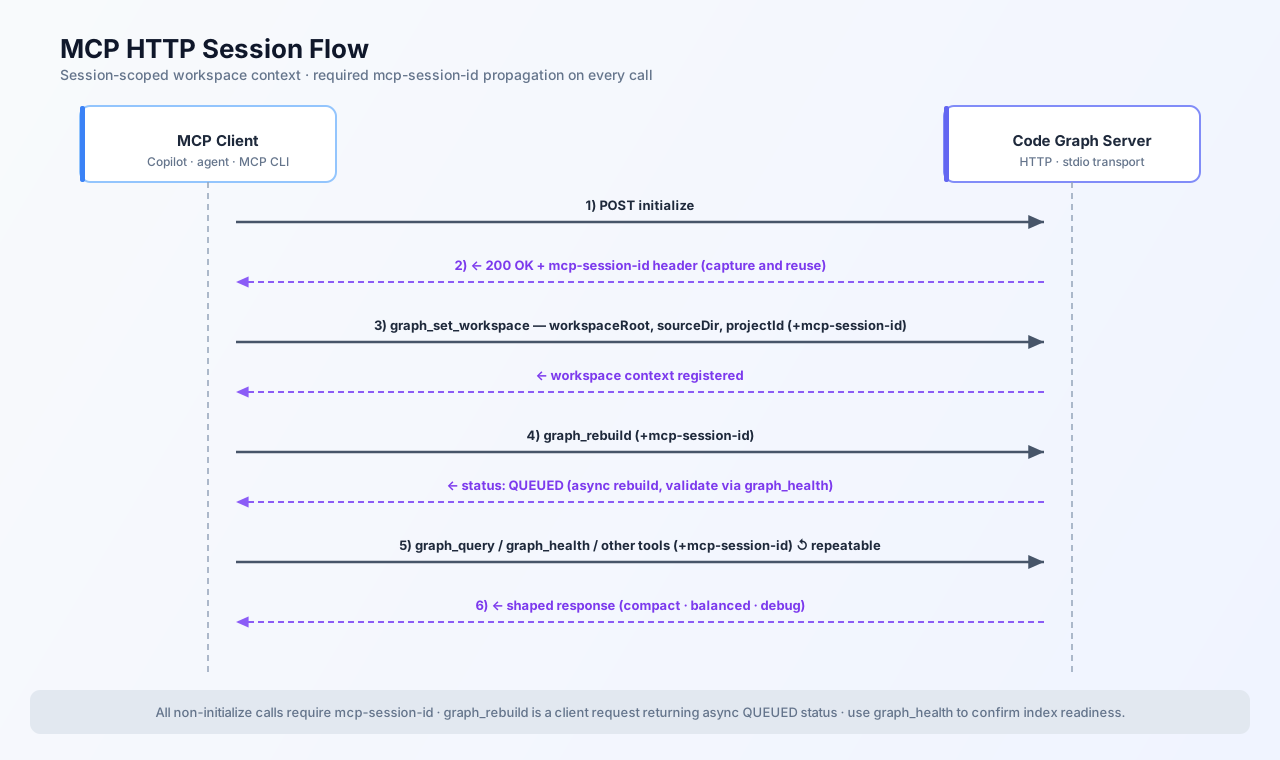
Session flow diagram
Visual examples
| Workflow | Minimal tool sequence | Outcome |
| ------------------------------ | ------------------------------------------------------ | ---------------------------------------------- |
| Boot a project context | initialize → graph_set_workspace → graph_rebuild | Graph becomes query-ready for that MCP session |
| Understand a subsystem | graph_query → code_explain → semantic_slice | Dependency map + concrete code slice |
| Plan safe changes | impact_analyze → test_select → test_run | Change radius + focused test execution |
| Coordinate multiple agents | agent_claim → context_pack → task_update | Ownership, task context, and durable progress |
Example A — Set workspace context
{
  "name": "graph_set_workspace",
  "arguments": {
    "workspaceRoot": "/workspace",
    "sourceDir": "src",
    "projectId": "my-repo"
  }
}
Example B — Natural graph query
{
  "name": "graph_query",
  "arguments": {
    "query": "find key graph files",
    "language": "natural",
    "mode": "local",
    "limit": 5
  }
}
Example C — Context pack for an active task
{
  "name": "context_pack",
  "arguments": {
    "task": "stabilize hybrid retrieval outputs",
    "taskId": "PHASE8-RET-01",
    "agentId": "agent-copilot",
    "profile": "compact"
  }
}
Runtime modes
- stdio ✅ recommended for local editor integrations (VS Code, Claude Desktop, Cursor) — simplest setup, no HTTP port or session headers needed
- http — for multi-client agent fleets, remote access, or automation pipelines that need concurrent sessions
Useful scripts
npm run start          # stdio server (recommended for editor use)
npm run start:http     # HTTP supervisor (multi-session / remote)
npm run build          # compile TypeScript
npm test               # run all 109 tests
Repository map
| Path | What's inside |
| ------------------------------------ | ------------------------------------------------------------------- |
| src/server.ts, src/mcp-server.ts | MCP / HTTP transport surfaces |
| src/tools/tool-handlers.ts | all 35 tool implementations |
| src/graph/ | graph client, orchestrator, hybrid retriever, watcher, docs builder |
| src/engines/ | architecture, test, progress, community, episode, docs engines |
| src/parsers/ | AST and markdown parsers (tree-sitter + regex fallback) |
| src/response/ | response shaping, profile budgets, summarization |
| docs/AGENT_CONTEXT_ENGINE_PLAN.md | implementation plan and phase status |
| docs/GRAPH_EXPERT_AGENT.md | full agent runbook |
What's already shipped
Every feature below is production-ready today:
- ✅ Hybrid retrieval for
graph_query— vector + BM25 + graph expansion fused with RRF - ✅ AST-accurate parsers via tree-sitter for TypeScript, TSX, JS/MJS/CJS, JSX, Python, Go, Rust, Java (activate with
LXRAG_USE_TREE_SITTER=true) - ✅ Watcher-driven incremental rebuilds — your graph stays fresh without manual intervention
- ✅ Temporal query and diff support — query any past graph state with
asOf, compare changes withdiff_since - ✅ Indexing-time symbol summarization — compact-profile answers stay useful even in tight token budgets
- ✅ MAGE-native Leiden community detection and PageRank PPR with JS fallbacks for non-MAGE environments
- ✅ SCIP IDs on all FILE, FUNCTION, and CLASS nodes for precise cross-tool symbol references
- ✅ Episode memory, agent coordination, context packs, and response budget shaping
- ✅ Docs & ADR indexing —
index_docsparses all your markdown into graph nodes;search_docsqueries them with BM25 or by symbol association
Release highlights
- Hybrid natural retrieval — your
graph_querycalls blend vector, BM25, and graph signals with RRF so you get the most relevant results across the whole codebase, not just the closest embedding match. - Multi-language AST parsers — tree-sitter gives you accurate symbol extraction for TypeScript, TSX, JavaScript, JSX, Python, Go, Rust, and Java. Enable with
LXRAG_USE_TREE_SITTER=true; each language falls back gracefully if the grammar isn't installed. - Impact-scoped test runs —
impact_analyze+test_selecttell your agent exactly which tests to run after a change, cutting unnecessary CI time without sacrificing coverage confidence. - Docs & ADR indexing — your documentation is now searchable the same way your code is.
index_docswalks the workspace, parses every markdown file intoDOCUMENTandSECTIONnodes, and stores them in the graph.search_docsretrieves them by text query or by symbol association. - Persistent agent memory — episodes, decisions, and claims survive across VS Code restarts so your agent can pick up exactly where it left off.
- Temporal code model —
asOfanddiff_sincelet you or your agent reason about the state of any file or symbol at any point in the past. - Always-current graph — the file watcher triggers incremental rebuilds on save so your graph never goes stale.
- Lower-token answers — indexing-time symbol summaries keep
compact-profile responses genuinely useful without growing the payload. - Safer BM25 fallback — Memgraph
text_searchis used when available; the server falls back to a local lexical scorer automatically so retrieval never breaks.
Tests and quality gates
The test suite covers all parsers, builders, engines, and tool handlers — 109 tests across 5 files, all green.
npm test                          # run all 109 unit tests
npm run benchmark:check-regression  # check latency / token-efficiency regressions
Benchmark scripts under scripts/ and benchmarks/ track:
- Query latency and token efficiency
- Retrieval accuracy trends
- Compact-profile response budget compliance
- Agent-mode synthetic task benchmarks
All new features ship with tests. The docs feature alone added 101 tests (50 parser + 23 builder + 17 engine + 11 tool-handler contract tests) before landing.
Integration tips
A few habits that make a big difference:
- Start every session with
graph_set_workspace→graph_rebuild(or let your configured client do it automatically via.github/copilot-instructions.md) - Prefer
graph_queryover file reads for discovery — you'll use far fewer tokens and get cross-file context for free - Use
profile: compactfor autonomous loops where every token counts; switch tobalancedordebugwhen you need more detail - Rebuild incrementally after meaningful edits (
graph_rebuildwithmode: incremental); the file watcher handles this for you during active sessions - Run
impact_analyzebefore tests so your agent only executes what's actually affected by a change
See:
.github/copilot-instructions.mddocs/GRAPH_EXPERT_AGENT.md- QUICK_START.md: step-by-step deployment, VS Code project wiring, and Copilot / Claude extension configuration
Contributing
Pull requests are welcome! Whether it's a new parser, a tool improvement, a bug fix, or better docs — open an issue to discuss what you'd like to change, or just send a PR directly.
- Bugs / features — open an issue first so we can align on scope
- New tools — follow the handler + registration pattern in
src/tools/tool-handlers.tsandsrc/server.ts; include tests - Docs — typos, clarifications, and examples are always appreciated
Support this project
LxRAG MCP is built and maintained in my personal time — researching graph retrieval techniques, designing the tool surface, writing tests, and keeping everything working across MCP protocol updates. a cup of coffe or any help you can provide will make a difference, If it saves you time or makes your AI-assisted workflows meaningfully better, consider supporting the work:
- GitHub Sponsors → github.com/sponsors/lexCoder2
- Buy Me a Coffee → buymeacoffee.com/hi8g
Every contribution — no matter the size — helps keep the project active and lets me prioritize new features and support over other obligations. Thank you. 🙏
License
MIT