Chat with your AWS environment 😀
Chat with your Workload
[!NOTE] English documentation is available in the second half of this README. [here]
あなたのAWS環境とチャットができます😀
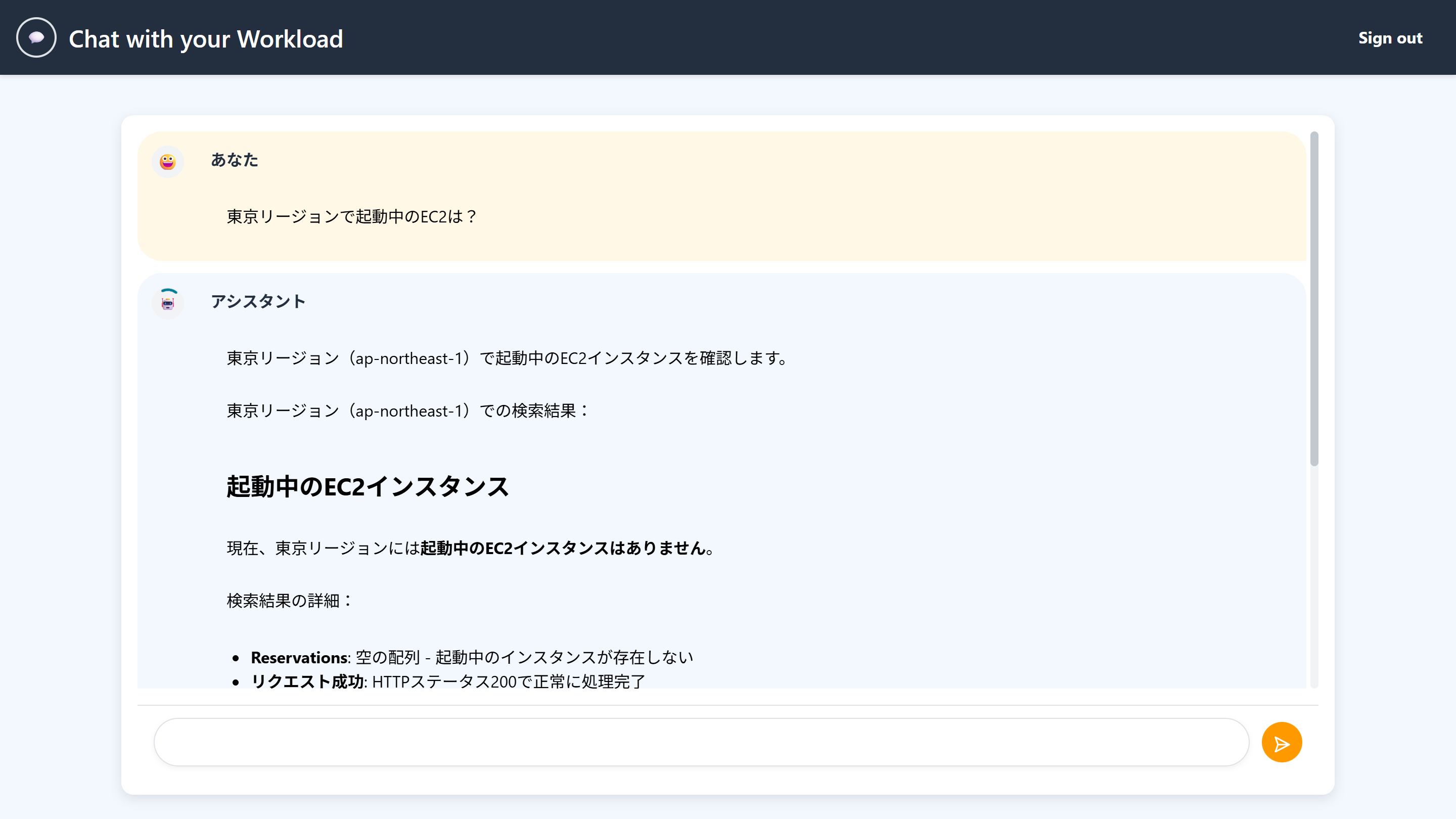
機能
-
デプロイしたAWS環境にReadOnly権限でアクセスし、任意のAWSリソースについてチャット形式で確認ができます
- 今月の利用料は?
- 起動中のEC2インスタンスは?
- 直近1時間以内に発生したLambdaのエラーは?
- S3バケットの作成者は?
-
AWS Documentation MCP Serverを経由してAWSドキュメントを確認できます
- Boto3でS3にアクセスするコードを教えて
- Kendraが提供されているリージョンは?
※Amplifyにデプロイする都合上、プロトコルとしてのMCPは使用せず直接関数呼び出しをしています
構成概要
Ampify Gen2で構築しており、Amplifyホスティングにデプロイ可能です。生成AI機能はAmplifyのAI kitを使用しています。
生成AIモデルは最新のClaude Sonnet 4をクロスリージョン推論で呼び出します。生成AIが使用するツールはAI kitの仕組みを使ってLambdaで実装しています。
flowchart LR
    subgraph AmplifyGen2["Amplify Gen 2"]
        Next.js["Next.js"]
        AmplifyUI["Amplify UI"]
        AIKit["AI kit"]
    end

    subgraph AmazonBedrock["Amazon Bedrock"]
        Claude["Claude Sonnet 4<br>(Cross Region Inference)"]
    end

    subgraph AWSLambda1["Lambda (use_aws)"]
        StrandsAgents["Strands Agents Tools"]
    end

    subgraph AWSLambda2["Lambda (aws_document)"]
        AwsDocumentation["AWS Documentation MCP Server<br>** direct use (no MCP) **"]
    end

    AIKit -- Model --> AmazonBedrock
    AIKit -- Tool --> AWSLambda1
    AIKit -- Tool --> AWSLambda2
デプロイ方法
バージニア北部リージョンを使用する実装となっています。
- 本リポジトリを自身のGitHubリポジトリにForkします。
- Amplify Gen2のドキュメントのQuickstartの「2. Deploy the starter app」以降の手順でデプロイします。
ローカル環境での動作
-
GitHubからクローンします
-
以下のコマンドを実行し、バックエンドのサンドボックスを作成します。
npm install npx ampx sandbox -
別のターミナルを起動し、フロントエンドを起動します。
npm run dev
カスタマイズ方法
1. 使用する生成AIモデルを変更する
クロスリージョン推論を使用しない場合は、amplify/data/resource.tsのmodelIdを変更します。
export const model = 'anthropic.claude-sonnet-4-20250514-v1:0';

export const crossRegionModel = `us.${model}`;

export const conversationHandler = defineConversationHandlerFunction({
  entry: './conversationHandler.ts',
  name: 'conversationHandler',
  models: [{ modelId: crossRegionModel }],
});
2. クロスリージョン推論で使用するリージョンを変更する
まず、amplify/data/resource.tsのcrossRegionModelを変更します。
export const crossRegionModel = `us.${model}`;
続いて、amplify/backend.tsで、IAMポリシーを指定している部分を、クロスリージョン推論で使用するリージョンの情報に変更します。
backend.conversationHandler.resources.lambda.addToRolePolicy(
  new PolicyStatement({
    resources: [
      `arn:aws:bedrock:us-east-1:${backend.stack.account}:inference-profile/${crossRegionModel}`,
      `arn:aws:bedrock:us-east-1::foundation-model/${model}`,
      `arn:aws:bedrock:us-east-2::foundation-model/${model}`,
      `arn:aws:bedrock:us-west-2::foundation-model/${model}`,
    ],
    actions: ['bedrock:InvokeModel', 'bedrock:InvokeModelWithResponseStream'],
  })
);
3. サインアップできるドメインを制限する
こちらのドキュメントを参考にしてください。
4. セルフサインアップを無効にする
こちらのドキュメントを参考にしてください。
Chat with your Workload (English)
Chat with your AWS environment 😀
Features
-
Access your deployed AWS environment with ReadOnly permissions and check any AWS resources in a chat format
- What are my charges this month?
- What EC2 instances are running?
- What Lambda errors occurred in the last hour?
- Who created this S3 bucket?
-
Access AWS documentation through the AWS Documentation MCP Server
- Show me code to access S3 with Boto3
- In which regions is Kendra available?
*Note: Due to Amplify deployment constraints, we're using direct function calls instead of the MCP protocol
Architecture Overview
Built with Amplify Gen2 and deployable to Amplify hosting. The generative AI functionality uses Amplify's AI kit.
The generative AI model calls the latest Claude Sonnet 4 using cross-region inference. The tools used by the generative AI are implemented in Lambda using the AI kit mechanism.
flowchart LR
    subgraph AmplifyGen2["Amplify Gen 2"]
        Next.js["Next.js"]
        AmplifyUI["Amplify UI"]
        AIKit["AI kit"]
    end

    subgraph AmazonBedrock["Amazon Bedrock"]
        Claude["Claude Sonnet 4<br>(Cross Region Inference)"]
    end

    subgraph AWSLambda1["Lambda (use_aws)"]
        StrandsAgents["Strands Agents Tools"]
    end

    subgraph AWSLambda2["Lambda (aws_document)"]
        AwsDocumentation["AWS Documentation MCP Server<br>** direct use (no MCP) **"]
    end

    AIKit -- Model --> AmazonBedrock
    AIKit -- Tool --> AWSLambda1
    AIKit -- Tool --> AWSLambda2
Deployment Method
This implementation uses the Northern Virginia (us-east-1) region.
- Fork this repository to your own GitHub repository.
- Follow the steps in the Amplify Gen2 documentation Quickstart from "2. Deploy the starter app" onwards to deploy.
Running in a Local Environment
-
Clone from GitHub
-
Run the following commands to create a backend sandbox:
npm install npx ampx sandbox -
Launch another terminal and start the frontend:
npm run dev
Customization Methods
1. Change the generative AI model
If you don't want to use cross-region inference, change the modelId in amplify/data/resource.ts:
export const model = 'anthropic.claude-sonnet-4-20250514-v1:0';

export const crossRegionModel = `us.${model}`;

export const conversationHandler = defineConversationHandlerFunction({
  entry: './conversationHandler.ts',
  name: 'conversationHandler',
  models: [{ modelId: crossRegionModel }],
});
2. Change the region used for cross-region inference
First, change the crossRegionModel in amplify/data/resource.ts:
export const crossRegionModel = `us.${model}`;
Next, modify the IAM policy specification in amplify/backend.ts to match the region information used for cross-region inference:
backend.conversationHandler.resources.lambda.addToRolePolicy(
  new PolicyStatement({
    resources: [
      `arn:aws:bedrock:us-east-1:${backend.stack.account}:inference-profile/${crossRegionModel}`,
      `arn:aws:bedrock:us-east-1::foundation-model/${model}`,
      `arn:aws:bedrock:us-east-2::foundation-model/${model}`,
      `arn:aws:bedrock:us-west-2::foundation-model/${model}`,
    ],
    actions: ['bedrock:InvokeModel', 'bedrock:InvokeModelWithResponseStream'],
  })
);
3. Restrict domains that can sign up
Please refer to this documentation for guidance.
4. Disable self-signup
Please refer to this documentation for guidance.