MCP Monitor intercepts every tool call made by an AI agent — whether the agent uses the Model Context Protocol (MCP) or calls Python functions directly — and surfaces metrics, session replays, and alerts through a local web dashboard.
MCP Monitor
Transparent observability for agentic AI pipelines.
MCP Monitor intercepts every tool call made by an AI agent — whether the agent uses the Model Context Protocol (MCP) or calls Python functions directly — and surfaces metrics, session replays, and alerts through a local web dashboard.
Zero changes to your agent. Zero changes to your MCP servers.
Features
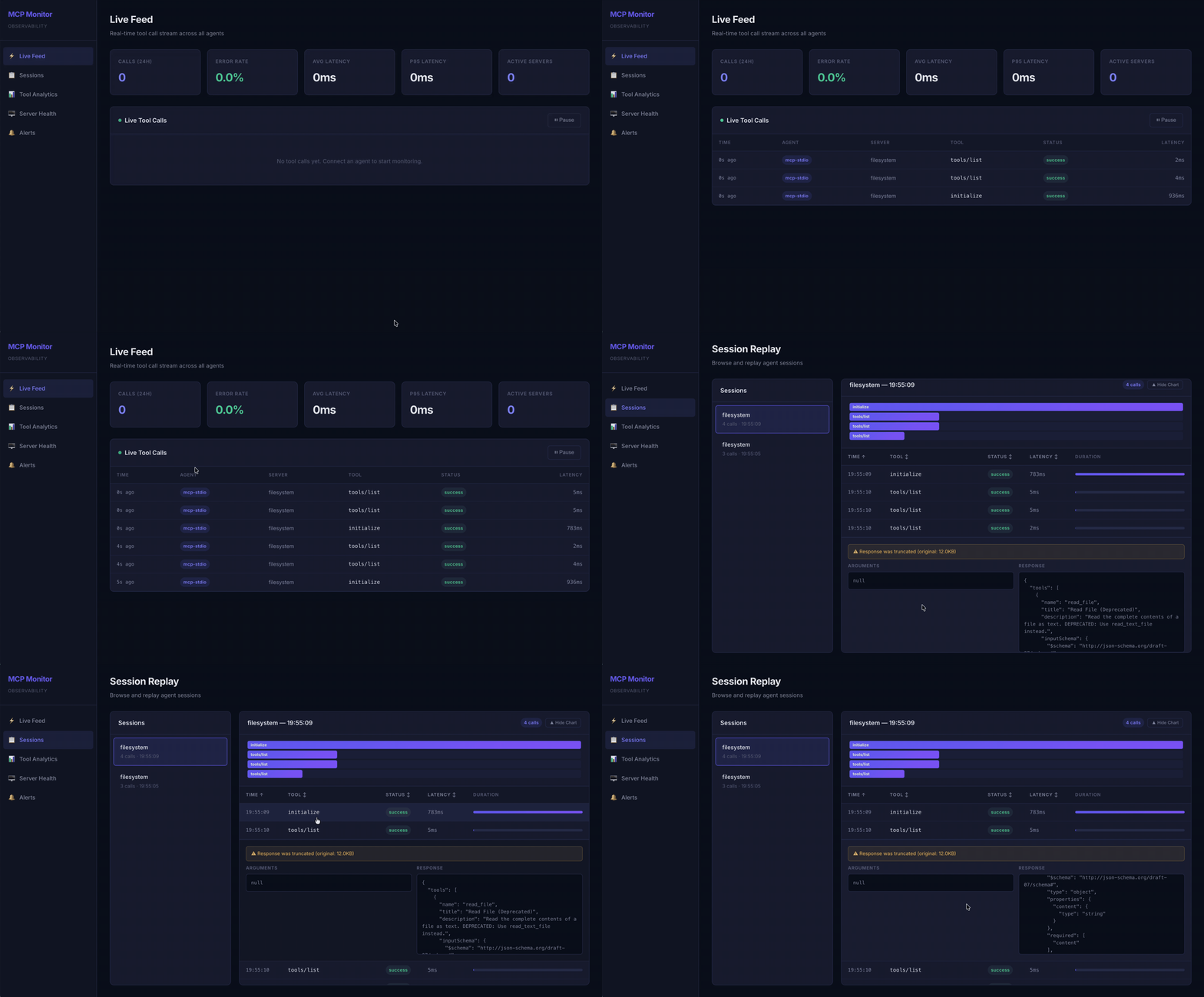
- ⚡ Live Feed — Real-time SSE-powered stream of all tool calls with status badges and latency
- 📋 Session Replay — Browse sessions, view call timelines with a Gantt chart, expand any call to inspect arguments and responses
- 📊 Tool Analytics — P50/P95/P99 latency charts, call volume, and error rate trends via Chart.js
- 🖥️ Server Health — Per-server status cards (healthy / degraded / down) with auto-refresh
- 🔔 Alerts — Configurable P95 latency and error rate thresholds with cooldown-based alerting
- 🔒 Secret Sanitization — Automatically redacts tokens, passwords, API keys from stored arguments
- 🐍 Python SDK — Zero-dependency pip package to monitor any Python agent (QwenAgent, LangChain, custom)
- 💾 SQLite Storage — Single-file database with WAL mode for fast concurrent reads
Architecture
Agent (Claude, Cursor, etc.)
    │
    ├── Multiplexer mode
    │     mcp-monitor serve
    │       ├── spawns Server A ──┐
    │       ├── spawns Server B ──┤── POST /api/ingest ──► Dashboard Server ──► SQLite
    │       └── spawns Server C ──┘         │
    │                                  EventBus.emit()
    ├── Per-server proxy mode                │
    │     mcp-monitor proxy             SSE push to
    │       └── spawns Server ──────►   Dashboard UI
    │
    └── Python SDK ──► POST /api/ingest
Multiplexer mode is the one approach: add one entry to your MCP config and monitor all servers. The serve command spawns every configured server, merges their tools, routes calls, and records everything.
Per-server proxy mode wraps a single server — useful when you want fine-grained control over which servers are monitored.
Quick Start
Prerequisites
- Node.js 18+
- npm
Install via GitHub Packages
- Authenticate to GitHub Packages: You need a Personal Access Token (classic) with the
read:packagesscope. - Tell npm where to find the package:
echo "@partha-sust16:registry=https://npm.pkg.github.com" >> ~/.npmrc - Install the package globally:
npm install -g @partha-sust16/mcp-monitor
You are now ready to run mcp-monitor start!
Install from Source
git clone https://github.com/Partha-SUST16/mcp_monitor.git
cd mcp_monitor

# Install backend dependencies
npm install

# Build the backend and the dashboard UI automatically
npm run build

# Link globally to use the 'mcp-monitor' command anywhere
npm link

# Start the dashboard server
mcp-monitor start
The dashboard will be available at http://localhost:4242.
Send a Test Event
curl -X POST http://localhost:4242/api/ingest \
  -H 'Content-Type: application/json' \
  -d '{
    "sessionId": "test-session",
    "agentType": "python-sdk",
    "serverName": "my-server",
    "toolName": "read_file",
    "method": "read_file",
    "arguments": {"path": "/tmp/test.txt"},
    "response": null,
    "status": "success",
    "latencyMs": 150,
    "timestamp": "2026-03-09T10:00:00Z"
  }'
Connecting Agents
Multiplexer Mode
Monitor all MCP servers with a single config entry. No need to wrap each server individually.
Step 1. List your servers in mcp-monitor.config.json:
{
  "servers": [
    { "name": "filesystem", "transport": "stdio", "command": "npx @modelcontextprotocol/server-filesystem /tmp" },
    { "name": "github", "transport": "stdio", "command": "npx @modelcontextprotocol/server-github", "env": { "GITHUB_TOKEN": "$GITHUB_TOKEN" } }
  ],
  "dashboard": { "port": 4242 }
}
Step 2. Replace all MCP server entries in your agent config with one:
{
  "mcpServers": {
    "mcp-monitor": {
      "command": "mcp-monitor",
      "args": ["serve", "-c", "/absolute/path/to/mcp-monitor.config.json"]
    }
  }
}
Step 3. Start the dashboard server separately:
mcp-monitor start
The agent sees one MCP server with all tools combined. MCP Monitor spawns each real server internally, routes every tools/call to the correct child, and records the call.
Note on Tool Names: To prevent naming collisions between different MCP servers that happen to expose identical tools, the Multiplexer prefixes all tool names with their originating server's name. For example, if your
filesystemserver has a tool namedread_file, the LLM will see it exposed asfilesystem_read_file.
Per-Server Proxy Mode
Alternatively, wrap individual servers by replacing their command:
{
  "mcpServers": {
    "filesystem": {
      "command": "mcp-monitor",
      "args": ["proxy", "--name", "filesystem",
               "--cmd", "npx @modelcontextprotocol/server-filesystem /tmp"]
    }
  }
}
Python Agent (QwenAgent)
from agent_monitor import patch_qwen_agent

patch_qwen_agent(server_name="my-agent")  # call once before creating agent
# rest of agent code unchanged
Generic Python Tool
from agent_monitor import monitor

@monitor(server_name="my-tools")
def query_database(sql: str) -> dict:
    ...
Python SDK Installation
cd sdk/python
pip install -e .
The SDK has zero external dependencies — it uses only Python stdlib (urllib, threading, json).
Configuration
Create mcp-monitor.config.json in the project root:
{
  "servers": [
    {
      "name": "filesystem",
      "transport": "stdio",
      "command": "npx @modelcontextprotocol/server-filesystem /tmp"
    },
    {
      "name": "github",
      "transport": "stdio",
      "command": "npx @modelcontextprotocol/server-github",
      "env": { "GITHUB_TOKEN": "$GITHUB_TOKEN" }
    },
    {
      "name": "remote-tools",
      "transport": "http",
      "targetUrl": "https://my-mcp-server.com",
      "listenPort": 4243
    }
  ],
  "dashboard": {
    "port": 4242
  },
  "alerts": {
    "latencyP95Ms": 2000,
    "errorRatePercent": 10,
    "cooldownMinutes": 5
  }
}
Environment variable substitution is supported in env fields — $VAR_NAME is replaced with process.env.VAR_NAME.
CLI Commands
# Start dashboard server + alert engine
mcp-monitor start [-c path/to/config.json]

# Run as a multiplexing MCP server (add as single entry in agent config)
mcp-monitor serve [-c path/to/config.json] [--dashboard-url http://localhost:4242]

# Start a single MCP proxy (wrap one server)
mcp-monitor proxy --name filesystem --cmd "npx @modelcontextprotocol/server-filesystem /tmp"

# List recent sessions
mcp-monitor sessions [--limit 20]

# Replay a session's tool calls
mcp-monitor replay <session-id>

# Show per-tool stats
mcp-monitor stats [--sort latency_p95|error_rate|call_count] [--since 1h|6h|24h|7d]

# Export data
mcp-monitor export [--format json|csv] [--since 24h] [--output file.json]
REST API
| Endpoint | Description |
|---|---|
| GET /api/overview | Aggregated stats: total calls, error rate, avg/p95 latency, recent calls |
| GET /api/sessions | Paginated session list with call counts (?limit=20&offset=0) |
| GET /api/sessions/:id/calls | All tool calls for a session in chronological order |
| GET /api/tools/stats | Per-tool latency percentiles and error rates (?since=24h) |
| GET /api/servers | Server health status derived from last 5 minutes of data |
| GET /api/alerts | Fired alert history (?limit=50&offset=0) |
| GET /api/stream | SSE endpoint — pushes tool_call and alert events in real time |
| POST /api/ingest | Accepts CollectorEvent JSON (used by Python SDK) |
Project Structure
mcp-monitor/
├── src/
│   ├── types.ts                          # All shared TypeScript interfaces
│   ├── config.ts                         # Config loader with env var substitution
│   ├── cli.ts                            # Commander.js entry point
│   ├── core/
│   │   ├── Store.ts                      # SQLite (better-sqlite3) CRUD
│   │   ├── Collector.ts                  # Sanitize → truncate → persist → emit
│   │   ├── RemoteCollector.ts           # HTTP POST to dashboard /api/ingest
│   │   ├── SessionManager.ts            # Session lifecycle + idle timeout
│   │   ├── EventBus.ts                  # Node.js EventEmitter singleton
│   │   └── AlertEngine.ts              # P95 latency & error rate monitoring
│   ├── ingestion/
│   │   ├── mcp/
│   │   │   ├── MuxServer.ts             # Multiplexing MCP server (aggregates all servers)
│   │   │   ├── ProtocolInterceptor.ts   # JSON-RPC request/response matching
│   │   │   ├── StdioProxy.ts            # MCP stdio transport proxy
│   │   │   └── HttpProxy.ts            # MCP HTTP reverse proxy
│   │   └── IngestEndpoint.ts            # POST /api/ingest handler
│   └── dashboard/
│       ├── server.ts                     # Express + SSE + static serving
│       ├── routes/                       # API route handlers
│       └── ui/                           # React + Vite dashboard
│           └── src/pages/
│               ├── LiveFeed.tsx
│               ├── SessionReplay.tsx
│               ├── ToolAnalytics.tsx
│               ├── ServerHealth.tsx
│               └── Alerts.tsx
├── sdk/python/
│   ├── pyproject.toml
│   └── agent_monitor/
│       ├── __init__.py
│       ├── collector.py                  # Fire-and-forget POST to /api/ingest
│       └── decorators.py                # patch_qwen_agent() + @monitor
├── mcp-monitor.config.json
├── package.json
└── tsconfig.json
Tech Stack
| Layer | Technology |
|---|---|
| MCP Proxy | TypeScript (child_process, JSON-RPC parsing) |
| Core | TypeScript + Express 5 |
| Database | SQLite via better-sqlite3 (WAL mode) |
| Dashboard UI | React 19 + Vite + Chart.js |
| Real-time Push | Server-Sent Events (SSE) |
| Python SDK | Python 3.9+ (stdlib only) |
| CLI | Commander.js |
Session Management
Sessions are created and managed automatically:
- MCP connections: A new session starts on every
initializeJSON-RPC message - Idle timeout: If 5+ minutes pass between tool calls, a new session is created
- Explicit session ID: Set
MCP_MONITOR_SESSION_IDenv var for deterministic session grouping - Python SDK: Each Python process gets a unique UUID session, or set
AGENT_MONITOR_SESSION_ID - Session end: Marked when the proxied process exits or the connection closes
Alert System
The AlertEngine is fully event-driven — no polling. It listens to every tool_call event from the EventBus and evaluates thresholds in real time:
- P95 Latency per tool → fires if above
latencyP95Msthreshold - Error Rate per tool → fires if above
errorRatePercentthreshold (requires ≥5 calls)
Cooldown logic prevents the same alert from re-firing within cooldownMinutes (default: 5 min). Alerts are persisted to SQLite and pushed to the dashboard via SSE.
License
MIT