MCP server by pauloFroes

mcp-kiwify
MCP server that wraps the Kiwify public API as semantic tools for LLM agents.
Works with Claude Code, Codex, Claude Desktop, Cursor, VS Code, Windsurf, and any MCP-compatible client.
Prerequisites
You need Kiwify API credentials. In your Kiwify dashboard, go to Apps > API > Criar API Key:
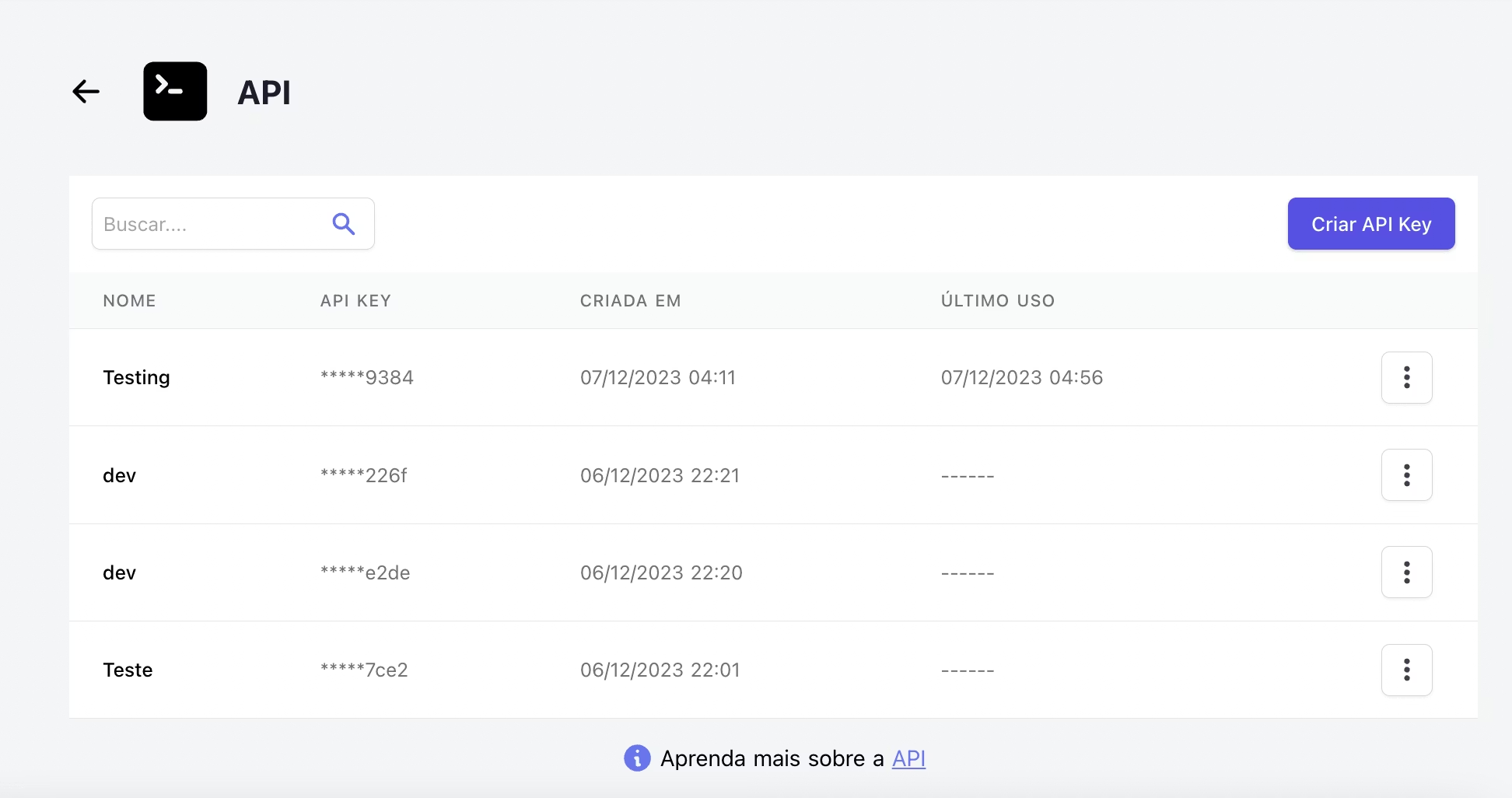
After creating the key, copy the three credentials shown in the modal:
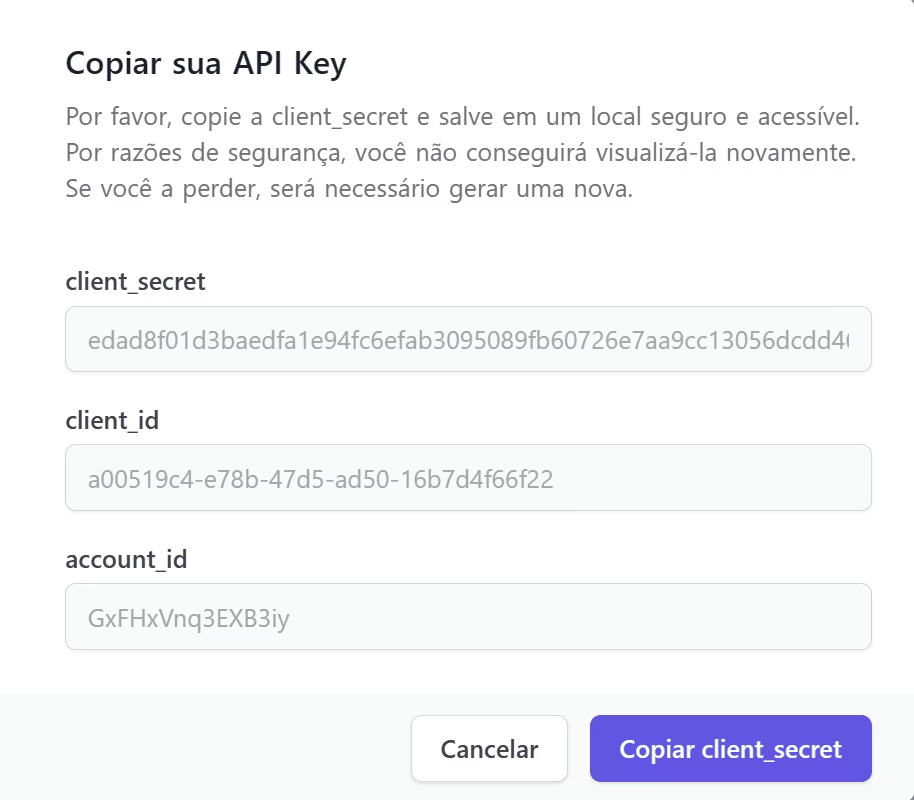
| Variable | Where to find |
| ---------------------- | ------------------------------------------------------------- |
| KIWIFY_CLIENT_ID | client_id field in the modal |
| KIWIFY_CLIENT_SECRET | client_secret field (copy it now — it won't be shown again) |
| KIWIFY_ACCOUNT_ID | account_id field in the modal |
Installation
Claude Code
claude mcp add kiwify \
  --transport stdio \
  -e KIWIFY_CLIENT_ID=your-client-id \
  -e KIWIFY_CLIENT_SECRET=your-client-secret \
  -e KIWIFY_ACCOUNT_ID=your-account-id \
  -- npx -y github:pauloFroes/mcp-kiwify
Codex
Add to your Codex configuration:
[mcp_servers.kiwify]
command = "npx"
args = ["-y", "@paulofroes/mcp-kiwify"]
env_vars = ["KIWIFY_CLIENT_ID", "KIWIFY_CLIENT_SECRET", "KIWIFY_ACCOUNT_ID"]
Claude Desktop
Add to claude_desktop_config.json:
{
  "mcpServers": {
    "kiwify": {
      "command": "npx",
      "args": ["-y", "@paulofroes/mcp-kiwify"],
      "env": {
        "KIWIFY_CLIENT_ID": "your-client-id",
        "KIWIFY_CLIENT_SECRET": "your-client-secret",
        "KIWIFY_ACCOUNT_ID": "your-account-id"
      }
    }
  }
}
Cursor
Add to ~/.cursor/mcp.json:
{
  "mcpServers": {
    "kiwify": {
      "command": "npx",
      "args": ["-y", "@paulofroes/mcp-kiwify"],
      "env": {
        "KIWIFY_CLIENT_ID": "your-client-id",
        "KIWIFY_CLIENT_SECRET": "your-client-secret",
        "KIWIFY_ACCOUNT_ID": "your-account-id"
      }
    }
  }
}
VS Code
Add to .vscode/mcp.json in your project:
{
  "servers": {
    "kiwify": {
      "command": "npx",
      "args": ["-y", "@paulofroes/mcp-kiwify"],
      "env": {
        "KIWIFY_CLIENT_ID": "your-client-id",
        "KIWIFY_CLIENT_SECRET": "your-client-secret",
        "KIWIFY_ACCOUNT_ID": "your-account-id"
      }
    }
  }
}
Windsurf
Add to ~/.codeium/windsurf/mcp_config.json:
{
  "mcpServers": {
    "kiwify": {
      "command": "npx",
      "args": ["-y", "@paulofroes/mcp-kiwify"],
      "env": {
        "KIWIFY_CLIENT_ID": "your-client-id",
        "KIWIFY_CLIENT_SECRET": "your-client-secret",
        "KIWIFY_ACCOUNT_ID": "your-account-id"
      }
    }
  }
}
Available Tools
| Tool | Description |
| ------------------------- | -------------------------------------- |
| list_products | List all products |
| get_product | Get product details by ID |
| list_sales | List sales with date range and filters |
| get_sale | Get sale details by ID |
| refund_sale | Refund a sale |
| get_sales_stats | Get aggregated sales statistics |
| list_affiliates | List affiliates with filters |
| get_affiliate | Get affiliate details by ID |
| edit_affiliate | Update affiliate commission or status |
| get_balance | Get account balance |
| list_payouts | List payout requests |
| create_payout | Request a withdrawal |
| list_webhooks | List configured webhooks |
| create_webhook | Create a new webhook |
| delete_webhook | Delete a webhook |
| list_event_participants | List event participants |
| get_account_details | Get account details |
Authentication
The server handles OAuth token management internally. You provide credentials once via environment variables and the server acquires, caches, and auto-refreshes the Bearer token (24h TTL).
License
MIT