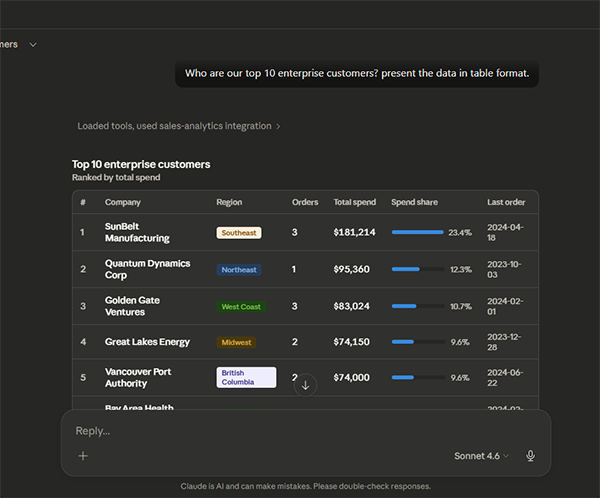
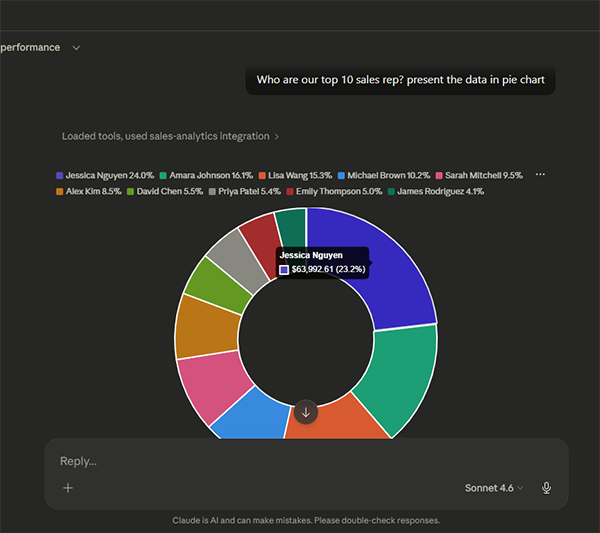
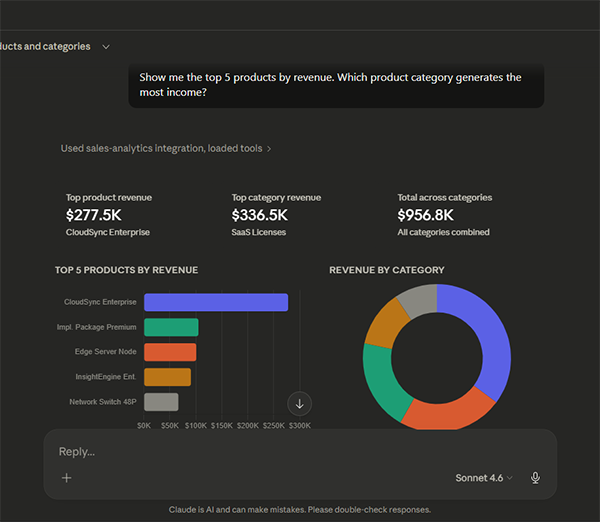
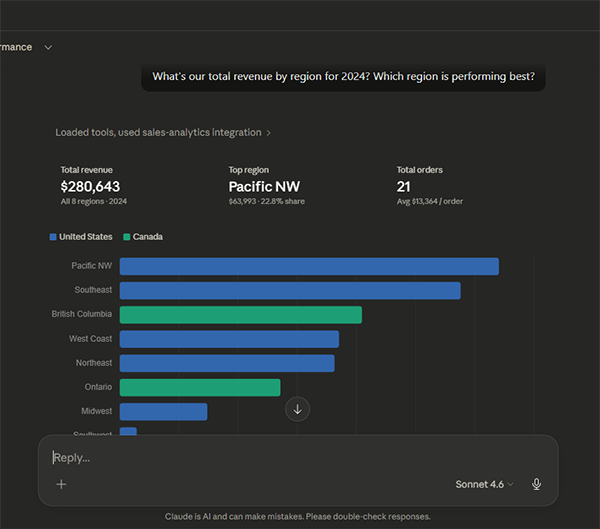
A Model Context Protocol (MCP) server that enables Large Language Models (LLMs) to directly query and analyze a PostgreSQL sales database through natural language conversations.
🔧 MCP Sales Analytics Server
A Model Context Protocol (MCP) server that enables Large Language Models (LLMs) to directly query and analyze a PostgreSQL sales database through natural language conversations.
Built with Python, the official MCP SDK, psycopg3, and Docker.




🧩 The Challenge
Business teams rely on sales data to make strategic decisions such as identifying top customers, tracking revenue trends or monitoring sales rep performance. However, accessing this data typically requires:
- SQL expertise — writing complex queries with joins, aggregations, and filters
- Database access — navigating credentials, connections, and security policies
- Rigid dashboards — pre-built reports that can't answer ad-hoc questions
This creates a bottleneck where business stakeholders depend on data analysts or engineers for every new question, slowing down decision-making.
💡 The Solution
This project implements a Model Context Protocol (MCP) server that acts as a bridge between an LLM and a PostgreSQL database. It allows users to ask questions about sales data in plain English and get accurate, real-time answers.
Using this tool, users can ask questions like "Who are our top 10 enterprise customers?" or "Tell me everything about [Customer], including their order history." in plain English and get Real Time results and analytics directly from a chatbot.
How It Works
- User asks a question in Claude Desktop (e.g., "Show me Q1 revenue by region")
- Claude interprets the question and selects the appropriate MCP tool
- MCP Server receives the tool call, executes a parameterized SQL query
- PostgreSQL returns the results
- MCP Server formats the data and sends it back to Claude
- Claude presents the results in a clear, conversational format
✨ Features
- 🗣️ Natural Language Queries — Ask questions in plain English
- 🔧 12 Pre-built Tools — Revenue analysis, customer insights, rep performance, and more
- 🛡️ Read-Only Safety — Database connection enforces SELECT-only queries
- 🔒 SQL Injection Prevention — All queries use parameterized placeholders
- ⏱️ Query Timeout — 30-second limit prevents runaway queries
- 🏊 Connection Pooling — Efficient database connection management
- 🐳 Docker Compose — One-command setup for the entire stack
- 📊 Realistic Sample Data — 30 customers, 51 orders, 12 reps, 22 products
- 🧠 Schema-as-Resource — LLM has access to full database documentation
📋 Prerequisites
🚀 Installation
Docker (Recommended)
The fastest way to get everything running. Docker handles PostgreSQL, data seeding, and the MCP server automatically.
  git clone https://github.com/sumarditjhai-sys/mcpserver.git
  cd mcpserver
  docker compose --env-file .env.docker up --build -d
To Connect the MCP server with Claude, open Claude Desktop go to "Settings" then "Developer" then "Edit Config". Replace "claude_desktop_config.json" contents with
{
  "mcpServers": {
    "sales-analytics": {
      "command": "docker",
      "args": [
        "exec",
        "-i",
        "mcp-sales-server",
        "python",
        "-m",
        "mcp_sales.server"
      ]
    }
  }
}
Restart Claude, and you are ready to chat. Try sending these questions:
-Show me revenue by region for 2024
-How is Sarah Mitchell performing against her quota?
-Show me the top 5 products by revenue. Which product category generates the most income?
-What's our total revenue by region for 2024? Which region is performing best?
-Show me the top 5 products by revenue. Which product category generates the most income?