mcp-flow is a professional-grade, node-based no-code platform for creating and deploying Model Context Protocol (MCP) servers visually. Build powerful tools for AI agents (Claude, ChatGPT, Cursor, Copilot) without writing a single line of code.
mcp-flow
A visual, node-based platform for building and deploying MCP (Model Context Protocol) servers without writing code. Design tool workflows using a drag-and-drop editor, then export production-ready TypeScript servers compatible with Claude, ChatGPT, Cursor, and Copilot.
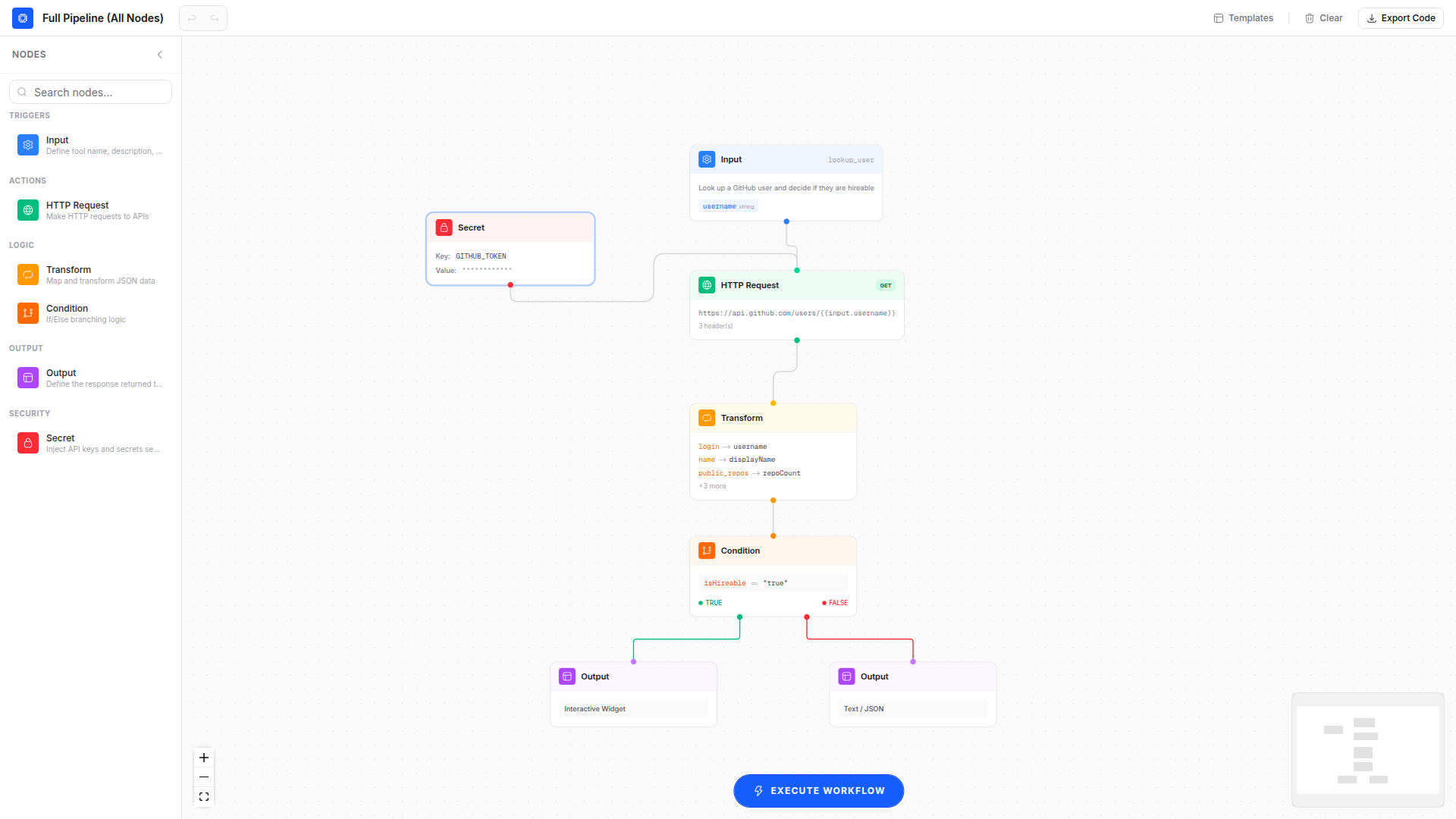
Architecture
mcp-flow/
├── frontend/          Next.js 16 (App Router) + React 19 + @xyflow/react
│   ├── app/           Pages and global styles
│   ├── components/
│   │   ├── editor/    Flow editor, nodes, edges, panels, modals
│   │   └── ui/        shadcn/ui components
│   └── lib/           Zustand store, templates, utilities
├── backend/           NestJS + Prisma (PostgreSQL)
│   └── src/
│       └── workflow/  Execute, generate, and validate endpoints
└── plan.md            Full project roadmap
Tech Stack
| Layer | Technology | | --------- | ----------------------------------------------------- | | Frontend | Next.js 16, React 19, TypeScript | | Canvas | @xyflow/react (React Flow) | | State | Zustand (undo/redo history, localStorage persistence) | | UI | shadcn/ui (radix-nova), Tailwind CSS v4 | | Icons | Hugeicons | | Animation | Framer Motion | | Backend | NestJS 11, Prisma, PostgreSQL | | Target | mcp-use (MCP server framework) |
Features
Node Types
- Input - Define tool name, description, and typed parameters (string, number, boolean) with required/optional and default values.
- HTTP Request - Configure method, URL, headers, and body with
{{input.param}}and{{secret.KEY}}variable interpolation. - Transform - Map fields between data shapes (
source.field -> target.field) or run inline JS expressions. - Condition - If/else branching based on field operators (equals, contains, gt, lt, exists, etc.) with true/false output handles.
- Secret - Inject environment variables and API keys securely. Values are masked in the UI and generated as
process.env["KEY"]. - Output - Choose between Text/JSON response or interactive Widget output.
Editor
- n8n-style left sidebar with categorized, searchable, draggable node palette.
- Drag-and-drop nodes from palette onto canvas.
- Connection validation (prevents invalid wiring like output-to-output).
- Custom smooth-step edges with delete button on selection.
- Per-node execution status highlighting (running, success, error).
- MiniMap for canvas navigation.
- Undo/redo with keyboard shortcuts (Ctrl+Z, Ctrl+Y).
- Auto-save to localStorage with restore on reload.
- Inline-editable workflow name.
- Delete nodes via keyboard (Delete/Backspace) or config panel button.
Templates
On first visit, a template picker dialog offers pre-built workflows:
- Full Pipeline (All Nodes) - Comprehensive showcase using all 6 node types: Input, Secret, HTTP, Transform, Condition, and branching Output.
- Weather Lookup - Fetch weather data with field transformation.
- GitHub Repository Info - Query the GitHub API with header configuration.
- Authenticated API Proxy - Secret-based auth token injection.
- Random Joke - Minimal input-to-output pipeline.
Code Generation
Dynamic mcp-use server code generation:
- Topological sort of the graph to determine execution order.
- Generates
server.tool()calls with Zod schemas from Input node parameters. - Supports multiple tools per workflow (multiple Input nodes).
- Variable interpolation:
{{input.param}},{{secret.KEY}},{{field.path}}. - Graph validation before export (missing connections, empty URLs, orphan nodes).
- Downloadable
index.tsandpackage.jsonwith quick-start instructions.
Execution
- Run workflows against real APIs directly from the editor.
- Per-node execution tracking with timing.
- Type-specific input controls in the run dialog (text, number, checkbox).
- Last-used parameter values remembered in localStorage.
- Generic JSON result viewer in the output panel.
Getting Started
Prerequisites
- Node.js 18+
- PostgreSQL (for backend persistence)
Development
# Install dependencies
cd frontend && npm install
cd ../backend && npm install

# Start both services
pnpm dev
# Or run individually:
cd frontend && npm run dev     # http://localhost:1528
cd backend && npm run dev      # http://localhost:3001
API Endpoints
| Method | Path | Description |
| ------ | -------------------- | ------------------------ |
| POST | /workflow/execute | Execute a workflow graph |
| POST | /workflow/generate | Generate MCP server code |
| POST | /workflow/validate | Validate graph integrity |
Generated Server Example
The exported code uses the mcp-use framework:
import { MCPServer, text, object, error } from 'mcp-use/server';
import { z } from 'zod';

const server = new MCPServer({
  name: 'mcp-flow-server',
  version: '1.0.0',
  description: 'Generated by MCP-Flow',
});

server.tool(
  {
    name: 'get_weather',
    description: 'Get current weather for a given city',
    schema: z.object({
      city: z.string().describe('City name'),
    }),
  },
  async (params) => {
    try {
      let data: any = { ...params };
      const response = await fetch(`https://wttr.in/${params.city}?format=j1`);
      if (!response.ok) {
        return error(`HTTP ${response.status}: ${response.statusText}`);
      }
      data = await response.json();
      return object(data);
    } catch (err: any) {
      return error(`Tool execution failed: ${err.message}`);
    }
  },
);

server.listen().then(() => console.log('MCP server running'));
License
UNLICENSED