Desktop app to manage MCP Streamable HTTP endpoints and browse tools/list (names, descriptions, inputSchema). Built with Electron, React, TypeScript, Vite.
MCP BROWSER
MCP BROWSER is an open-source Electron desktop app for managing MCP (Model Context Protocol) HTTP endpoints and browsing server tools (tools/list): names, descriptions, and inputSchema.
Author & maintainer: Guo's.
Repository: github.com/unicorngithub/MCP-Browser
English | 简体中文
Screenshots
Captured against MCP Feature Reference Server — https://example-server.modelcontextprotocol.io/debug/mcp (Debug MCP App, Streamable HTTP, no OAuth). The root /mcp path on the same host may require authorization; see the official site for OAuth.
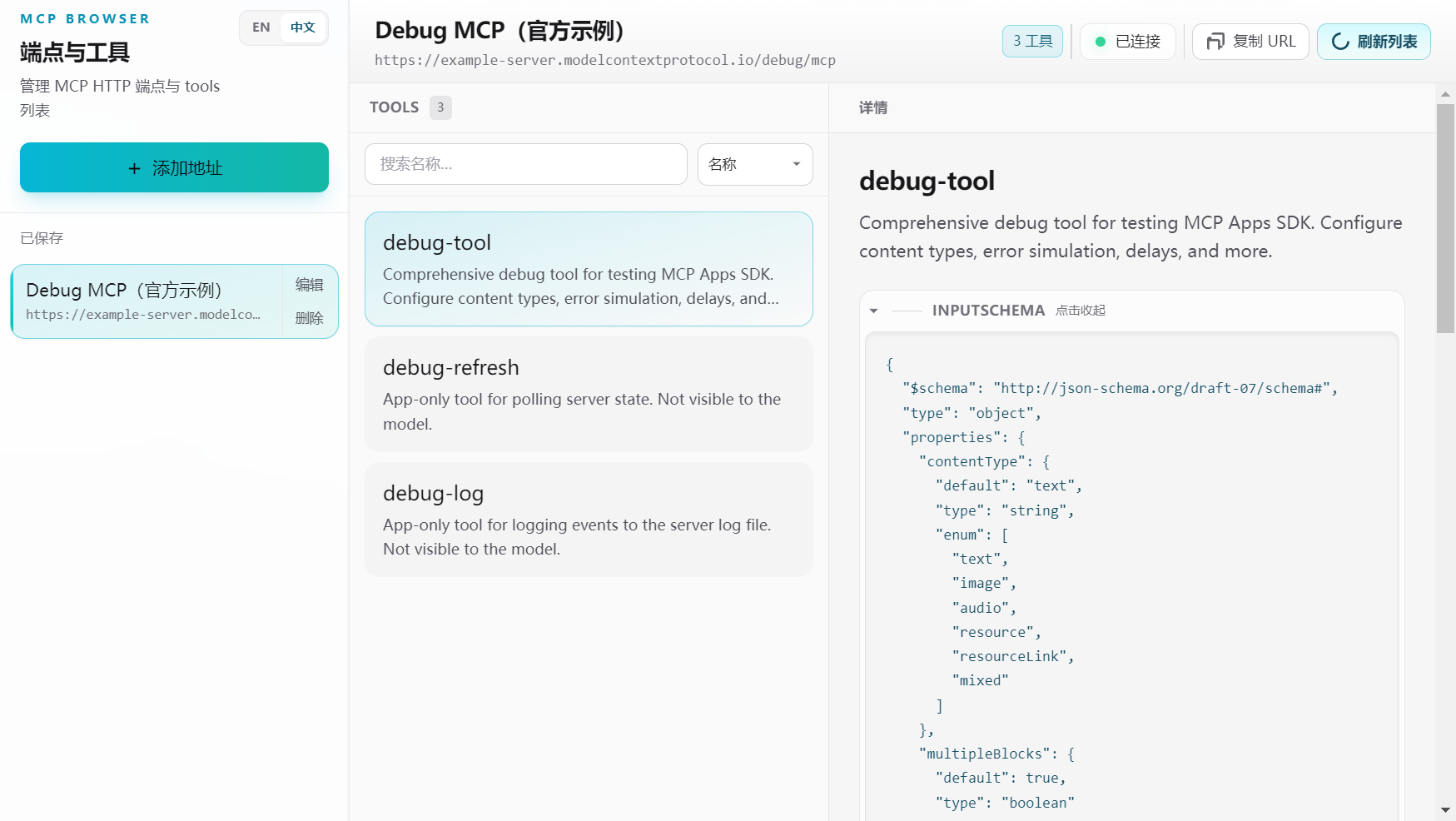
Main window: default UI is Simplified Chinese (switch via sidebar EN / 中文; menu bar follows). Connected to the official Debug MCP sample — tool list and selected tool (description, inputSchema, tool test).
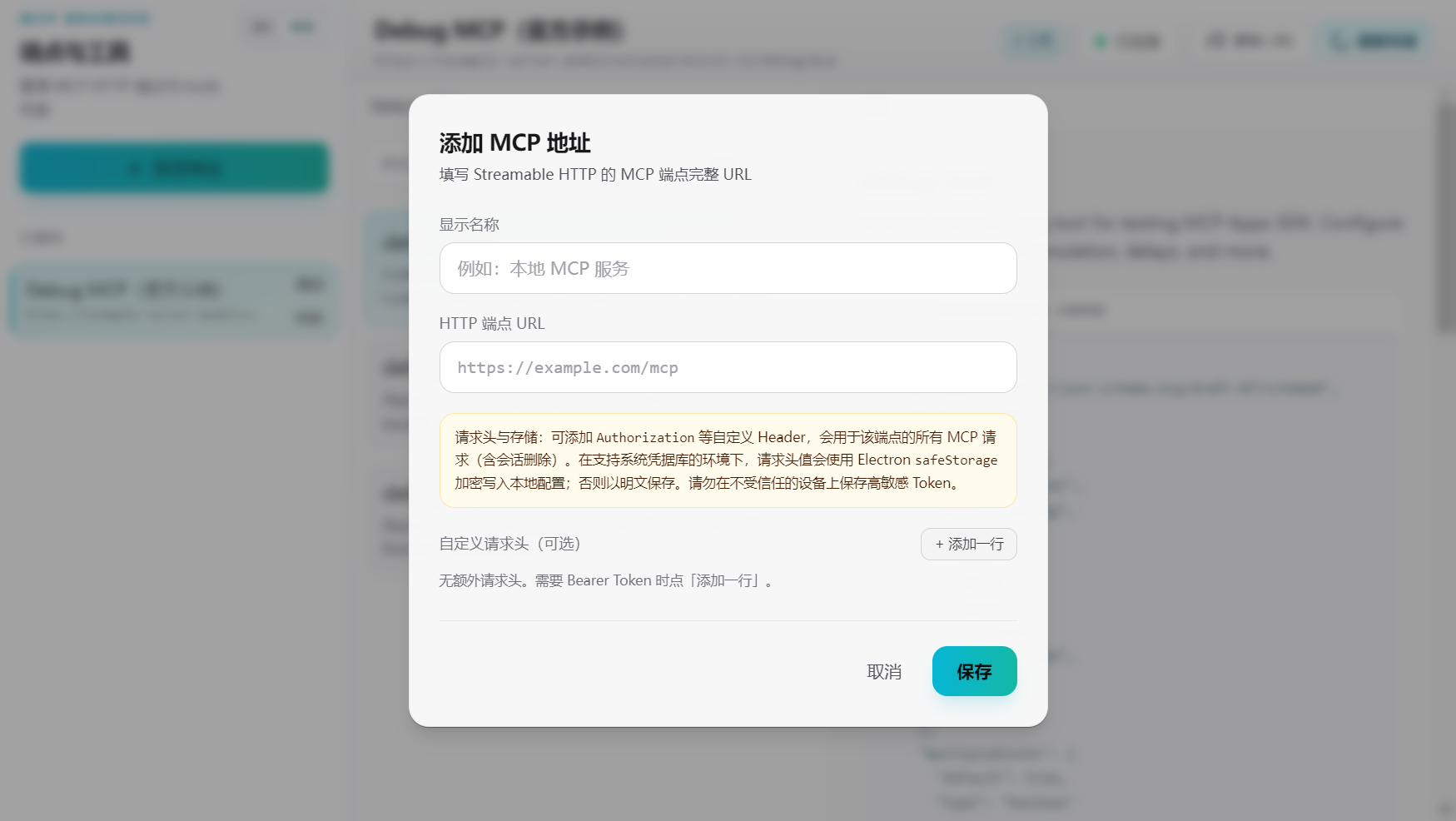
Add or edit an endpoint; optional headers (e.g. Authorization) for authenticated servers.
Features
- Save, edit, and delete MCP server URLs; persist with electron-store
- Streamable HTTP client:
initialize→ session (Mcp-Session-Id) →notifications/initialized→tools/list(spec-aligned) - Tool list and detail view (JSON
inputSchema) - UI i18n: English and 简体中文 in the renderer (react-i18next); menu bar and native dialogs stay in sync via preload (
appLocale) and main-process strings inshared/appShellStrings.ts - React 18 + TypeScript + Vite + Tailwind CSS + Zustand
Requirements
- Node.js 18+ (recommended 20 LTS)
- pnpm or npm
Quick start
git clone https://github.com/unicorngithub/MCP-Browser.git
cd MCP-Browser
pnpm install
pnpm dev
Production build (run on the target OS when packaging):
pnpm build
Portable output only (release/<version>/win-unpacked/, etc.), no NSIS installer:
pnpm run build:dir
Clean dist/, dist-electron/, release/, and Vite cache before a full rebuild:
pnpm clean
pnpm rebuild   # clean + pnpm build
pnpm + Electron
If Electron fails to download or start under pnpm, ensure package.json includes pnpm.onlyBuiltDependencies for electron and esbuild, then reinstall.
macOS: Gatekeeper and quarantine
Prebuilt downloads are not Apple-notarized. macOS may block launch or show “MCP BROWSER is damaged and can’t be opened” — often a Gatekeeper / quarantine artifact, not a corrupted binary.
1. Privacy & Security
- From the menu bar, open the Apple menu () > System Settings — on macOS Monterey and earlier, System Preferences.
- Go to Privacy & Security (older releases: Security & Privacy).
- Under Security, check Allow applications downloaded from. If Anywhere is available, select it.
2. If “Anywhere” is missing
Enable downloads from any source (administrative):
sudo spctl --master-disable
Re-harden when finished testing:
sudo spctl --master-enable
3. Remove quarantine from the installed app
Clear the com.apple.quarantine extended attribute so the system stops treating the bundle as internet-sourced:
sudo xattr -r -d com.apple.quarantine /Applications/MCP\ BROWSER.app
Change the path if you installed elsewhere (e.g. ~/Applications/...).
Command reference
| Command | Scope | What it addresses |
|--------|--------|-------------------|
| sudo xattr -r -d com.apple.quarantine <path-to-.app> | Single application | Removes quarantine metadata for that bundle only; preferred when you trust this app. |
| sudo spctl --master-disable | System-wide Gatekeeper | Allows unsigned / unnotarized apps globally until re-enabled; use sparingly. |
Project layout
├── build/             App icons for electron-builder (`icon.png`, generated `.ico` / `.icns`)
├── docs/images/       README screenshots (`app-window.png`, `app-add-server.png`; refresh with `pnpm test:update-screenshots` on non-Linux, not on every `pnpm test`)
├── electron/          Main process, preload, IPC, MCP client
├── public/            Static assets (favicon, `icon.png` for the window in dev/prod)
├── scripts/           Helper scripts (e.g. `clean.mjs`)
├── shared/            Shared types, locale helpers, main-process UI strings (`appShellStrings.ts`, MCP IPC constants)
├── src/               React renderer (UI, stores)
├── dist/              Vite web build
└── dist-electron/     Compiled Electron main + preload
Scripts
| Script | Description |
| ------ | ----------- |
| pnpm dev | Vite + Electron development |
| pnpm build | tsc + Vite + electron-builder (installers per config) |
| pnpm run build:dir | tsc + Vite + electron-builder --dir (unpacked app only) |
| pnpm clean | Remove dist/, dist-electron/, release/, node_modules/.vite |
| pnpm rebuild | pnpm clean then pnpm build |
| pnpm test | Vitest (E2E uses the official Debug MCP HTTP demo; needs network, skipped on Linux; does not overwrite README screenshots) |
| pnpm test:update-screenshots | Sets MCP_BROWSER_UPDATE_SCREENSHOTS=1 to refresh docs/images/*.png and test/screenshots/e2e.png |
| pnpm preview | Vite preview of the renderer build |
Security notes
- contextIsolation enabled; preload exposes narrow APIs (
mcpDesktop,updaterIpc), not fullipcRenderer - MCP HTTP traffic runs in the main process (no renderer CORS issues)
License
MIT — see LICENSE. Copyright Guo's as stated there for this project.
Redistributing binaries or source aggregates may require shipping LICENSE and NOTICE together so third-party license obligations stay intact.
References
- Model Context Protocol — specification and documentation this client implements against.
Dependencies ship under their own licenses; see package metadata and NOTICE where applicable.