MCP Package Manager - Manage MCP server packages with ease









简体中文 | English
⛭ mcp-pm — Homebrew for MCP Servers
A CLI package manager for the Model Context Protocol ecosystem. Install, search, serve, and manage MCP servers with a single command.
Quick Start • Features • Commands • Architecture • Comparison • Registries
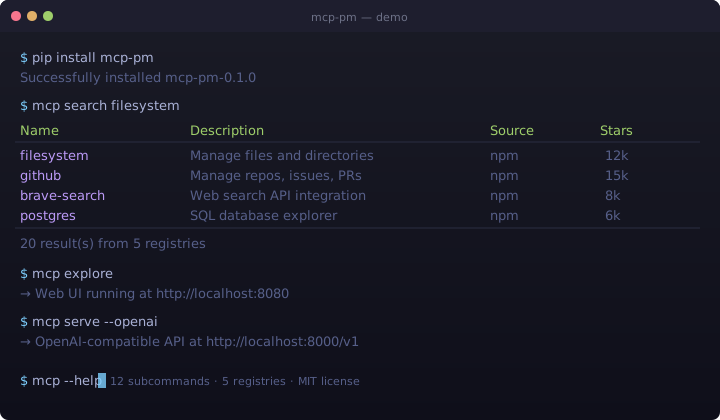
✨ Quick Start
# Install
pip install mcp-pm

# Search for MCP servers across 5 registries (Smithery, npm, PyPI, built-in...)
mcp search filesystem

# Install a server
mcp install mcp-server-filesystem

# List installed servers
mcp list

# Explore the Web UI dashboard
mcp explore

# Run a server in an isolated sandbox
mcp sandbox my-server --level docker

# Start an OpenAI-compatible HTTP proxy
mcp serve
No servers installed yet? Run
mcp search databaseto discover servers from the community registry, ormcp exploreto browse them visually.
🚀 Features
| Feature | Description |
|---------|-------------|
| 🔍 Multi-Registry Search | Search across 5 registries simultaneously — Smithery (5,000+ servers), npm, PyPI, built-in curated list |
| 📦 One-Command Install | mcp install <server> — installs from npm, pip, git, or Docker |
| 🔒 Sandbox Isolation | Run untrusted servers in isolated environments (subprocess, Docker) |
| 🌐 Web UI Dashboard | Beautiful dark-themed HTMX dashboard for visual management |
| ⚡ OpenAI Proxy | Expose all installed MCP tools as an OpenAI-compatible API |
| 🛡️ mcp doctor | Diagnostic tool that checks your entire MCP setup |
| 🔧 12 Commands | Full lifecycle management — install, uninstall, update, list, search, info, explore, serve, sandbox, config, doctor, run |
| 🌍 Multi-language UI | Web UI supports English and 中文 (Chinese), extensible to any language |
| 📝 YAML Config | Human-readable configuration at ~/.mcp-pm/config.yaml |
| 🎨 Beautiful CLI | Rich terminal output with tables, colors, and progress spinners |
🎮 Commands
| Command | Description | Example |
|---------|-------------|---------|
| mcp install | Install an MCP server | mcp install mcp-server-filesystem |
| mcp uninstall | Remove an installed server | mcp uninstall my-server |
| mcp update | Update all installed servers | mcp update |
| mcp list | List installed servers and tools | mcp list |
| mcp search | Search across all registries | mcp search database |
| mcp info | Show detailed server info | mcp info github |
| mcp explore | Launch the Web UI dashboard | mcp explore |
| mcp serve | Start HTTP proxy server | mcp serve |
| mcp sandbox | Run server in sandbox | mcp sandbox my-server --level docker |
| mcp config | Manage configuration | mcp config get servers |
| mcp doctor | Diagnose installation health | mcp doctor |
| mcp run | Run an MCP tool directly | mcp run my-server tool-name |
🏗️ Architecture
┌─────────────────────────────────────────────────────────────┐
│                    User Interfaces                          │
│  ┌──────────┐  ┌────────────┐  ┌──────────┐  ┌──────────┐  │
│  │  CLI     │  │ Web UI     │  │ VS Code  │  │ CI/CD    │  │
│  │ Terminal │  │ Dashboard  │  │ Ext.     │  │ Actions  │  │
│  └────┬─────┘  └─────┬──────┘  └────┬─────┘  └────┬─────┘  │
└───────┼──────────────┼──────────────┼──────────────┼────────┘
        │              │              │              │
        ▼              ▼              ▼              ▼
┌─────────────────────────────────────────────────────────────┐
│                    CLI Core (click + rich)                   │
│  ┌─────────────────────────────────────────────────────────┐│
│  │    12 Subcommands: install · uninstall · list · search  ││
│  │    info · explore · serve · sandbox · config · update   ││
│  │    doctor · run                                          ││
│  └─────────────────────────────────────────────────────────┘│
│  ┌──────────┐  ┌──────────┐  ┌──────────┐  ┌─────────────┐ │
│  │ Installer│  │ Config   │  │ Sandbox  │  │ HTTP Proxy  │ │
│  │ (multi-  │  │ (YAML)   │  │ (Docker  │  │ (OpenAI     │ │
│  │  source) │  │          │  │  isol.)  │  │  Compat.)   │ │
│  └──────────┘  └──────────┘  └──────────┘  └─────────────┘ │
└───────────────────┬─────────────────────────────────────────┘
                    │
                    ▼
┌─────────────────────────────────────────────────────────────┐
│                  Registry Integrations                       │
│  ┌────────────┐  ┌──────────┐  ┌──────────┐  ┌──────────┐  │
│  │ Smithery   │  │ npm      │  │ PyPI     │  │ Built-in │  │
│  │ 5,000+ srvs│  │ Registry │  │ Registry │  │ 27 srvs  │  │
│  └────────────┘  └──────────┘  └──────────┘  └──────────┘  │
└───────────────────┬─────────────────────────────────────────┘
                    │
                    ▼
┌─────────────────────────────────────────────────────────────┐
│                  Execution Environment                       │
│  ┌──────────────┐  ┌──────────────┐  ┌───────────────────┐  │
│  │ Subprocess   │  │ Docker       │  │ OpenAI API Proxy  │  │
│  │ Direct Spawn │  │ Sandbox      │  │ MCP → OpenAI     │  │
│  └──────────────┘  └──────────────┘  └───────────────────┘  │
└─────────────────────────────────────────────────────────────┘
📦 Registry Backends
mcp-pm aggregates servers from 5 registries simultaneously:
| Registry | Status | Servers | Type | |----------|--------|---------|------| | Built-in | ✅ Always available | 27 curated | Offline | | Smithery (smithery.ai) | ✅ Online | 5,000+ | API | | npm (npmjs.com) | ✅ Online | All mcp-server packages | API | | PyPI (pypi.org) | ✅ Online | All MCP Python packages | API | | MCP.so | ⚠️ Deprecated (API retired) | — | Graceful fallback | | GitHub Registry | ⚠️ Temporarily unavailable | — | Graceful fallback |
All backends are queried in parallel with a 3-second timeout — you always get results fast.
🔄 Comparison
| Feature | mcp-pm | MCP.so | Smithery | GitHub Registry | |---------|:----------:|:------:|:--------:|:---------------:| | CLI-first | ✅ | ❌ | ❌ | ❌ | | Offline mode (built-in index) | ✅ | ❌ | ❌ | ❌ | | Sandbox isolation | ✅ | ❌ | ❌ | ❌ | | Interactive TUI | ✅ | ❌ | ❌ | ❌ | | Multi-registry search | ✅ | ❌ | ❌ | ❌ | | Web UI dashboard | ✅ | ✅ | ✅ | ✅ | | Auto-config generation | ✅ | ❌ | ❌ | ❌ | | Open-source + self-hostable | ✅ | ❌ | ❌ | ✅ | | OpenAI-compatible proxy | ✅ | ❌ | ❌ | ❌ | | 12 subcommands | ✅ | — | — | — |
🛠️ Development
# Clone and set up
git clone https://github.com/weinotes/mcp-pm.git
cd mcp-pm
python3 -m venv .venv
source .venv/bin/activate
pip install -e ".[dev,web]"

# Run tests
python -m pytest tests/ -v --tb=short

# Start Web UI
mcp explore

# Lint
ruff check .
ruff format --check .
🤝 Contributing
Contributions are welcome! Please see CONTRIBUTING.md for guidelines.
- Bug reports: Open an issue
- Feature requests: Start a discussion
- Security issues: See SECURITY.md
📄 License
MIT License — Copyright (c) 2025-2026 Davey Wong wgwcko@gmail.com
Made with ❤️ by Davey Wong