Multi-cluster Kubernetes MCP server - query any connected cluster with natural language via Claude or VS Code. Deploy a lightweight agent per cluster, talk to all of them through one MCP endpoint.
kube-mcp
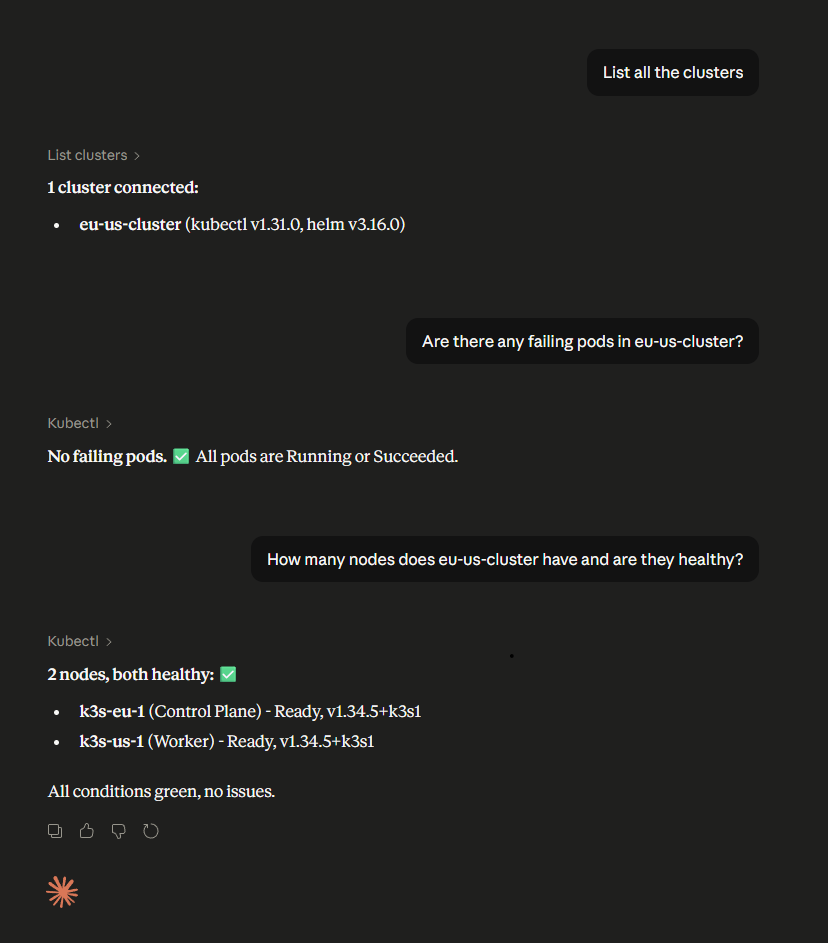
A Model Context Protocol (MCP) server that lets AI assistants (Claude, VS Code extension, etc.) query multiple Kubernetes clusters simultaneously using natural language.
Each cluster runs a lightweight agent that connects back to a central MCP server. The AI talks to the central server and commands are routed to the right cluster transparently.
Architecture
Claude / VS Code Extension
        │  MCP over HTTP
        ▼
┌─────────────────────┐
│   Central Server    │  ← single endpoint, aggregates all clusters
│  (MCP + WebSocket)  │
└──────┬──────────────┘
       │ WebSocket (wss://)
  ┌────┴────┐
  │         │
┌─▼──┐   ┌──▼──┐
│ A  │   │  B  │   cluster agents (one per cluster)
└────┘   └─────┘
  k8s      k8s       in-cluster kubectl / helm (read-only)
- Central server — exposes an MCP HTTP endpoint and manages WebSocket connections from cluster agents.
- Cluster agent — deployed as a Kubernetes Deployment with a Helm chart. Uses the in-cluster service account for read-only
kubectl/helmaccess and connects outbound to the central server.
Features
- Query any connected cluster from a single MCP endpoint
- Per-cluster token authentication (each cluster has its own secret)
- Read-only by default — only
get,list,watchverbs allowed - Command injection protection — all arguments passed as arrays, no shell execution
- Blocked flags —
--server,--kubeconfig,--token, etc. are rejected - Output size cap (2 MB) and command timeout (55 s)
- Structured JSON logging with audit trail
- Liveness and readiness probes on the agent
- WebSocket reconnect with exponential backoff
- Per-IP WebSocket connection limit
- Agent reports kubectl and helm versions to the central server on connect
Available MCP Tools
| Tool | Description |
|------|-------------|
| list_clusters | List all connected clusters with versions and last-seen timestamps |
| kubectl | Run a read-only kubectl command against a specific cluster |
| helm | Run a read-only helm command against a specific cluster |
Example prompts
- "What pods are running in kube-system on my prod cluster?"
- "List all deployments across all clusters"
- "Show me the Helm releases installed on staging"
- "Describe the failing pod on eu-cluster"
Prerequisites
- Kubernetes clusters (1.24+)
- Helm 3
- A container registry to push the images to
- An ingress with TLS for the central server (recommended)
Quick Start
1. Build and push images
# Central server
docker build -t <your-registry>/central-server:latest \
  -f packages/central-server/Dockerfile .
docker push <your-registry>/central-server:latest

# Cluster agent
docker build -t <your-registry>/cluster-agent:latest \
  -f packages/cluster-agent/Dockerfile .
docker push <your-registry>/cluster-agent:latest
2. Deploy the central server
Generate an MCP API key and a token for each cluster agent:
openssl rand -hex 32   # MCP API key (for Claude / VS Code)
openssl rand -hex 32   # token for cluster-1
openssl rand -hex 32   # token for cluster-2
Install the Helm chart:
helm install central-server ./helm/central-server \
  --namespace mcp-system --create-namespace \
  --set image.repository=<your-registry>/central-server \
  --set config.mcpApiKey="<mcp-api-key>" \
  --set config.clusterTokens.prod-us="<token-for-prod-us>" \
  --set config.clusterTokens.staging-eu="<token-for-staging-eu>" \
  --set ingress.enabled=true \
  --set ingress.hosts[0].host=mcp.example.com \
  --set ingress.tls[0].hosts[0]=mcp.example.com \
  --set ingress.tls[0].secretName=mcp-tls
The ingress must support WebSocket upgrades. For nginx-ingress add these annotations:
nginx.ingress.kubernetes.io/proxy-read-timeout: "3600"
nginx.ingress.kubernetes.io/proxy-send-timeout: "3600"
nginx.ingress.kubernetes.io/proxy-http-version: "1.1"
3. Deploy the cluster agent (repeat per cluster)
helm install cluster-agent ./helm/cluster-agent \
  --namespace mcp-system --create-namespace \
  --set image.repository=<your-registry>/cluster-agent \
  --set config.centralServerUrl=wss://mcp.example.com \
  --set config.clusterName=prod-us \
  --set config.agentToken="<token-for-prod-us>"
Each cluster's
agentTokenmust match the corresponding entry inclusterTokenson the central server.
4. Connect your MCP client
VS Code (Claude extension) — .mcp.json in your project root:
{
  "mcpServers": {
    "multi-cluster-k8s": {
      "type": "http",
      "url": "https://mcp.example.com/mcp",
      "headers": {
        "X-Api-Key": "<mcp-api-key>"
      }
    }
  }
}
Claude.ai — Remote MCP server URL:
https://mcp.example.com/mcp?api_key=<mcp-api-key>
5. Verify
Ask Claude: "List all connected clusters" — you should see your clusters with their kubectl and helm versions.
Configuration Reference
Central Server
| Environment variable | Required | Description |
|---------------------|----------|-------------|
| CLUSTER_TOKENS | Yes | JSON object mapping cluster names to tokens: {"prod":"token1","staging":"token2"} |
| MCP_API_KEY | No | API key for MCP clients. If unset, the MCP endpoint is open to anyone who can reach it. |
| PORT | No | HTTP port (default: 3000) |
| LOG_LEVEL | No | Pino log level (default: info) |
| MAX_AGENT_CONNECTIONS_PER_IP | No | Max WebSocket connections per source IP (default: 10) |
Cluster Agent
| Environment variable | Required | Description |
|---------------------|----------|-------------|
| CENTRAL_SERVER_URL | Yes | WebSocket URL of the central server, e.g. wss://mcp.example.com |
| CLUSTER_NAME | Yes | Name for this cluster — must match a key in CLUSTER_TOKENS on the server |
| AGENT_TOKEN | Yes | Token for this cluster — must match the corresponding value in CLUSTER_TOKENS |
| INSECURE_TLS | No | Set to true to skip TLS verification (dev only, never in production) |
Security
- Per-cluster tokens — every agent authenticates with its own unique token. A compromised cluster cannot impersonate another.
- Timing-safe comparison — token verification iterates all registered tokens without early exit to prevent timing attacks.
- Read-only RBAC — the cluster agent's ClusterRole only grants
get,list,watchverbs. - Verb allowlist — the executor validates every command against an allowlist before running it.
- Blocked flags — flags like
--server,--kubeconfig,--token,--execare rejected even if the verb is allowed. - No shell execution — all commands are passed as argument arrays to
child_process.spawn, preventing injection. - Non-root containers — both images run as UID 1000 with a read-only root filesystem.
- Output cap — command output is capped at 2 MB to prevent memory exhaustion.
Repository Structure
.
├── packages/
│   ├── central-server/     # MCP server + WebSocket hub
│   └── cluster-agent/      # In-cluster Kubernetes agent
├── helm/
│   ├── central-server/     # Helm chart for the central server
│   └── cluster-agent/      # Helm chart for the cluster agent
├── .dockerignore
├── .gitignore
└── package.json            # npm workspace root
Development
npm install
npm run build        # build both packages
Each package has its own tsconfig.json and compiles to dist/.
License
MIT — see LICENSE.