DAM MCP Server — digital asset management platform: assets, metadata & tagging, versions & renditions, collections, rights/licensing with clearance gating, brand review, shares, and usage tracking
DAM MCP Server




A full Digital Asset Management platform for ADK-Rust Enterprise agents. 23 MCP tools covering the complete asset lifecycle — ingest, rich metadata & tagging, versions & renditions, collections, rights/licensing with clearance gating, brand review, shares, and usage tracking.
A platform, not a point solution
This is modeled as a general DAM (à la Bynder / Brandfolder / AEM Assets), so a wide range of media-content agents are simply clients of it: Asset Tagging, Brand Compliance Review, Rights Clearance, Social Post Production, Podcast Show Notes, Video Production Planning — and anything else that needs to find, govern, and distribute assets.
Architecture
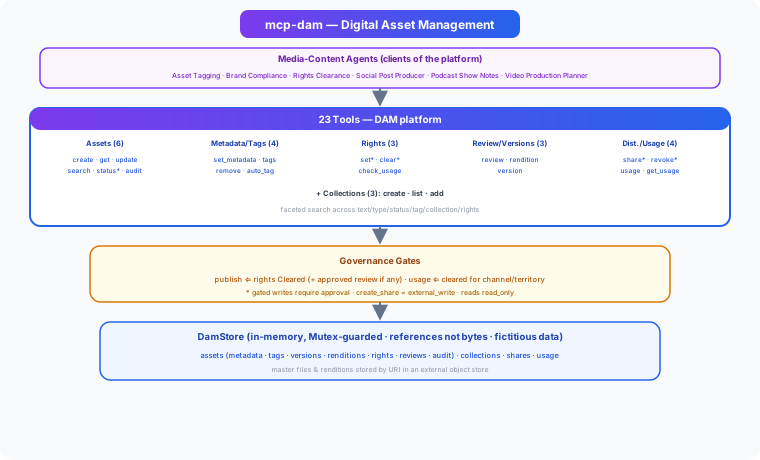
Capabilities
- Assets — any media type, rich custom metadata (arbitrary JSON), lifecycle status (draft → in_review → approved → published → archived → expired), and a full provenance audit trail
- Tagging — faceted tags (keyword/color/subject/campaign), human or
auto_tag(heuristic keyword + type derivation, a stand-in for an ML tagger) - Versions & renditions — master-file versioning plus derivatives (thumbnails, web/print variants, transcodes)
- Collections — albums and smart collections, nestable
- Rights & licensing — license terms, channels, territories, expiry; clearance gating and a
check_usage_rightsdecision - Review — brand/legal/editorial reviews with outcomes feeding the approval gate
- Distribution — share links/portals and usage tracking (where each asset was published), gated by rights
- Search — faceted across text, type, status, tag, collection, and rights status
Governance gates
- Publish requires rights =
Cleared, and if any review exists it must be approved (no open rejections/changes). - Recording usage is refused unless the asset is usable on that channel right now (status, expiry, channel & territory).
- Rights, publish, and share writes are gated for approval in production;
create_shareis classedexternal_write.
Tools (23)
Assets (6)
create_asset · get_asset · update_asset · search_assets · set_status (publish gated) · get_audit_trail
Metadata & Tags (4)
set_metadata · add_tags · remove_tag · auto_tag
Rights (3)
set_rights · clear_rights (gated) · check_usage_rights
Review, Renditions & Versions (3)
add_review · add_rendition · add_version
Collections (3)
create_collection · list_collections · add_to_collection
Distribution & Usage (4)
create_share (gated) · revoke_share (gated) · record_usage (rights-gated) · get_usage
Example
> create_asset(filename: "beach_sunset.jpg", title: "Beach Sunset", description: "Golden hour over the ocean",
               asset_type: "image", mime_type: "image/jpeg", uri: "store://a.jpg")   → AST-1004
> auto_tag(id: "AST-1004")        → ["beach","sunset","golden","hour","ocean","image"]

> record_usage(asset_id: "AST-1004", channel: "instagram")   → Error: blocked by rights (not_cleared)
> clear_rights(id: "AST-1004", license: "royalty_free", channels: ["social","instagram"])
> check_usage_rights(id: "AST-1004", channel: "instagram")   → allowed: true
> record_usage(asset_id: "AST-1004", channel: "instagram", reference: "post/1")   → USE-1005

> add_review(id: "AST-1004", kind: "brand_compliance", reviewer: "brand", outcome: "approved")
> set_status(id: "AST-1004", status: "published")            → published
> search_assets(query: "sunset")                             → 1 asset
Installation
1. Build
git clone https://github.com/zavora-ai/mcp-dam
cd mcp-dam
cargo build --release
2. Add to your MCP client
Claude Desktop / Kiro / Cursor / Windsurf:
{
  "mcpServers": {
    "dam": {
      "command": "/path/to/mcp-dam"
    }
  }
}
3. Use it
> search_assets(asset_type: "video", status: "approved")
> check_usage_rights(id: "AST-1001", channel: "print", territory: "US")
Data Handling
- References, not bytes — assets, renditions, and versions are stored by URI (content lives in your object store); this server manages the metadata, rights, and governance layer.
- Provenance — every mutation appends to the asset's audit trail.
- Integration scaffold — the in-memory store is for development; back it with your real DAM/object store and bind actors to authenticated identities in production.
MCP Server Manifest
server_id = "mcp_dam"
display_name = "Digital Asset Management"
version = "1.0.0"
domain = "media_content"
risk_level = "medium"
writes_allowed = "gated"
transports = ["stdio"]
Contributors
| 
James Karanja Maina |
|:---:|
License
Apache-2.0 — see LICENSE for details.
Part of the ADK-Rust Enterprise MCP server ecosystem.
Registry Compliance
This server implements the ADK MCP SDK contract:
- HealthCheck — async health probe for registry monitoring
- mcp-server.toml — manifest declaring tools, risk classes, and approval gates
- Structured tracing —
RUST_LOGenv-filter for observability