MCP server by zipging
Illustrator MCP for Codex
Control Adobe Illustrator from Codex with a tiny local MCP server.
This project is designed for one practical workflow: ask an image model to make a clean high-resolution reference figure, give that PNG to Codex, and let Codex rebuild it in Illustrator as an editable vector deliverable.
The MCP server is intentionally small and dependency-free. It runs on macOS, talks to Illustrator through AppleScript, and exposes a few tools for running ExtendScript, inspecting the active document, and editing selected objects.
Why This Exists
Scientific and technical figures often start as raster screenshots, AI-generated mockups, or paper figures that are hard to edit. Codex can use this MCP server to:
- create new Illustrator documents;
- draw vector boxes, arrows, heatmaps, plots, legends, and labels;
- search for vector-style replacements for raster assets when appropriate;
- save editable Illustrator working files locally and export reviewable
.pngpreviews; - iterate until text, arrows, borders, and figure panels are production-ready.
Suggested Workflow
-
Generate or collect a high-quality reference image. Use GPT Image / GPT Image 2 if available, or the latest image generation model in your tool.
-
Send the reference PNG to Codex. Ask Codex to reproduce it in Illustrator using this MCP server.
-
Ask Codex to replace raster details with vector equivalents. For example, use simple drawn organs, icons, UMAP-like clusters, heatmaps, violin plots, flow arrows, legends, and diagrams instead of embedding low-resolution PNG fragments.
-
Require a final deliverable pass. Codex should export a
.pngpreview, inspect it, and fix overlaps before delivery. If you need an editable working file, ask Codex to save it locally; this repository only ships PNG previews and generation scripts for examples.
Examples
The example gallery is intentionally PNG-only. Editable .ai files are not committed to the repository.
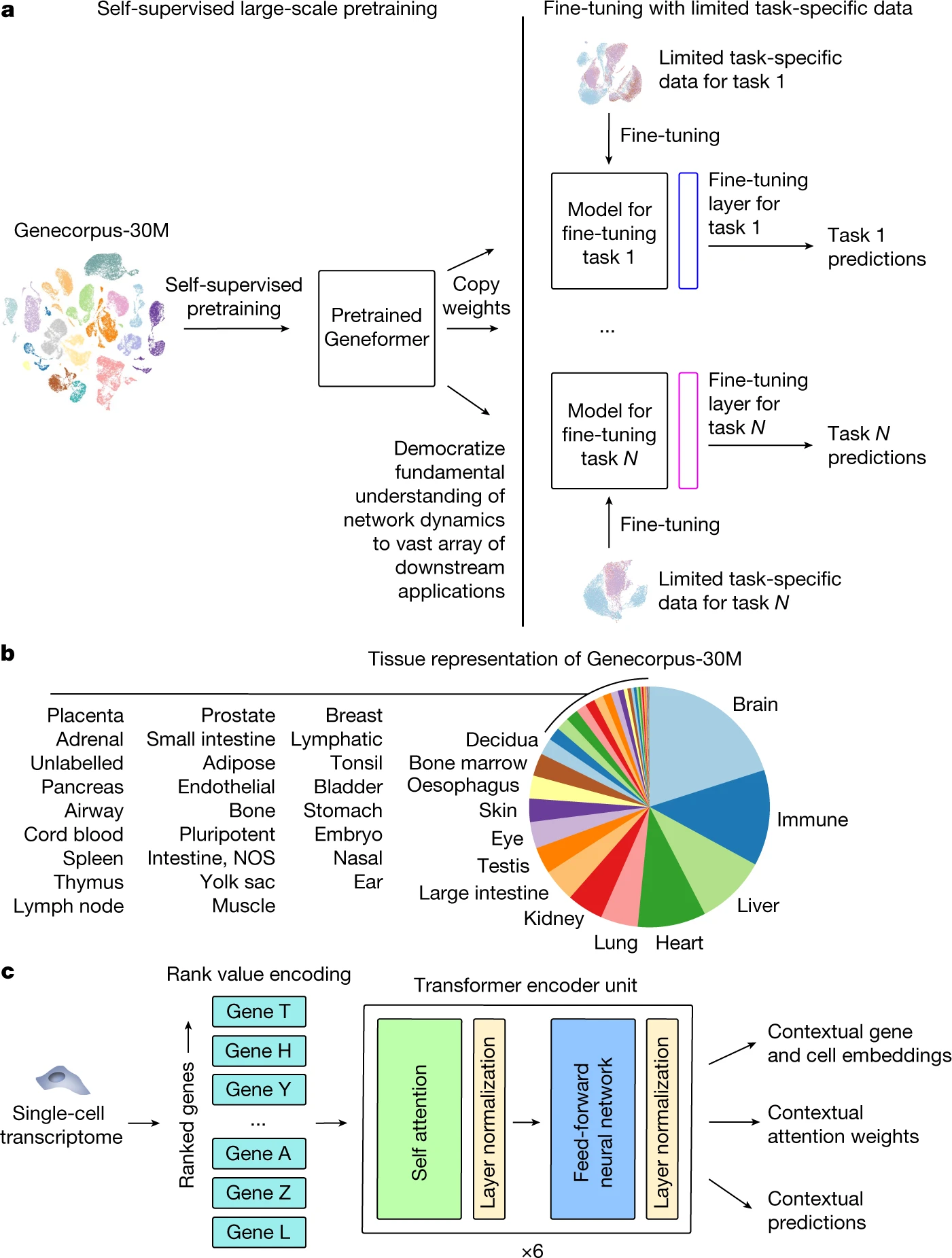
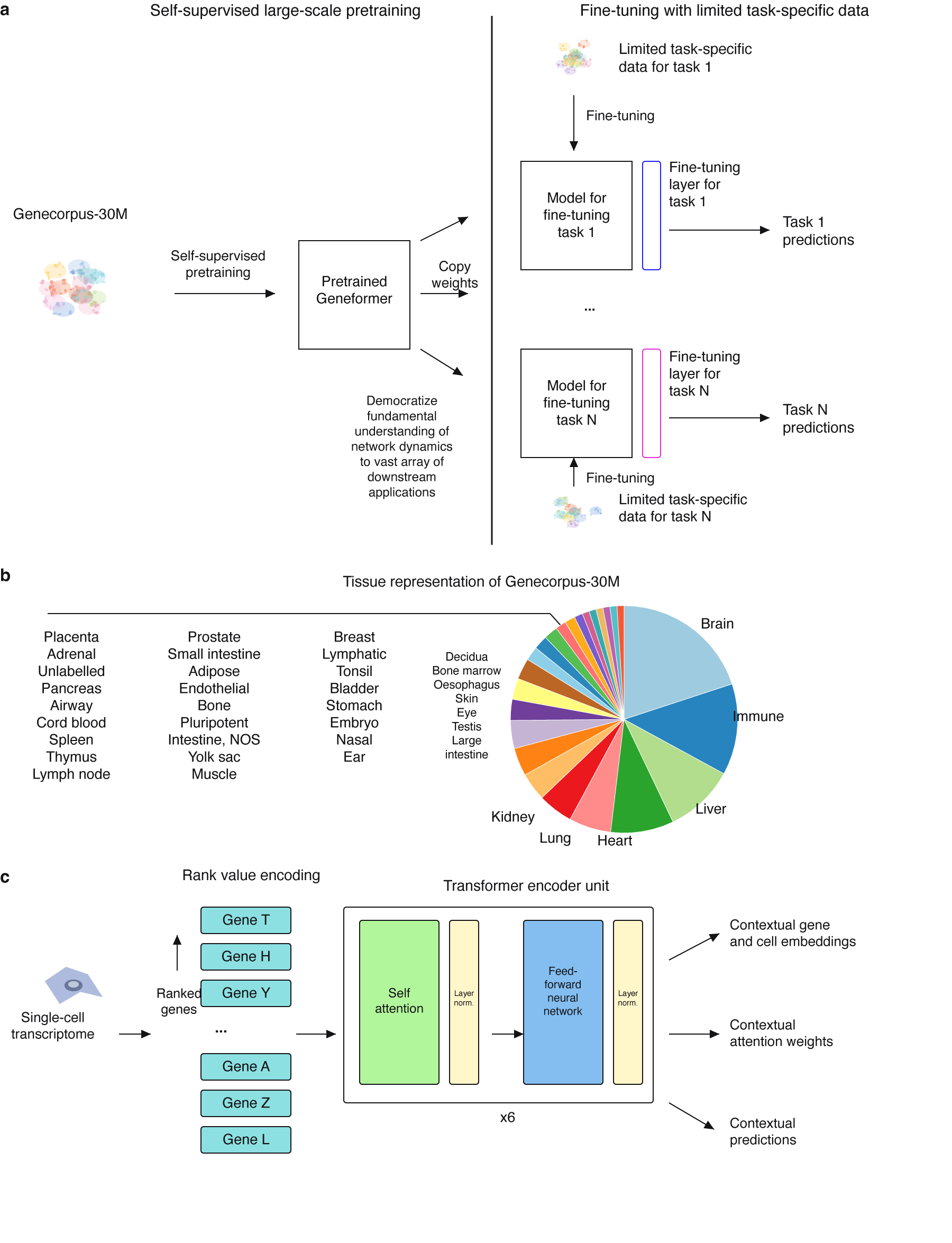
Geneformer-style Workflow Figure
Reference paper: Transfer learning enables predictions in network biology. The source article is not CC BY; review the publisher's reuse terms before redistributing the original panel PNG.
| Original PNG | Recreated with Illustrator MCP |
|---|---|
|
|
Files:
examples/geneformer/original.pngexamples/geneformer/recreated.pngexamples/geneformer/draw_geneformer_recreated.jsx
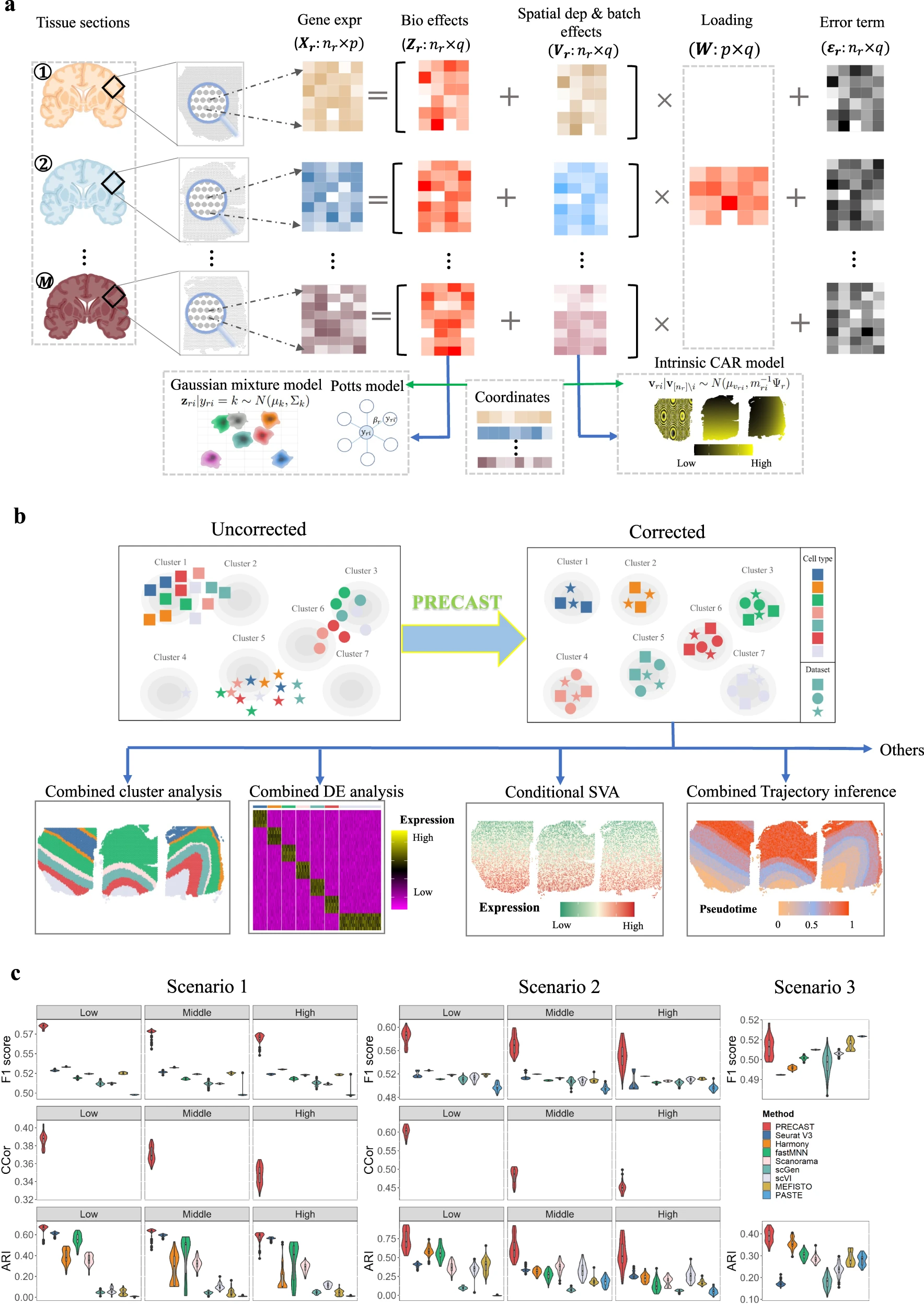
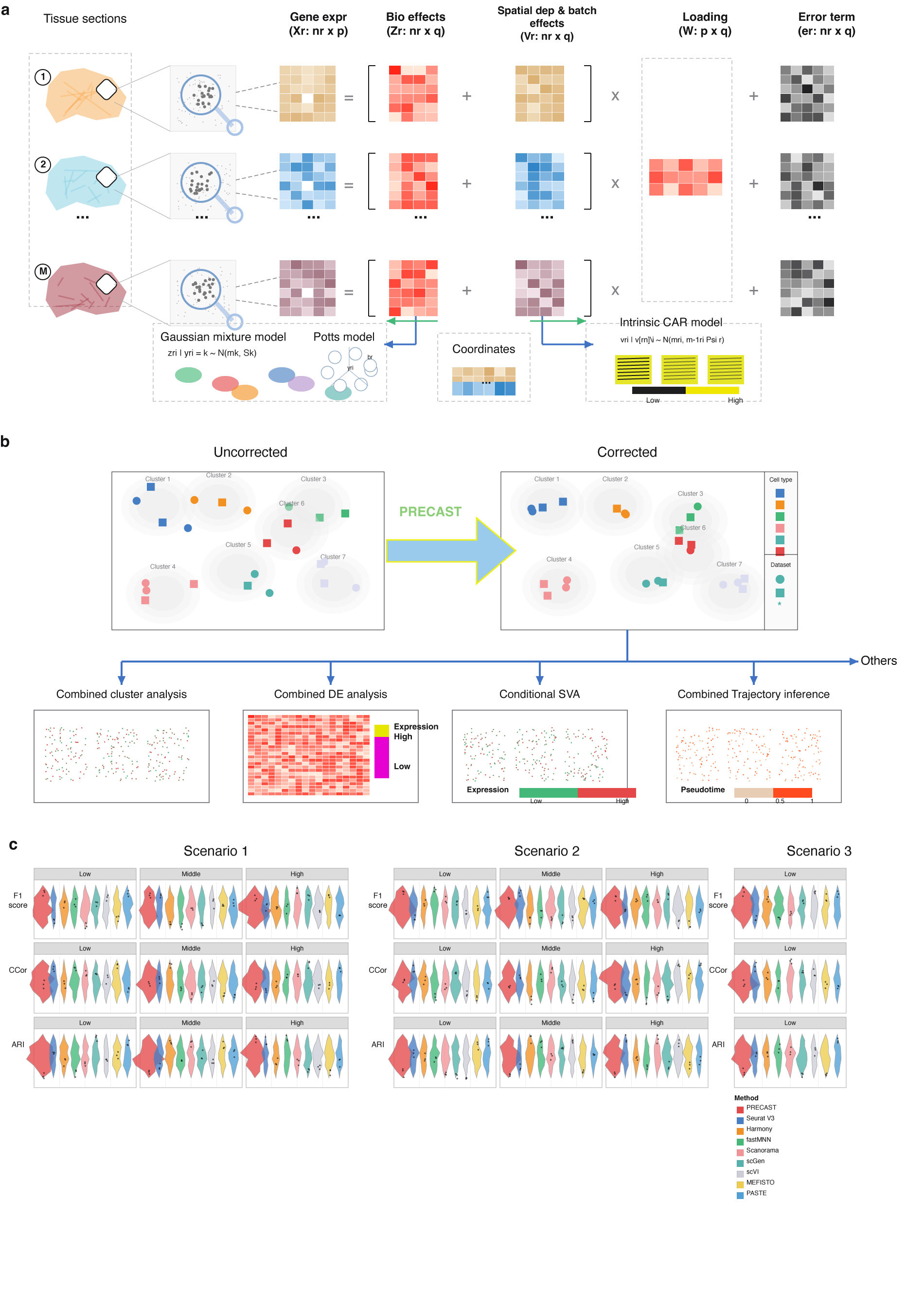
PRECAST-style Method Figure
Reference paper: Probabilistic embedding, clustering, and alignment for integrating spatial transcriptomics data with PRECAST. The PRECAST article is CC BY 4.0, so the reference PNG is included with attribution.
| Original PNG | Recreated with Illustrator MCP |
|---|---|
|
|
Files:
examples/precast/original.pngexamples/precast/recreated.pngexamples/precast/draw_precast_recreated.jsx
Install
This MCP server currently supports macOS with Adobe Illustrator installed locally.
mkdir -p ~/code/mcp
git clone https://github.com/zipging/illustrator-mcp-for-codex.git ~/code/mcp/illustrator-mcp-for-codex
chmod +x ~/code/mcp/illustrator-mcp-for-codex/illustrator_mcp.py
Open Adobe Illustrator once before using the server. macOS may ask for Automation permission the first time Codex controls Illustrator.
Codex Configuration
Add this to ~/.codex/config.toml:
[mcp_servers.illustrator]
command = "python3"
args = [
  "/Users/YOUR_USERNAME/code/mcp/illustrator-mcp-for-codex/illustrator_mcp.py"
]
env = { ILLUSTRATOR_APP_ID = "com.adobe.illustrator" }
Restart Codex after editing the config.
The default bundle id is com.adobe.illustrator, which works across recent versioned Illustrator app names such as Adobe Illustrator 2025. If needed, set ILLUSTRATOR_APP_ID or ILLUSTRATOR_APP in the environment.
Available MCP Tools
illustrator_eval_js: run ExtendScript JavaScript in Adobe Illustrator.illustrator_document_info: inspect the active document.illustrator_set_selection_fill: set RGB fill for selected items.illustrator_set_selection_stroke: set RGB stroke and optional stroke width for selected items.
Smoke Test
This verifies that the server speaks MCP JSON-RPC. It does not require Illustrator:
printf '{"jsonrpc":"2.0","id":1,"method":"initialize","params":{"protocolVersion":"2024-11-05","capabilities":{},"clientInfo":{"name":"test","version":"0"}}}\n{"jsonrpc":"2.0","method":"notifications/initialized","params":{}}\n{"jsonrpc":"2.0","id":2,"method":"tools/list","params":{}}\n' | python3 illustrator_mcp.py
Recommended Prompt
Use this when asking Codex to recreate a figure:
Use the Illustrator MCP to recreate this reference figure as an editable Illustrator document.

Requirements:
- Rebuild the figure with vector shapes wherever possible.
- Do not simply embed the original PNG as the final result.
- You may search the web for vector-style assets or draw simplified replacements for raster details.
- Preserve the overall panel structure, hierarchy, colors, and visual meaning.
- Use fixed text boxes and generous margins.
- Text must not overlap with other text, arrows, borders, icons, plots, or panel frames.
- Arrows must be aligned, visually intentional, and must not run through labels or important shapes.
- Keep formulas and labels legible. If a long label would collide, shorten it or add a line break.
- Export a `.png` preview. Save the editable Illustrator file locally only if requested.
- Inspect the exported PNG before final delivery and iterate until it is clean enough to hand off.
More prompt templates are in prompts/.
Notes for Figure Reproduction
- Prefer drawing native Illustrator shapes over embedding raster crops.
- Keep dense panels on a grid.
- Use named helper functions for rectangles, arrows, labels, heatmaps, legends, and plots.
- Export a PNG after each major layout pass and visually inspect it.
- If Illustrator hangs while exporting a complex figure, split the work into two steps: draw/save first, then export PNG from the active document.
References
- Theodoris, C.V., Xiao, L., Chopra, A. et al. Transfer learning enables predictions in network biology. Nature 618, 616-624 (2023).
- Liu, W., Liao, X., Luo, Z. et al. Probabilistic embedding, clustering, and alignment for integrating spatial transcriptomics data with PRECAST. Nat Commun 14, 296 (2023). The article is licensed under CC BY 4.0.
macOS Permissions
If Illustrator does not respond, check:
System Settings -> Privacy & Security -> Automation
Allow your MCP client, terminal, or Codex host process to control Adobe Illustrator.
License
MIT