Alfresco MPC (Model Context Protocol) PoC
Alfresco MCP Proof of Concept (PoC)
This repository contains a Proof of Concept (PoC) for integrating Alfresco as a Model Context Protocol server. The project demonstrates how to connect Alfresco capabilities to AI using standard client-server applications.
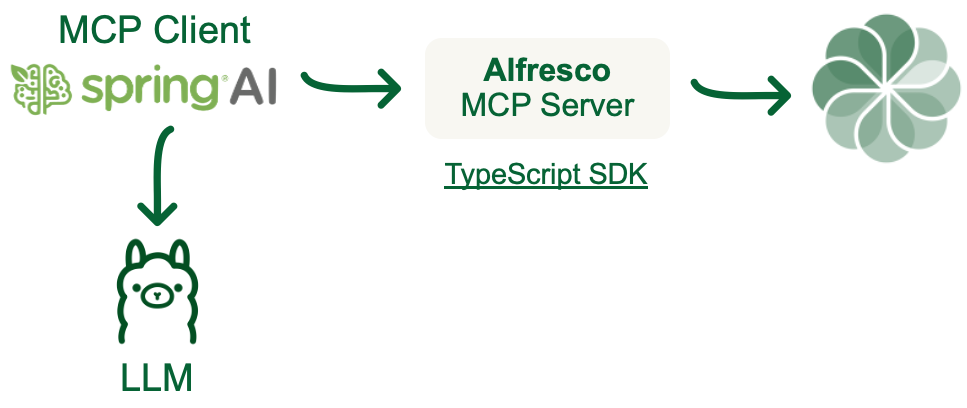
Project Structure
The repository is structured as follows:
alfresco/: Contains a Docker Compose setup for a standard Alfresco deployment. This must be run before the MCP integration.alfresco-mcp-client/: A Java-based client application for interacting with the MCP server using Spring AIalfresco-mcp-server/: A Node.js-based server application for handling MCP requests using TypeScript SDK
Prerequisites
Before running the project, ensure you have the following installed:
- Docker (version 20.10.0 or higher)
- Docker Compose (version 1.29.0 or higher)
- Java Development Kit (JDK) 17 or higher (for the client application)
- Node.js (version 18 or higher) and npm (for the server application)
- Git (for cloning the repository)
Getting Started
Step 1: Clone the Repository
Clone the repository to your local machine:
git clone https://github.com/aborroy/alfresco-mcp-poc.git
cd alfresco-mcp-poc
Step 2: Run the Alfresco Docker Compose
Navigate to the alfresco/ directory and start the Alfresco deployment using Docker Compose:
cd alfresco
docker-compose up --build --force-recreate
This will start the Alfresco Content Services stack, including the repository, Share, and other required services. Wait for all services to initialize completely.
Step 3: Verify Alfresco Deployment
Once the services are up, you can access the Alfresco Share interface at:
- Alfresco Share: http://localhost:8080/share
- Alfresco Repository: http://localhost:8080/alfresco
Use the default credentials (admin / admin) to log in.
Step 4: Set Up and Run the MCP Client
Start the Ollama server locally:
ollama serve
Navigate to the alfresco-mcp-client/ directory and follow the instructions in its README.md to set up and run the MCP client:
cd ../alfresco-mcp-client
mvn clean package
java -jar target/alfresco-mcp-client-0.8.0.jar
Customization
You can customize the Alfresco deployment by modifying the docker-compose.yml file in the alfresco/ directory. Additionally, the MCP server and client components can be configured to suit your specific use case.
Contributing
Contributions to this project are welcome! Please open an issue or submit a pull request with your proposed changes.