A powerful Model Context Protocol (MCP) server for Supabase, **built with [mcp-use](https://github.com/mcp-use/mcp-use)**. This server provides interactive tools and beautiful React widgets for exploring and querying your Supabase database.
Supabase MCP Server
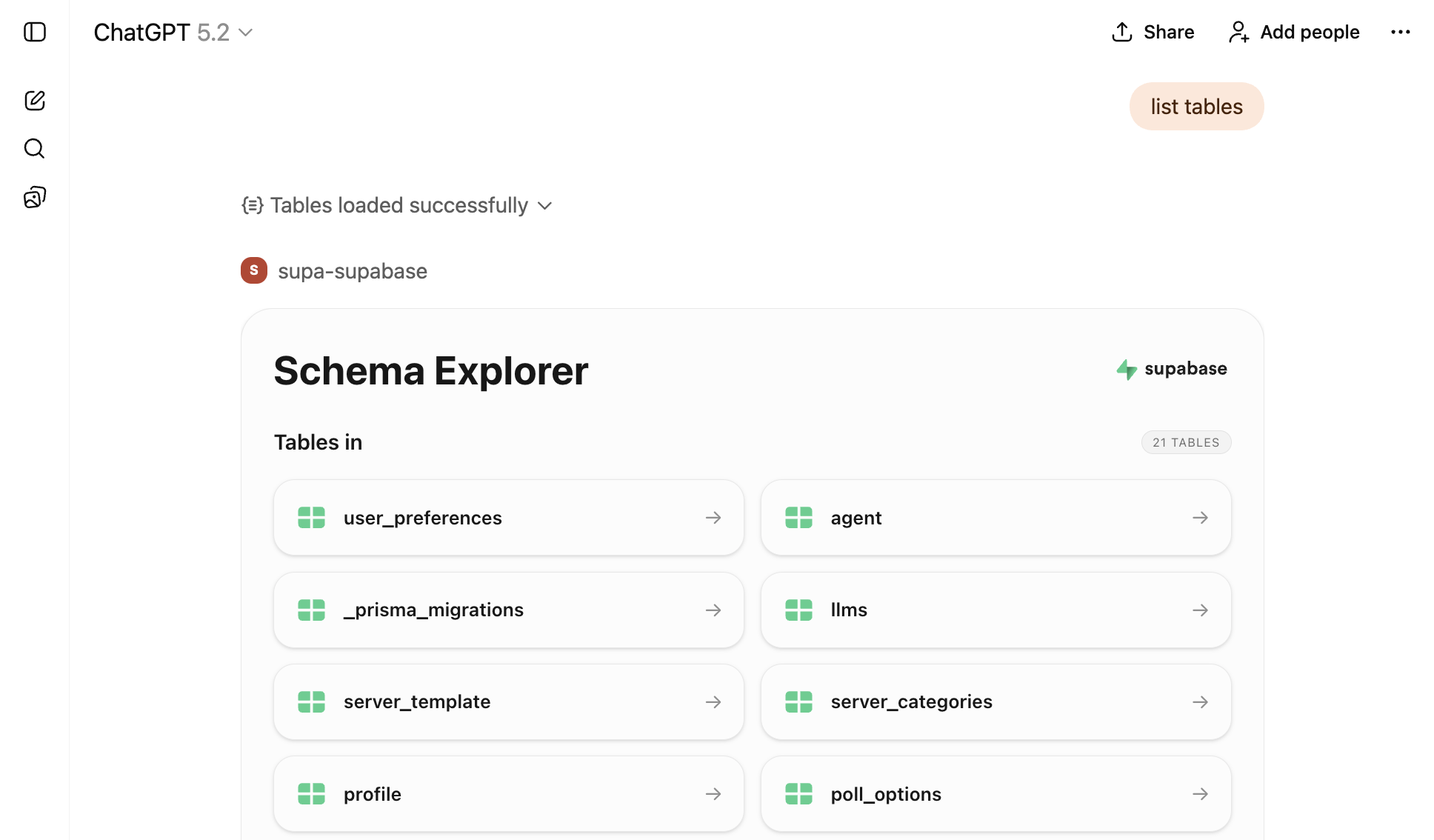
A powerful Model Context Protocol (MCP) server for Supabase, built with mcp-use. This server provides interactive tools and beautiful React widgets for exploring and querying your Supabase database.
🚀 Built with mcp-use
This MCP server is powered by mcp-use, a modern framework for building MCP servers with:
- Type-safe server creation - Build MCP servers with full TypeScript support
- React widget support - Create interactive UI components using the OpenAI Apps SDK
- Simplified client connections - Easily connect to other MCP servers without LangChain
- Built-in development tools - Hot reload, build, and deploy commands
- Zero boilerplate - Focus on your tools, not infrastructure
Features
- 🔍 Database Schema Explorer - Browse all tables in your Supabase database with an interactive UI
- 📊 Table Viewer - Display and explore table data with a beautiful data table widget
- 🔎 SQL Query Executor - Run read-only SQL queries and view results in an interactive widget
- 🎨 React Widgets - Rich, interactive UI components built with React and Tailwind CSS
- 🔐 Secure Authentication - Uses Supabase Personal Access Tokens for secure access
Prerequisites
- Node.js 18+ and yarn
- A Supabase project
- A Supabase Personal Access Token (generate one here)
Installation
# Install dependencies
yarn install
Configuration
Set the following required environment variables:
# Required: Your Supabase Personal Access Token
export ACCESS_TOKEN="your-access-token"

# Required: Content Security Policy URLs for widget loading => required by ChatGPT
export CSP_URLS="https://supabase.com,https://mcp.supabase.com,https://*.mcp-use.com,https://*.supabase.co"
Development
mcp-use provides convenient development commands:
# Start development server with hot reload
yarn dev

# Build for production
yarn build

# Start production server
yarn start

# Deploy the server
yarn deploy
Available Tools
list-tables
List all tables in your Supabase database. Opens an interactive schema explorer widget.
Parameters:
schemas(optional): Array of schema names to include (default:["public"])
Widget: schema-explorer - Interactive table browser with schema information
show-table
Display data from a specific table. Opens a data table viewer widget.
Parameters:
tableName(required): Name of the table to displayschema(optional): Schema name (default:"public")limit(optional): Maximum number of rows to fetch (default:100)
Widget: table-viewer - Interactive data table with sorting and filtering
execute-sql
Execute read-only SQL queries on your Supabase database. Opens a query results widget.
Parameters:
query(required): SQL query to execute
Widget: query-results - Interactive query results viewer with syntax highlighting
Available Resources
supabase://project-url
Get the API URL for your Supabase project.
UI Widgets
This server includes three custom React widgets built with mcp-use:
- Schema Explorer (
schema-explorer) - Browse database tables and schemas - Table Viewer (
table-viewer) - View and explore table data - Query Results (
query-results) - Display SQL query results
All widgets are built with:
- React 19
- Tailwind CSS
- Radix UI components
- Lucide React icons
Architecture
This server demonstrates the power of mcp-use:
- Server-side: Uses
mcp-use/serverto create tools, resources, and widgets - Client-side: Uses
mcp-use/clientto connect to Supabase's official MCP server - No LangChain: Direct MCP client connections without external dependencies
- Type-safe: Full TypeScript support with Zod schemas
Project Structure
.
├── index.ts                 # Main server file using [mcp-use](https://github.com/mcp-use/mcp-use)
├── resources/               # React widget components
│   ├── components/         # Reusable UI components
│   ├── schema-explorer/    # Schema explorer widget
│   ├── table-viewer/       # Table viewer widget
│   ├── supabase-status/    # Display Supabase status for a certain time window
│   └── query-results/      # Query results widget
└── package.json            # Dependencies including [mcp-use](https://github.com/mcp-use/mcp-use)
License
MIT