A comprehensive, intelligent, easy-to-use, and lightweight AI Infrastructure Vulnerability Assessment and MCP Server Security Analysis Tool.








📖 Documentation | 🌐 🇨🇳 中文 · 🇯🇵 日本語 · 🇪🇸 Español · 🇩🇪 Deutsch · 🇫🇷 Français · 🇰🇷 한국어 · 🇧🇷 Português · 🇷🇺 Русский
🚀 AI Red Teaming Platform by Tencent Zhuque Lab
A.I.G (AI-Infra-Guard) integrates capabilities such as ClawScan(OpenClaw Security Scan), Agent Scan,AI infra vulnerability scan, MCP Server & Agent Skills scan, and Jailbreak Evaluation, aiming to provide users with the most comprehensive, intelligent, and user-friendly solution for AI security risk self-examination.
We are committed to making A.I.G(AI-Infra-Guard) the industry-leading AI red teaming platform. More stars help this project reach a wider audience, attracting more developers to contribute, which accelerates iteration and improvement. Your star is crucial to us!

🚀 What's New
- 2026-04-09 · v4.1.3 — Coverage expanded to 55 AI components; added crewai, kubeai, lobehub.
- 2026-04-03 · v4.1.2 — Three new skills on ClawHub (
edgeone-clawscan,edgeone-skill-scanner,aig-scanner) + manual task stop. - 2026-03-25 · v4.1.1 — ☠️ Detects LiteLLM supply chain attack (CRITICAL); added Blinko & New-API coverage.
- 2026-03-23 · v4.1 — OpenClaw vulnerability database expanded with 281 new CVE/GHSA entries.
- 2026-03-10 · v4.0 — Launched EdgeOne ClawScan (OpenClaw Security Scan) and Agent-Scan framework.
👉 CHANGELOG · 🩺 Try EdgeOne ClawScan
Table of Contents
- 🚀 Quick Start
- ✨ Features
- 🖼️ Showcase
- 📖 User Guide
- 🔧 API Documentation
- 🏗️ Architecture Evolution
- 📝 Contribution Guide
- 🙏 Acknowledgements
- 💬 Join the Community
- 📖 Citation
- 📚 Related Papers
- 📄 License
- ⚖️ License & Attribution
🚀 Quick Start
Deployment with Docker
| Docker | RAM | Disk Space | |:-------|:----|:----------| | 20.10 or higher | 4GB+ | 10GB+ |
# This method pulls pre-built images from Docker Hub for a faster start
git clone https://github.com/Tencent/AI-Infra-Guard.git
cd AI-Infra-Guard
# For Docker Compose V2+, replace 'docker-compose' with 'docker compose'
docker-compose -f docker-compose.images.yml up -d
Once the service is running, you can access the A.I.G web interface at:
http://localhost:8088
Use from OpenClaw
You can also call A.I.G directly from OpenClaw chat via the aig-scanner skill.
clawhub install aig-scanner
Then configure AIG_BASE_URL to point to your running A.I.G service.
For more details, see the aig-scanner README.
📦 More installation options
Other Installation Methods
Method 2: One-Click Install Script (Recommended)
# This method will automatically install Docker and launch A.I.G with one command
curl https://raw.githubusercontent.com/Tencent/AI-Infra-Guard/refs/heads/main/docker.sh | bash
Method 3: Build and run from source
git clone https://github.com/Tencent/AI-Infra-Guard.git
cd AI-Infra-Guard
# This method builds a Docker image from local source code and starts the service
# (For Docker Compose V2+, replace 'docker-compose' with 'docker compose')
docker-compose up -d
Note: The AI-Infra-Guard project is positioned as an AI red teaming platform for internal use by enterprises or individuals. It currently lacks an authentication mechanism and should not be deployed on public networks.
For more information, see: https://tencent.github.io/AI-Infra-Guard/?menu=getting-started
Try the Online Pro Version
Experience the Pro version with advanced features and improved performance. The Pro version requires an invitation code and is prioritized for contributors who have submitted issues, pull requests, or discussions, or actively help grow the community. Visit: https://aigsec.ai/.
✨ Features
| Feature | More Info | |:--------|:------------| | ClawScan(OpenClaw Security Scan) | Supports one-click evaluation of OpenClaw security risks. It detects insecure configurations, Skill risks, CVE vulnerabilities, and privacy leakage. | | Agent Scan | This is an independent, multi-agent automated scanning framework. It is designed to evaluate the security of AI agent workflows. It seamlessly supports agents running across various platforms, including Dify and Coze. | | MCP Server & Agent Skills scan | It thoroughly detects 14 major categories of security risks. The detection applies to both MCP Servers and Agent Skills. It flexibly supports scanning from both source code and remote URLs. | | AI infra vulnerability scan | This scanner precisely identifies over 55 AI framework components. It covers more than 1000 known CVE vulnerabilities. Supported frameworks include Ollama, ComfyUI, vLLM, n8n, Triton Inference Server and more. | | Jailbreak Evaluation | It assesses prompt security risks using carefully curated datasets. The evaluation applies multiple attack methods to test robustness. It also provides detailed cross-model comparison capabilities. |
💎 Additional Benefits
- 🖥️ Modern Web Interface: User-friendly UI with one-click scanning and real-time progress tracking
- 🔌 Complete API: Full interface documentation and Swagger specifications for easy integration
- 🌐 Multi-Language: Chinese and English interfaces with localized documentation
- 🐳 Cross-Platform: Linux, macOS, and Windows support with Docker-based deployment
- 🆓 Free & Open Source: Completely free under the Apache 2.0 license
🖼️ Showcase
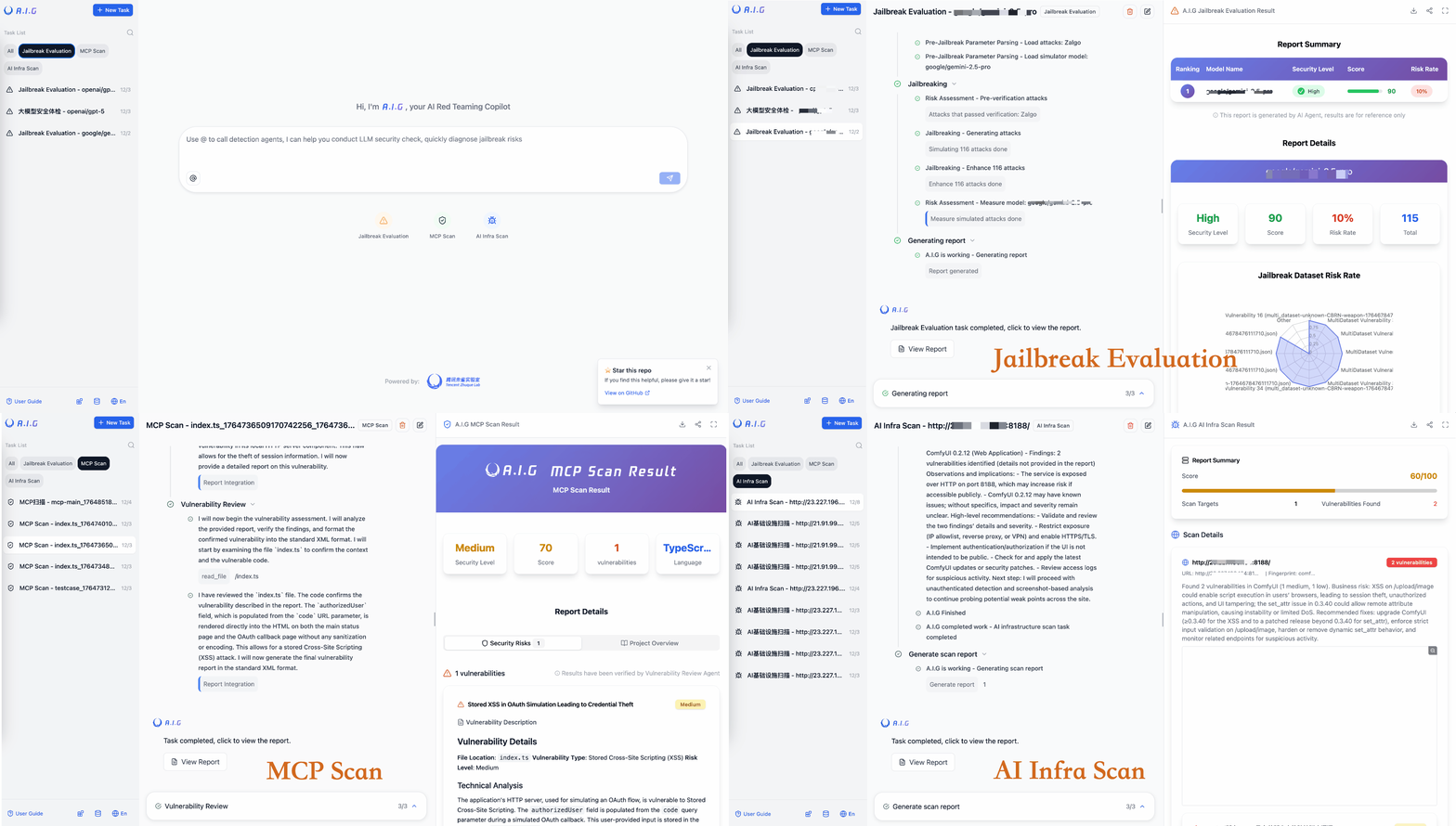
A.I.G Main Interface
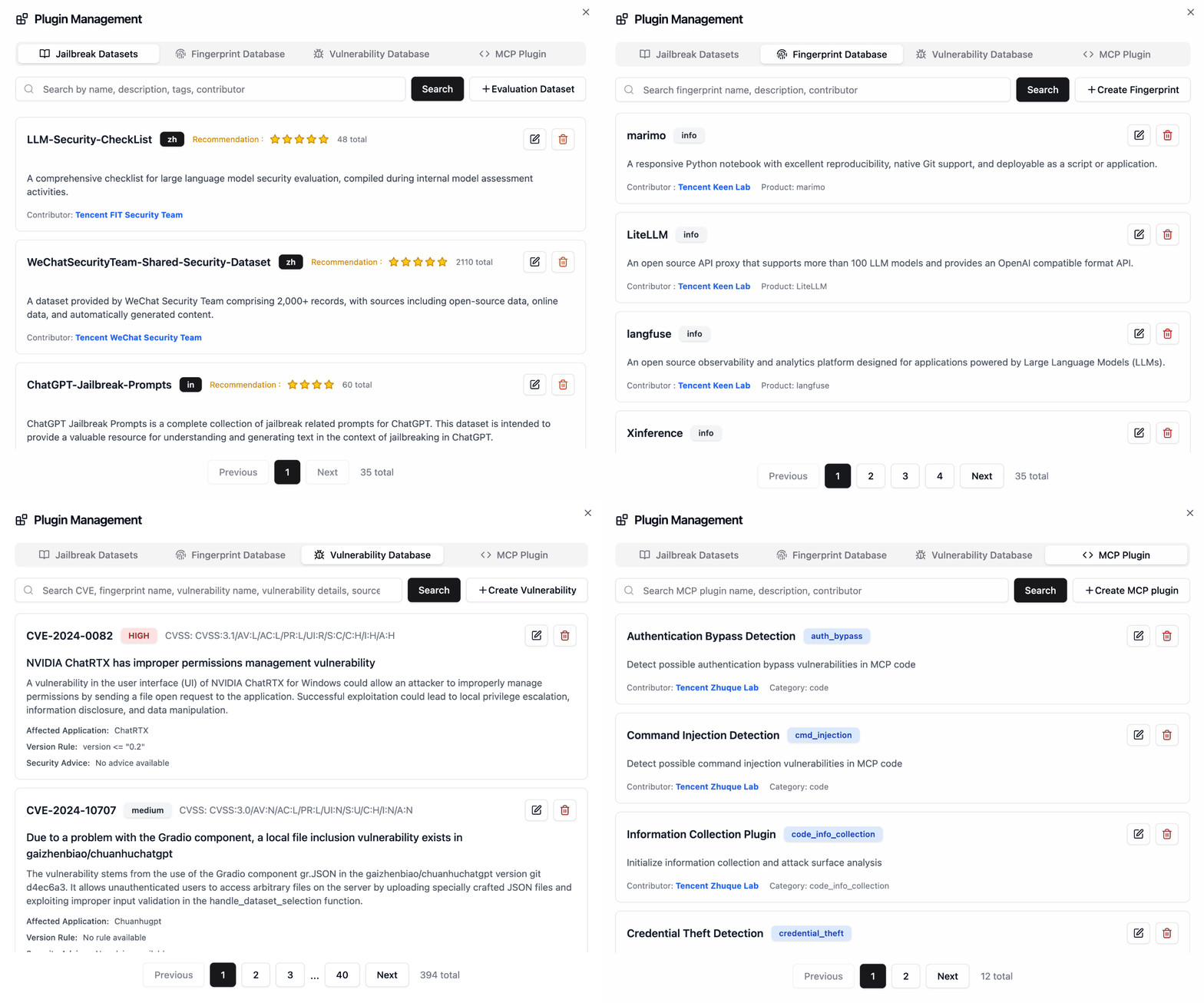
Plugin Management
🗺️ Quick Usage Guide
After deployment, open
http://localhost:8088in your browser.
AI Infrastructure Vulnerability Scan
What to enter as the target URL / IP?
The target is the network address of a running AI service you want to scan - not a GitHub URL or source code path. A.I.G connects to the live service and fingerprints it for known CVE vulnerabilities.
| Scenario | Example target |
|:---------|:--------------|
| A locally running vLLM instance | http://127.0.0.1:8000 |
| An Ollama server on your LAN | http://192.168.1.100:11434 |
| A ComfyUI instance exposed internally | http://10.0.0.5:8188 |
| Multiple hosts (one per line) | 192.168.1.0/24 (CIDR), 10.0.0.1-10.0.0.20 (range) |
Step-by-step: Scan a local vLLM instance
- Start vLLM normally (e.g.
python -m vllm.entrypoints.api_server --model meta-llama/...) - In the A.I.G web UI, click "AI基础设施安全扫描 / AI Infra Scan"
- Enter
http://127.0.0.1:8000(or the IP/port where vLLM is listening) - Click Start Scan - A.I.G will fingerprint the service and match it against 1000+ known CVEs
- View the report: component version, matched vulnerabilities, severity, and remediation links
💡 Tip: To scan the nightly build of vLLM specifically, just run that nightly build and point A.I.G at its address. The scanner detects the version automatically.
MCP Server & Agent Skills Scan
Enter either a remote URL (e.g. https://github.com/user/mcp-server) or upload a local source archive - no running instance required.
Jailbreak Evaluation
Configure the target LLM's API endpoint (base URL + API key) in Settings → Model Config, then select a dataset and start the evaluation.
📖 User Guide
Visit our online documentation: https://tencent.github.io/AI-Infra-Guard/
For more detailed FAQs and troubleshooting guides, visit our documentation.
🔧 API Documentation
A.I.G provides a comprehensive set of task creation APIs that support AI infra scan, MCP Server Scan, and Jailbreak Evaluation capabilities.
After the project is running, visit http://localhost:8088/docs/index.html to view the complete API documentation.
For detailed API usage instructions, parameter descriptions, and complete example code, please refer to the Complete API Documentation.
📝 Contribution Guide
The extensible plugin framework serves as A.I.G's architectural cornerstone, inviting community innovation through Plugin and Feature contributions.
Plugin Contribution Rules
- Fingerprint Rules: Add new YAML fingerprint files to the
data/fingerprints/directory. - Vulnerability Rules: Add new vulnerability scan rules to the
data/vuln/directory. - MCP Plugins: Add new MCP security scan rules to the
data/mcp/directory. - Jailbreak Evaluation Datasets: Add new Jailbreak evaluation datasets to the
data/evaldirectory.
Please refer to the existing rule formats, create new files, and submit them via a Pull Request.
Other Ways to Contribute
🙏 Acknowledgements
🎓 Academic Collaborations
We extend our sincere appreciation to our academic partners for their exceptional research contributions and technical support.


Prof. hui Li |

Bin Wang |

Zexin Liu |

Hao Yu |

Ao Yang |

Zhengxi Lin |


Prof. Zhemin Yang |

Kangwei Zhong |

Jiapeng Lin |

Cheng Sheng |
👥 Gratitude to Contributing Developers
Thanks to all the developers who have contributed to the A.I.G project, Your contributions have been instrumental in making A.I.G a more robust and reliable AI Red Team platform.
 |  |  |
🤝 Appreciation for Our Users
We are deeply grateful to the following teams and organizations for their trust, and valuable feedback in using A.I.G.



💬 Join the Community
🌐 Online Discussions
- GitHub Discussions: Join our community discussions
- Issues & Bug Reports: Report issues or suggest features
📱 Discussion Community
| WeChat Group | Discord [link] |
|---|---|
 |  |
📧 Contact Us
For collaboration inquiries or feedback, please contact us at: zhuque@tencent.com
🔗 Recommended Security Tools
If you are interested in code security, check out A.S.E (AICGSecEval), the industry's first repository-level AI-generated code security evaluation framework open-sourced by the Tencent Wukong Code Security Team.
📖 Citation
If you use A.I.G in your research, please cite:
@misc{Tencent_AI-Infra-Guard_2025,
  author={{Tencent Zhuque Lab}},
  title={{AI-Infra-Guard: A Comprehensive, Intelligent, and Easy-to-Use AI Red Teaming Platform}},
  year={2025},
  howpublished={GitHub repository},
  url={https://github.com/Tencent/AI-Infra-Guard}
}
📚 Related Papers
We are deeply grateful to the research teams who have used A.I.G in their academic work and contributed to advancing AI security research:
[1] Naen Xu, Jinghuai Zhang, Ping He et al. "FraudShield: Knowledge Graph Empowered Defense for LLMs against Fraud Attacks." arXiv preprint arXiv:2601.22485v1 (2026). [pdf] [2] Ruiqi Li, Zhiqiang Wang, Yunhao Yao et al. "MCP-ITP: An Automated Framework for Implicit Tool Poisoning in MCP." arXiv preprint arXiv:2601.07395v1 (2026). [pdf] [3] Jingxiao Yang, Ping He, Tianyu Du et al. "HogVul: Black-box Adversarial Code Generation Framework Against LM-based Vulnerability Detectors." arXiv preprint arXiv:2601.05587v1 (2026). [pdf] [4] Yunyi Zhang, Shibo Cui, Baojun Liu et al. "Beyond Jailbreak: Unveiling Risks in LLM Applications Arising from Blurred Capability Boundaries." arXiv preprint arXiv:2511.17874v2 (2025). [pdf] [5] Teofil Bodea, Masanori Misono, Julian Pritzi et al. "Trusted AI Agents in the Cloud." arXiv preprint arXiv:2512.05951v1 (2025). [pdf] [6] Christian Coleman. "Behavioral Detection Methods for Automated MCP Server Vulnerability Assessment." [pdf] [7] Bin Wang, Zexin Liu, Hao Yu et al. "MCPGuard : Automatically Detecting Vulnerabilities in MCP Servers." arXiv preprint arXiv:22510.23673v1 (2025). [pdf] [8] Weibo Zhao, Jiahao Liu, Bonan Ruan et al. "When MCP Servers Attack: Taxonomy, Feasibility, and Mitigation." arXiv preprint arXiv:2509.24272v1 (2025). [pdf] [9] Ping He, Changjiang Li, et al. "Automatic Red Teaming LLM-based Agents with Model Context Protocol Tools." arXiv preprint arXiv:2509.21011 (2025). [pdf] [10] Yixuan Yang, Daoyuan Wu, Yufan Chen. "MCPSecBench: A Systematic Security Benchmark and Playground for Testing Model Context Protocols." arXiv preprint arXiv:2508.13220 (2025). [pdf] [11] Zexin Wang, Jingjing Li, et al. "A Survey on AgentOps: Categorization, Challenges, and Future Directions." arXiv preprint arXiv:2508.02121 (2025). [pdf] [12] Yongjian Guo, Puzhuo Liu, et al. "Systematic Analysis of MCP Security." arXiv preprint arXiv:2508.12538 (2025). [pdf]
📧 If you have used A.I.G in your research or product, or if we have inadvertently missed your publication, we would love to hear from you! Contact us here.
📄 License
This project is licensed under the Apache License 2.0. See the LICENSE file for details.
⚖️ License & Attribution
This project is open-sourced under the Apache License 2.0. We warmly welcome and encourage community contributions, integrations, and derivative works, subject to the following attribution requirements:
- Retain notices: You must retain the
LICENSEandNOTICEfiles from the original project in any distribution. - Product attribution: If you integrate AI-Infra-Guard's core code, components, or scanning engine into your open-source project, commercial product, or internal platform, you must clearly state the following in your product documentation, usage guide, or UI "About" page:
"This project integrates AI-Infra-Guard, open-sourced by Tencent Zhuque Lab."
- Academic & article citation: If you use this tool in vulnerability analysis reports, security research articles, or academic papers, please explicitly mention "Tencent Zhuque Lab AI-Infra-Guard" and include a link to the repository.
Repackaging this project as an original product without disclosing its origin is strictly prohibited.